a
m
ID
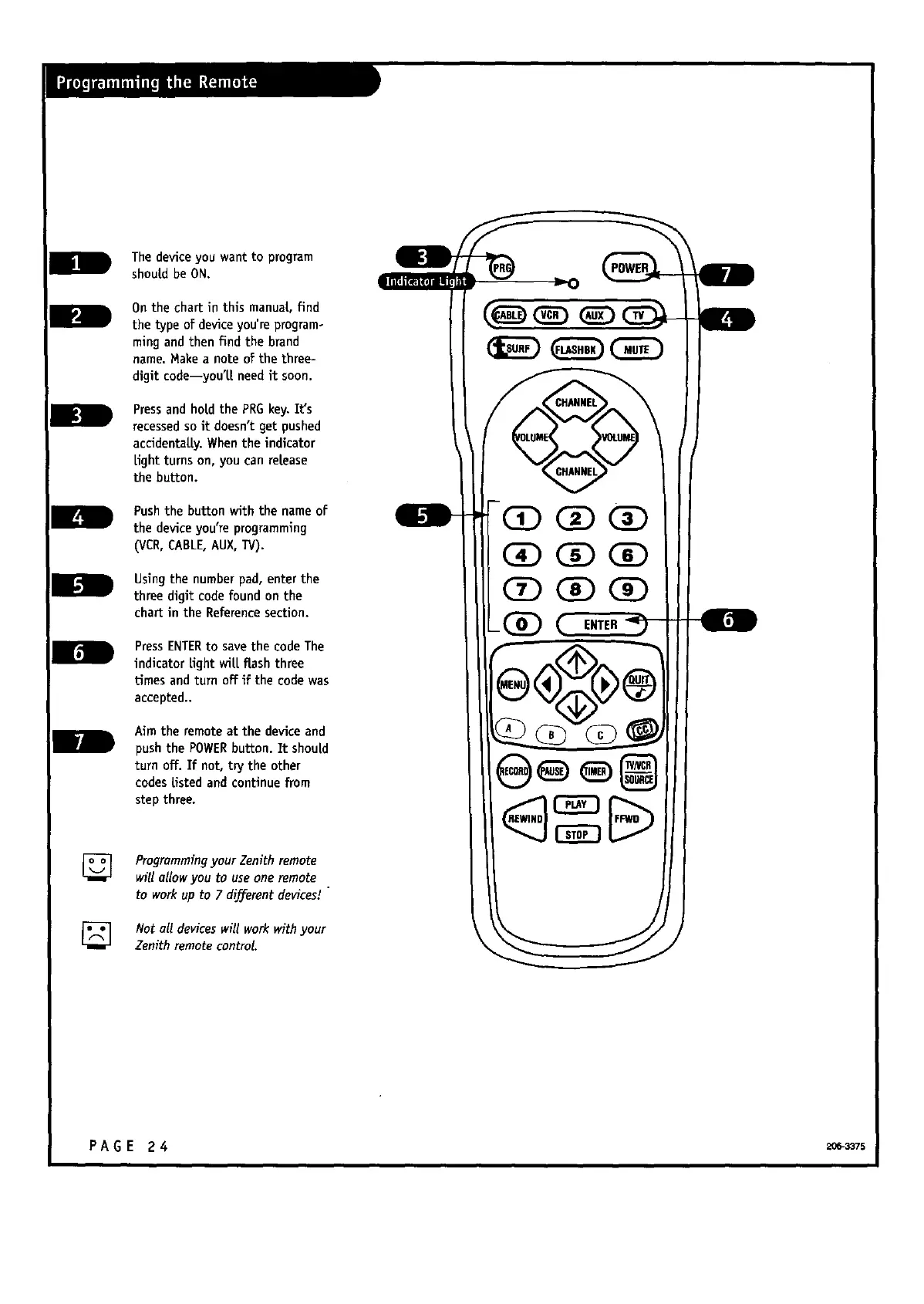
The deviceyou want to program
should be ON.
On the chartinthismanual,find
thetypeofdeviceyou'reprogram-
mingand thenfindthebrand
name.Make a noteofthethree-
digitcode--you'l.[needitsoon.
Pressand holdthePRG key.It's
recessedsoitdoesn'tgetpushed
accidenta[|y.When theindicator
Lightturnson,you can release
thebutton.
Pushthebuttonwiththename of
thedeviceyou'reprogramming
(VCR,CABLE,AUX,TV).
Usingthenumberpad,enterthe
threedigitcodefoundonthe
chartintheReferencesection.
PressENTERto savethecodeThe
indicatorLightwilLflashthree
timesand turnoffifthecodewas
accepted..
Aim theremoteatthe deviceand
pushthePOWER button.Itshou[d
turnoff.Ifnot,trytheother
codeslistedand continuefrom
stepthree.
Programmingyour Zenith remote
will allow you to useone remote
to work up to 7 different devices/
Not all devices will work with your
Zenith remote control.
C2E)
PAGE 24 2_-_7s



 To Next Page