806835NZ v1.05 03.22 G5 User guide
17
SECTION 3: Command Centre Screen
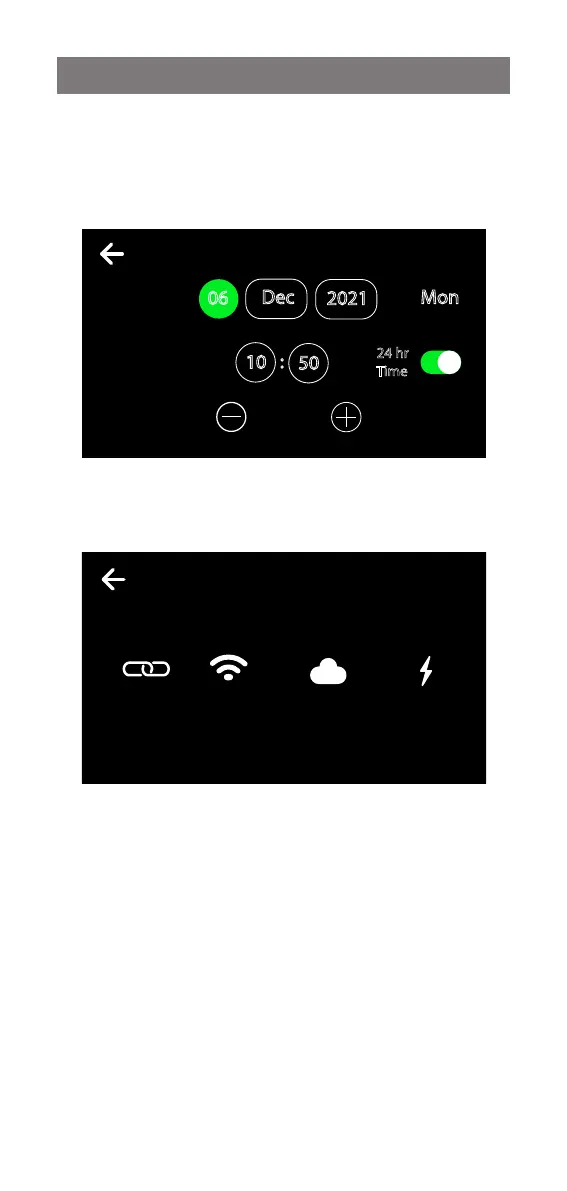
Date and time
Touch the text boxes on the screen and then press + and -
to set the current date and time. Press the tick to confirm
and save.
Network
Connect to Wi Fi (available with optional Zenith Assist kit).
DATE & TIME
2021
Dec
06
10
50
:
24 hr
Time
Mon
12:12 PM
NETWORK 12:12
Off Connected Registered Off
Zip Wi-Fi
Hotspot
Wi-Fi
Network
Cloud
Registration
Fault
relay


 To Next Page