806835NZ v1.05 03.22 G5 User guide
33
SECTION 3: Command Centre Screen
12:12 PMENERGY USE
00000.0
000.0
Total (kWh)
Last Period (kWh)
01/01/2020
Date of Reset
3.7.3 Energy Use
Track energy usage of your HydroTap by viewing the total
energy consumed and the energy consumed since the last
energy use reset.
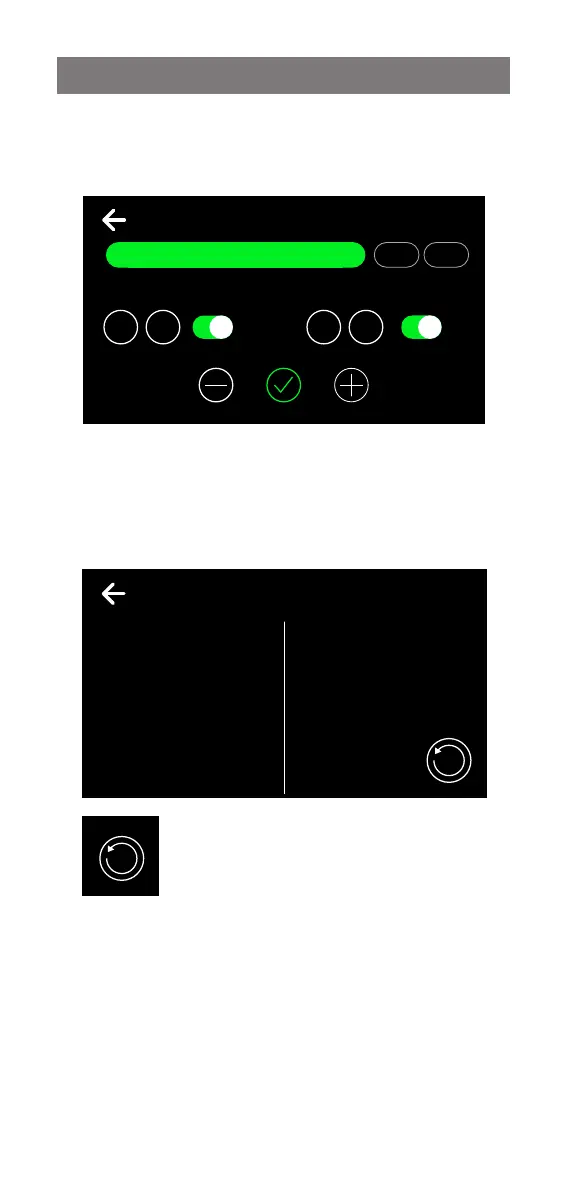
12:12 PMSET TIMER
Off at On at
Mon Tue Wed Thu Fri Sat Sun
0023
:
0023
:
3.7.2 On/Off Timer continued
Select the day or range of days, then set the desired Off/
On times. Touch the tick to confirm and save.
The bottom right button is used to reset the
‘last period’ usage counter.
12:12 PMENERGY USE
00000.0
000.0
Total (kWh)
Last Period (kWh)
01/01/2020
Date of Reset


 To Next Page