EasyManua.ls Logo

Zenith VRA412 - VCR Audio;Video Connections; Connecting VCR to TV via A;V; Connecting Accessories to VCR via A;V

Zenith VRA412
32 pages
Print Icon
To Next Page IconTo Next Page
To Previous Page IconTo Previous Page
Loading...
INSTALLATION PAGE 5
Optional
connections
for your VCR
Connections for your VCR
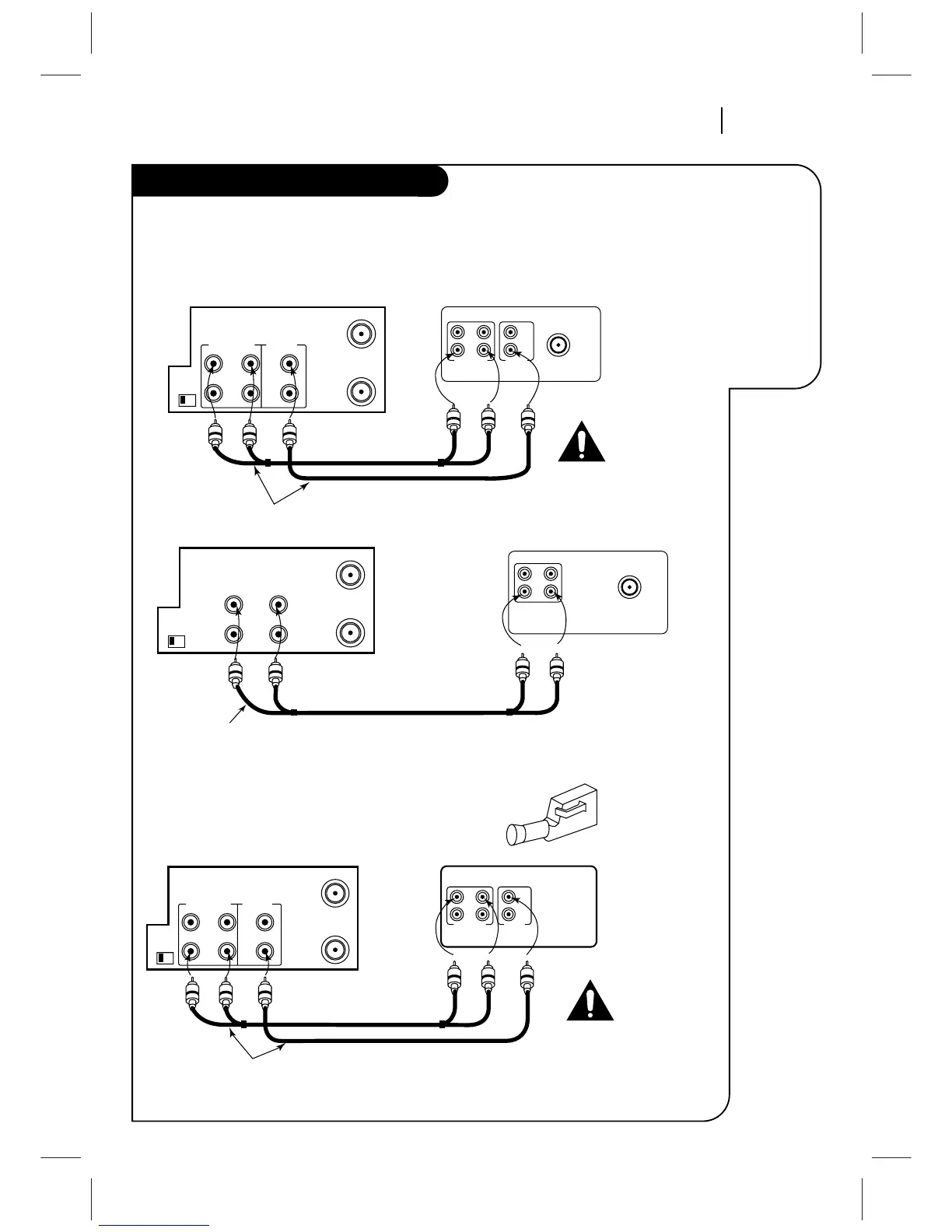
Audio/Video (A/V) Connections to TV
Use A/V connections for a better picture.
Accessory Audio/Video (A/V) Connections to VCR
CH3 CH4
OUT
IN
OUT
IN
R-AUDIO-L VIDEO
VHF/UHF/CATV
ANT
IN
Back Panel of Typical TV
ANT
IN
A/V cable is not provided with VCR.
ANT
IN
OUT
TO
TV
VHF/UHF/CATV
VIDEOAUDIO
OUT
IN
Back Panel of Monaural VCR
Back Panel of Stereo VCR
OUT
AUDIO VIDEO
IN
VHF/UHF/CATV
Back Panel of Typical Monaural TV
Note: If the back panel
on your TV is different,
refer to the TV's operating
guide.
A/V cable is not provided with VCR.
ANT
IN
OUT
TO
TV
VHF/UHF/CATV
VIDEOR-AUDIO-L
OUT
IN
OUT
CH3 CH4
IN
ANT
IN
OUT
TO
TV
VHF/UHF/CATV
VIDEOR-AUDIO-L
OUT
IN
OUT
CH3 CH4
IN
Back Panel of Stereo VCR
OUT
IN
OUT
IN
R-AUDIO-L VIDEO
Jack panel of Accessory
A/V cable is not provided with VCR.
Accessory
Component:
Another VCR,
Camcorder,
Video Camera,
Satellite Receiver,
Laser Disc Player
Turn off power
or unplug VCR
before making
any connections.
Turn off power
or unplug VCR
before making
any connections.

Related product manuals