PAGE 14 J CONTROLS AND DISPLAYS
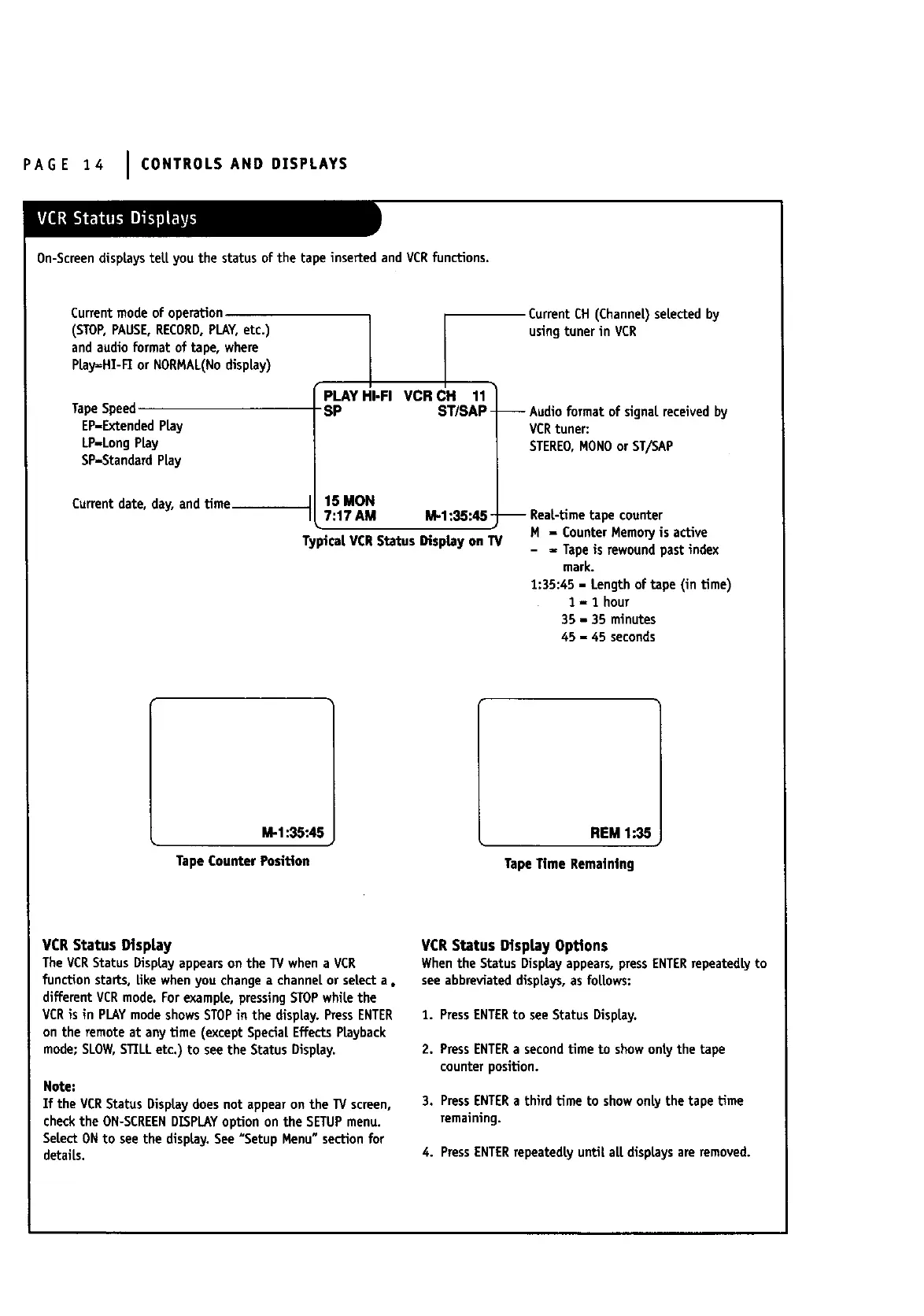
)n-ScreendispLaysteLLyou the status of the tape inserted and VCRfunctions.
Currentmodeof operation
(STOP,PAUSE,RECORD,PLAY,etc.)
and audio format of tape, where
PLay=HT-FEor NORMAL(Nodisplay)
TapeSpeed
EP-ExtendedPLay
LP-LongPLay
SP-StandardPLay
Current date, day, andtime
1[
PLAY HI-FI VCR CH 11
SP ST/SAP -
15 MON
7:17 AM M-1:35:45 -
Typical VCRStatus Display on1!/
Current CH (ChanneL)selectedby
using tuner in VCR
-- Audioformat of signalreceivedby
VCRtuner:
STEREO,MONOor ST/SAP
-- ReaL-timetape counter
H - Counter MemopJis active
- ,, Tapeis rewound past index
mark.
1:35:45 - Length of tape (in time)
1 - 1 hour
35 - 35 minutes
45 - 45 seconds
M-1:35:45
TapeCounterPosition
REM 1:35
TapeTime Remaining
VCR Status Display
TheVCRStatus DispLayappearson the TV whena VCR
function starts, like whenyou changea channelor select a o
different VCRmode.Forexample, pressingSTOPwhile the
VCRis in PLAYmodeshowsSTOPin the display.PressENTER
on the remote at any time (except SpecialEffectsPLayback
mode;SLOW,STILLetc.) to see the Status DispLay.
Note:
If the VCRStatus DispLaydoes not appearon the TV screen,
checkthe ON-SCREENDISPLAYoption on the SETUPmenu.
SeLectONto see the display.See"Setup Menu" sectionfor
details.
VCR Status Display Options
Whenthe Status DispLayappears,pressENTERrepeatedly to
seeabbreviateddisplays,asfoLLows:
1. PressENTERto see Status DispLay.
2. PressENTERa secondtime to show only the tape
counterposition.
3. PressENTERa third time to showonLythe tape time
remaining.
4. PressENTERrepeatedlyuntil alLdisplaysare removed.



 To Next Page