OPERATION I PAGE 15
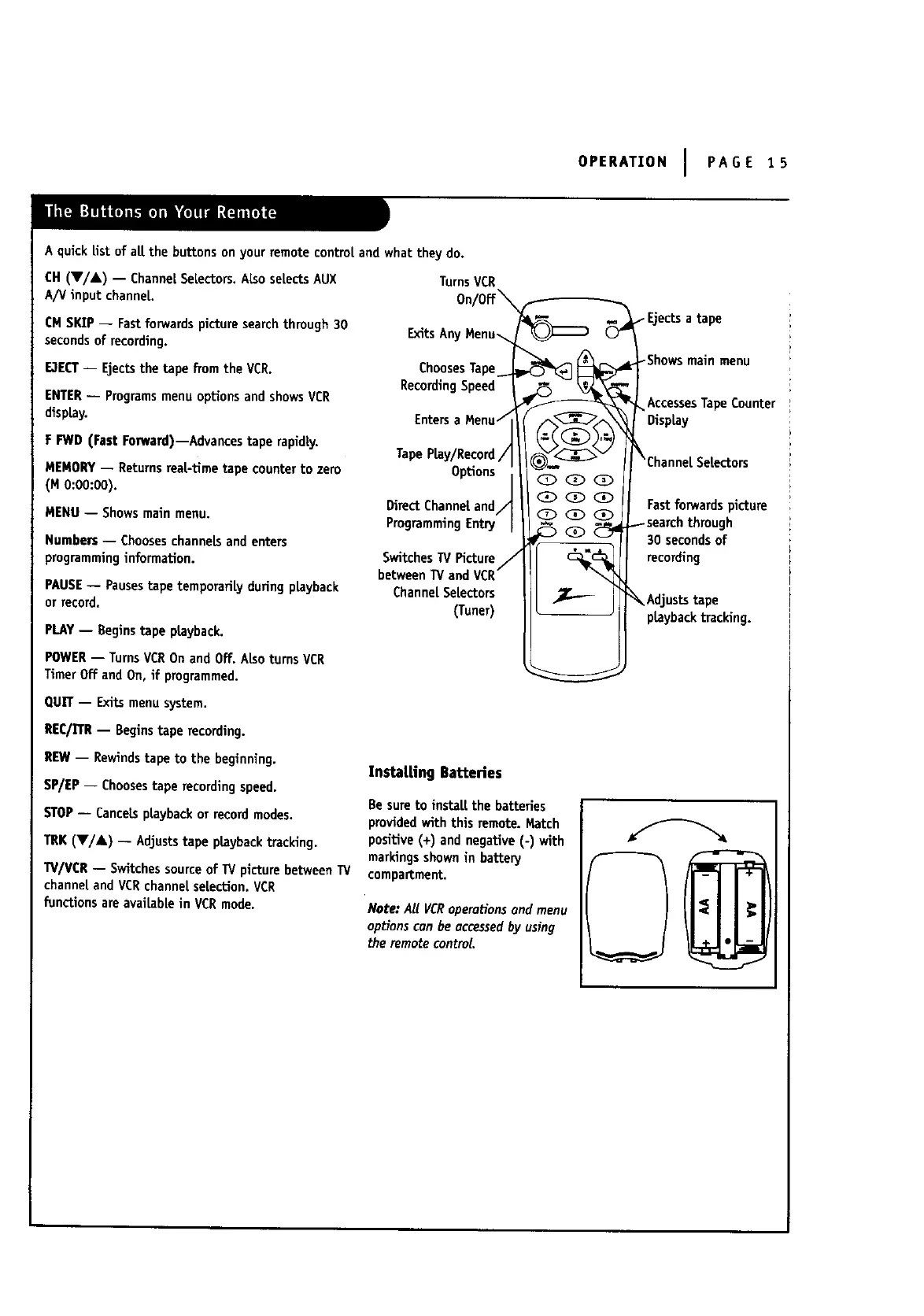
A quickEst of all.the buttons on your remote control and what they do.
CH (V/A) -- ChannelSeLectors.ALsoselectsAUX TurnsVCR
A/V input channel
CM SKIP -- Fastforwardspicture searchthrough 30
secondsof recording.
ExitsAn
E3ECT-- Ejectsthe tape from the VCR.
ENTER-- Programsmenu optionsand showsVCR
display.
F FWD (Fast Eonvard)--Advancestape rapidly.
MEMORY-- Returnsrea|-time tape counterto zero
(M 0:00:00).
MENU -- Showsmain menu.
Numbers -- Chooseschannelsandenters
programminginformation.
PAUSE-- Pausestape temporarily duringplayback
or record.
PLAY-- Beginstape playback.
POWER-- TurnsVCROnand Off. AlsoturnsVCR
TimerOff and On, if programmed.
QUN"-- Exits menusystem.
REC/]TR-- Beginstape recording.
REW-- Rewindstape to the beginning.
SP/EP -- Choosestape recordingspeed.
STOP-- CanceLsptaybackor recordmodes.
TRK (V]&) -- Adjuststape ptaybacktracking.
TV]VCR-- Switchessourceof W picturebetweenTV
channeland VCRchannel selection.VCR
functionsare avaitablein VCRmode.
ChoesesTa
RecordingSpeed
Enters
TapeP_y/Record
Options
Direct Channeland
ProgrammingEntry
SwitchesW_cturaJ
betweenTVand VCR
ChanneLSeLectors
(Tuner)
InstaLLingBatteries
Be sureto insta[t the batteries
providedwith this remote. Match
positive (+) and negative (-) with
markings shownin battery
compartment.
Note: All VCRoperationsand menu
optionscan be accusedby using
the remotecontrol
_Shows main menu
AccessesTapeCounter
Fastforwardspicture
30 secondsof
recording
_ Adjuststape
playbacktracking.



 To Next Page