PAGE 20 I OPERATION
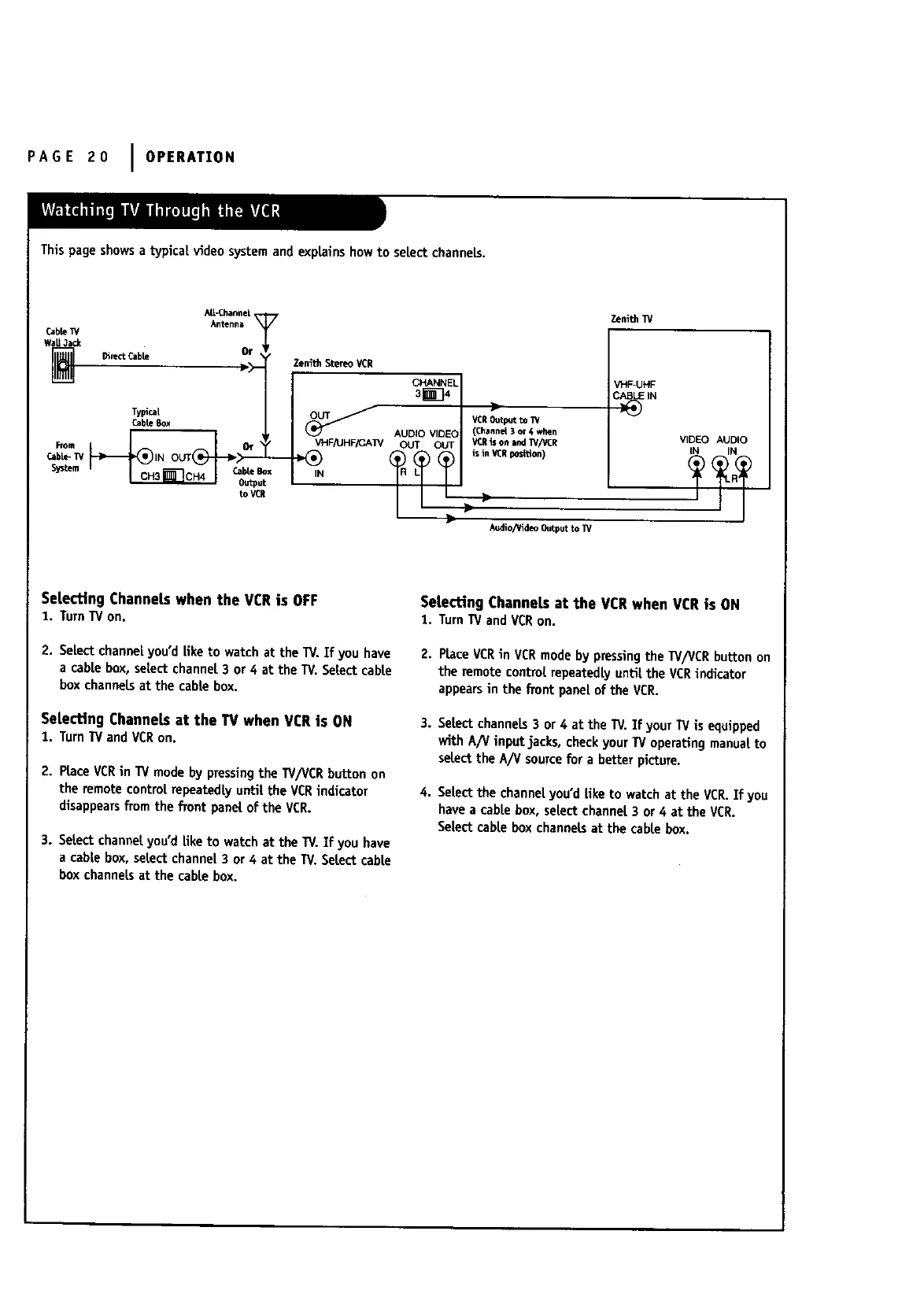
This page showsa typical video systemand explainshowto seLectchanneLs.
AIL-Chamne|,
Antenna
CableW
w_ • Or
7
TypicaL
CableBox
_tem I _ _Ou_u_tx
to VCR
Zenith StereoVCR
VHFJU HFF-AW
IN
CHANNEL
sin34
ZenithW
VCROut_t to W
(Channel3 or 4 when
VCRis onind TV/V_R
in Y_Epo=_don)
VHF-UHF
AUDIO VIDEC VIDEO AUDIO
OUT OUT _ i_l
..
kedio/_deo Output to IV
Selecting ChanneLswhen the VCRis OFF
1. TurnTVon.
2. SeLectchannelyou'dLiketo watch at the TV.If you have
a cable box, selectchannel 3 or 4 at the TV,SeLectcable
box channelsat the cable box.
SeLectingChannetsat the TVwhen VCRis ON
1. TurnTVandVCRon.
2. PlaceVCRin TV modeby pressingthe W/VCR button on
the remotecontroL repeatedlyuntil the VCRindicator
disappearsfTomthe fxont panel of the VCR.
3. SeLectchannelyou'd Liketo watch at the TV. If you have
a cabLebox, select channeL3 or 4 at the TV.SeLectcable
box channeLsat the cable box.
SeLectingChanneLsat the VCRwhen VCRis ON
!. TurnTVandVCRon.
2. Place VCRin VCRmode by pressingthe W/VCR button on
the remote control repeatedlyuntil the VCRindicator
appearsin the fiont paneLof the VCR.
3. SeLectchannels3 or 4 at the TV. If your TVis equipped
with A/V input jacks, checkyour TV operatingmanual to
selectthe A/V sourcefor a better picture.
4. SeLectthe channeLyou'd Liketo watch at the VCR.If you
havea cable box, select channel3 or 4 at the VCR.
SeLectcable box channeLsat the cable box.



 To Next Page