PAGE 8 I INSTALLATION
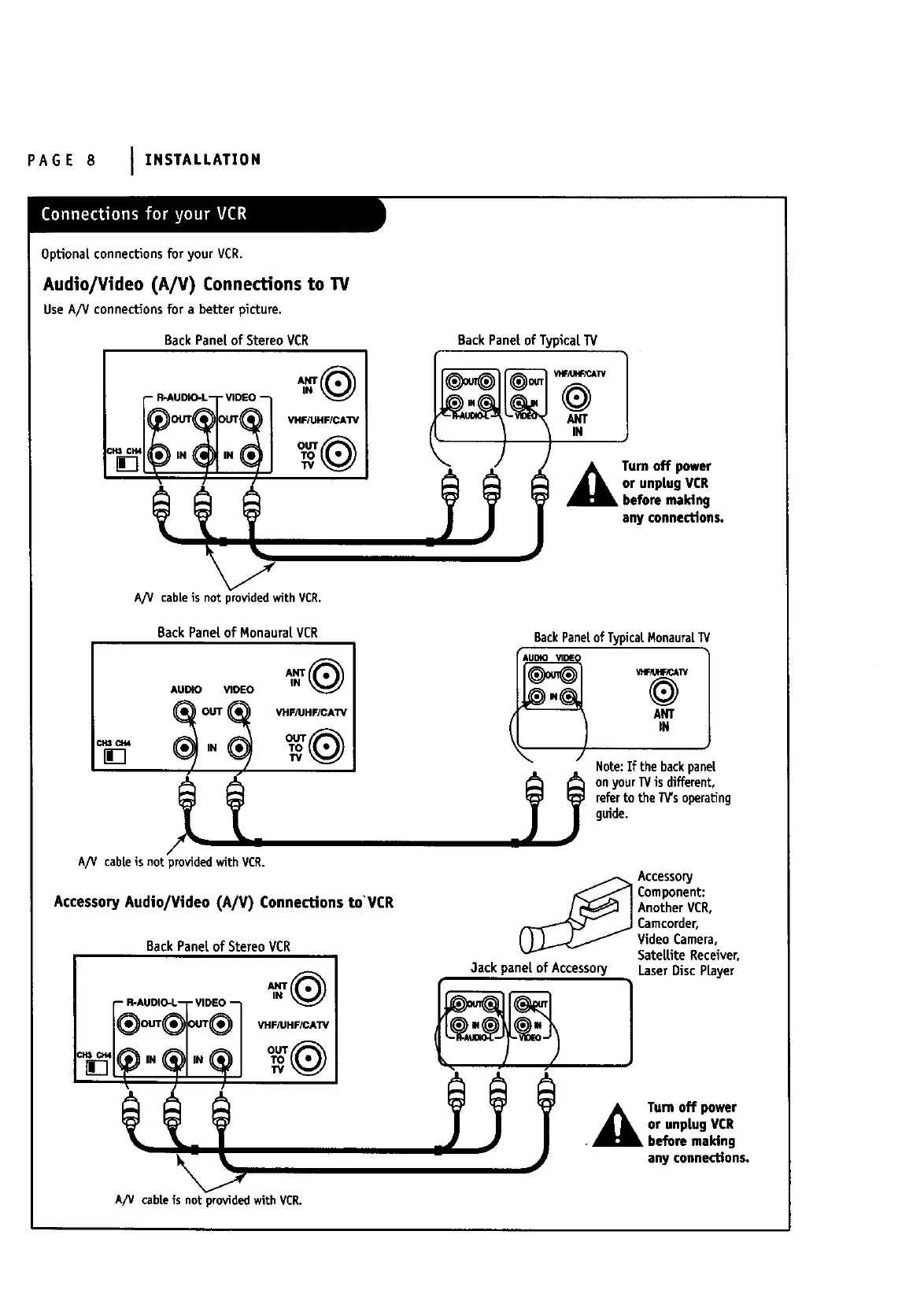
OpUonaLconnectionsfor your VCR.
Audio/Video (A/V) ConnecUons to TV
UseA/V connectionsfor a better picture.
BackPaneLof StereoVCR
VHF/UHFICA'r7
A/_/ cableis not providedwithVCR.
BackPanel of Monaural VCR
BackPanetof TypicalTV
(1 11÷-
A umoffpower
or unplug VCR
before making
any connections.
BackPanetof TypicatMonauraL
AUDIO VI
IN
Note:If the backpanel
onyourTVis different,
referto the7_s operating
guide.
A/V cableis not provided with VCR.
AccessoryAudio/Video (A/V) Connections to'VCR
BackPanetof StereoVCR
R-AUDIO-L VIDEO
_ Accessory
Component:
AnotherVCR,
Camcorder,
VideoCamera,
SateLliteReceiver,
3ackpaneLof Accessory LaserDiscPrayer
A Tum off power
or unplug VCR
• before maMng
any connections
A/V cabLeisnot providedwith VCR.



 To Next Page