3 easy steps to see your sleep data in a whole new way
1. Visit www.myZeo.com and click “sign in for myZeo”
in the navigaon bar
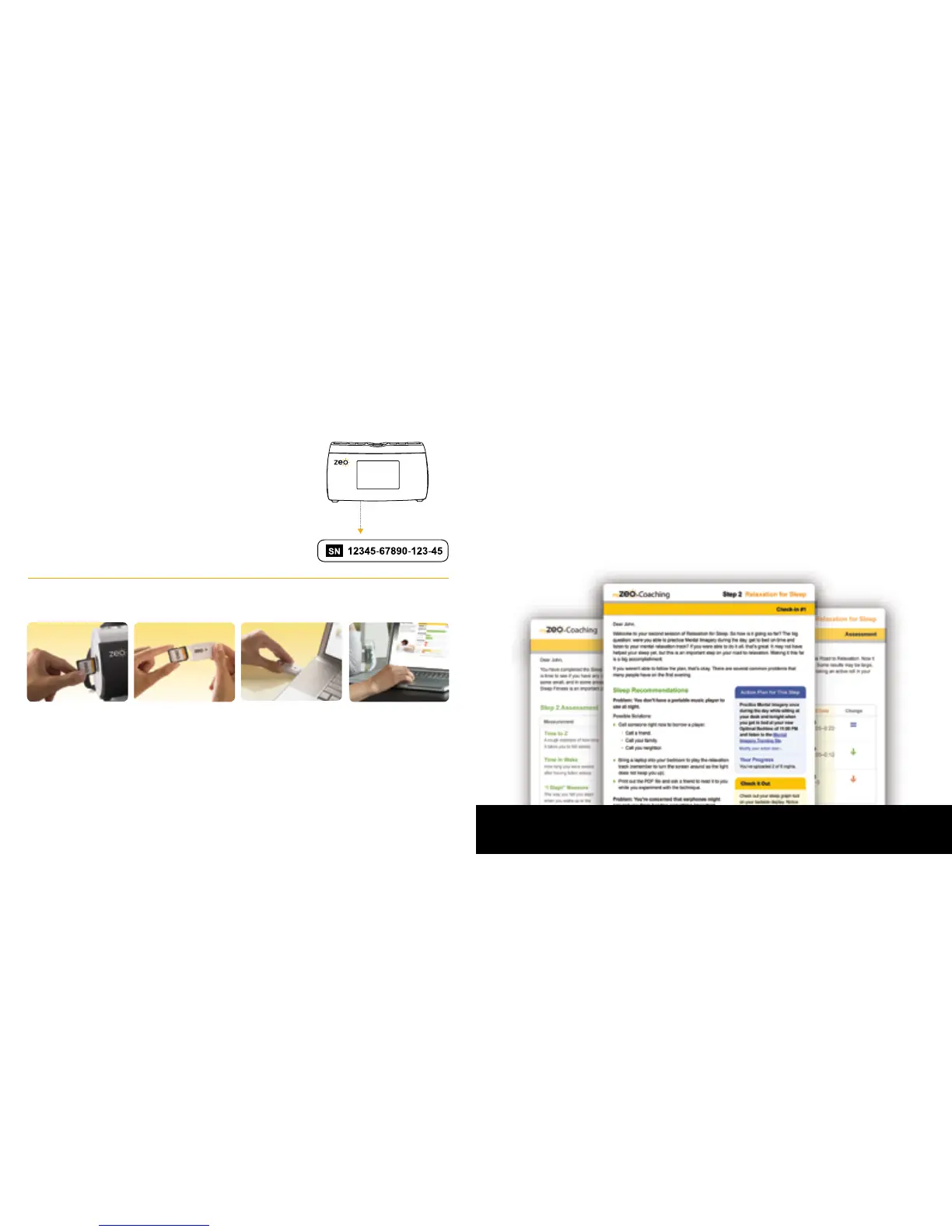
2. Fill out your Sleep Prole. You’ll need the serial
number on the boom of your Zeo Bedside Display
3. Upload your data and explore your sleep!
Uploading your sleep data is easy
Note: When you are done, remember to return your SD card to your Zeo Bedside Display!
Mac Users: If prompted to reformat SD card, choose “No.”
Get the guidance you need to help
you improve your sleep
• Target the Sleep Stealers that may be robbing you of sleep
• Explore your recommended sleep strategies and see which ones
actually impact your sleep
• Receive regular assessments of your progress
For more information about getting the most from Zeo, myZeo and the coaching
program, visit www.myZeo.com/guide
14
Create Your myZeo Account Today The 7 Step Sleep Fitness
™
Program
15
Serial Number
Gently push the
SD card to eject
Insert the card
into the reader
Insert the reader into
the USB port
of your computer
Sign in to myZeo.com and
click on
“Upload your
Sleep Data”


 To Next Page