iOS /Android
Step 1 Download App
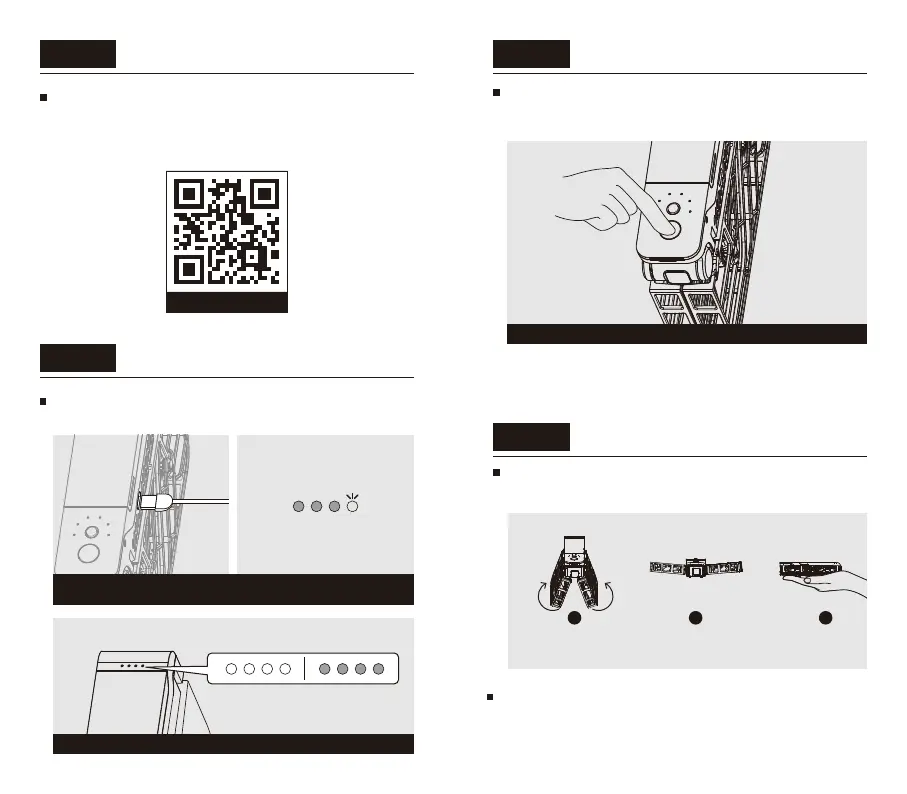
Step 2
Charge the battery
before you use HoverAir X1 for the first time, be
sure to charge it.
Step 3
Power on
Press and hold power button for 2 seconds until the
voice prompt is heard, and the status indicator will
light on in green.
Step 4
Mode Selection and Takeoff
Open up the HoverAir X1 as shown below and hold it
flat in your palm.
Scan the QR code below to download and install
Hover X1 App.
*This guide is subject to change without prior notice. Please
visit our official website for user manual and other latest
information.
When the battery is fully charged, LEDs will be always-on or always-off
Wait for about 7 seconds, and HoverAir X1 will power on.
Always-offAlways-on
Connect the USB cable and USB power source.
When battery is being charged, LEDs will blink.
1 2 3
Short press the mode button (behind the power button)
to select the flight mode of your choice. You can long
press the mode button to toggle parameters for each
flight mode.
04 05


 To Next Page