. Pan Axis Balance
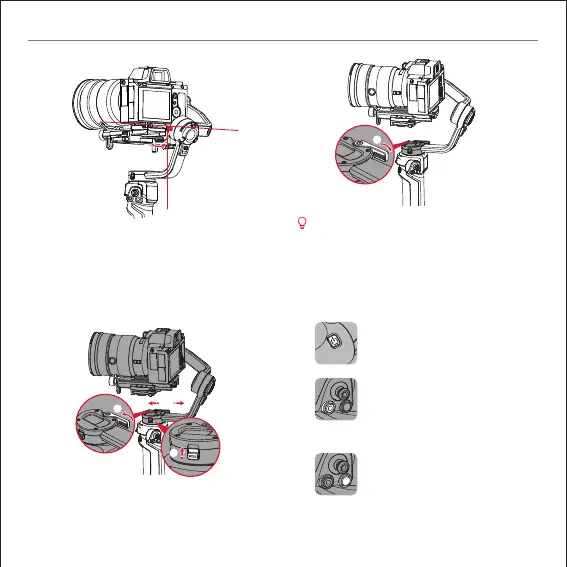
Unlock the pan axis①, loosen the pan axis latch②, hold
and slightly tilt the handle, push the pan axis to move
left or right③ until the pan axis can stay still in any position.
Complete this step by tightening up the pan axis latch④.
⑤
④
③
②
①
zhiyun-tech.com
EN Quick start guide
After balancing WEEBILL 3, the motor torque needs to
be adjusted for proper function. It is recommended to
adjust the motor torque via“ Auto Calibration” in the
display screen menu.
6. Basic Operation
Button Description
Power Button
Long press: Turn on/off the gimbal.
Photo/Video Button
Half press:
Activate auto-focus on certain cameras
Long press: Take photos
Single press: Start/stop filming videos.
Mode Switch
Single press: Switch among PF/L/F mode
Double press:
Switch among POV/V/Portrait mode
Long press:
Sleep/wake mode for the gimbal motors
④
M
M


 To Next Page
 Loading...