The Zimmer Cryo 7 is a medical device designed for cold air therapy, providing pain relief and supporting various medical and aesthetic treatments. It utilizes the latest technology to deliver cold air to the skin surface, offering a non-invasive method for pain management and reduction of swelling.
Function Description
The Cryo 7 delivers a continuous stream of cold air, which can be precisely directed to the treatment area. This cold air flow helps to cool the skin surface locally, leading to vasoconstriction, reduced nerve conduction velocity, and decreased metabolic activity in the treated tissues. These physiological responses contribute to pain reduction, muscle relaxation, and a decrease in inflammation and edema.
The device is intended for use in a variety of medical fields, including:
- Musculoskeletal System: Acute and chronic painful conditions such as rheumatic diseases, tendinopathies, acute inflammation, and lower back pain.
- Procedure-related Pain: Pain associated with knee, hip, spinal, and shoulder surgery.
- Peri-procedural Pain: Pain management during dermatological procedures (e.g., photodynamics and laser therapy), for chest drain removal, and before/during injections and aspirations.
- Neurological Disorders: Spasticity and pain in connection with neurological disorders.
The Cryo 7 features a high-resolution touch screen display for intuitive operation. Users can select fan levels and therapy times, save favorite settings, and manage patient data. The device also includes a flexible spring arm that assists in directing the cold air flow, enhancing user comfort during therapy. An energy-saving standby mode is integrated for efficient operation.
Important Technical Specifications
Mains Voltage: 220 V - 240 V / 50-60 Hz
Power Consumption: Max. 5 A
Protection Class: I
IP Protection Class: IP20
Dimensions (H x W x D): 1060 mm x 500 mm x 560 mm
Weight: 60 kg (without accessories)
Environmental Conditions (Operation):
- Temperature: 10 to 35°C
- Air Humidity: 20-80% relative air humidity without condensation
- Air Pressure: 900-1030 hPa
Environmental Conditions (Storage and Transport):
- Temperature: -10 to 50°C
- Air Humidity: 10-90% relative air humidity without condensation
- Air Pressure: 700-1060 hPa
Interfaces: USB 2.0, RS232
Temperature Emitted at the Device Outlet: -30°C ± 3°C
Fan Levels: 1-9
Therapy Time: 1:00 – 100:00 min
Load Capacity of the Shelf Plate: Maximum 35 kg
Length of the Treatment Tube: 2.5 m
Mains Fuse: 16 A
The device is classified as a medical device (Class IIa) and bears the CE 0123 mark, indicating conformity with applicable European Community requirements.
Usage Features
Start-up and Configuration:
- The device performs a one-time initial set-up upon first switch-on.
- Users can configure language, temperature display (Celsius/Fahrenheit), and color scheme (PT colour = blue, Derma colour = orange).
- Distributor information (name, telephone, email) can be entered.
- The initial set-up is accepted by activating the "Save" button.
Patient Preparation:
- Before treatment, patients should remove metal objects in the therapy area.
- The site to be treated must not be covered by clothing.
- Patients must be informed about the goals and effects of cold air therapy, as well as potential discomfort or sensitivity to excessive heat or cold.
Therapy Operation:
- Starting Therapy: Select the fan level and therapy time on the display. The therapy starts upon activation of the "Start" button.
- During Therapy: The operator continuously monitors patient comfort and adjusts treatment parameters (air flow and therapy distance) as needed.
- Cold Air Output: The cold air output can be started and stopped using the "Start" and "Stop" buttons.
- Interrupting/Resuming Therapy: The "Stop" button interrupts the cold air output. Activating the "Start" button again resumes the cold air output with the automatically saved remaining therapy time.
- End of Therapy: The therapy time elapsed, the cold air output ends, and the screen switches back to the start screen.
Display Elements and Buttons:
- Arrow Buttons: Adjust fan level and therapy time values.
- Standard Button: Restores factory settings or individual settings in the configuration menu.
- Display: Shows fan level and time values. Direct selection is possible by tapping the desired location.
- Fan Level: Numeric display of the fan level.
- Therapy Time: Numeric display of the current therapy time. A keypad appears for setting the time.
- Favourites: The start screen displays entries saved in Favourites. Users can call up, edit, delete, and change the order of entries in the Favourites list.
Maintenance Features
General Maintenance:
- Before maintenance or cleaning, the device must be switched off at the main switch (18) and the power cable must be disconnected.
- Labels on the device (such as warning, control unit signs, identification plate) are not damaged during cleaning and disinfection.
- Do not use sprays.
- Liquids must not get into the device during cleaning or disinfection.
Housing / Accessories Cleaning:
- Visible soiling on the housing, cable, display, and accessories can be cleaned with commercially available alcohol-free plastic cleaners.
- Wipe the surface until the dirt has been removed using a soft cloth that has been soaked according to the manufacturer's instructions for the cleaning agent but not dripping wet.
- For disinfection, use commercially available alcohol-free disinfectants for metal and plastic, with bactericidal, virucidal, and fungicidal properties.
- Wipe all surfaces with a soft cloth soaked according to the disinfectant manufacturer's instructions but not dripping wet.
- Pre-soaked disinfectant cloths can also be used.
- Observe instructions for drying or post-cleaning.
Defrost Container:
- The defrost container should be cleaned whenever it has been emptied.
- To do this, open the lid of the defrost container.
- The defrost container has a capacity of approximately 1.5 liters.
- When the defrost container is full, an acoustic signal sounds, and the "Defrost container fill level" icon appears in the status bar.
- To remove the defrost container, open the maintenance door, remove the container from the hatch, and take off the cover.
- Ensure the emptied defrost container is correctly positioned.
Air Filter:
- The air filter is located at the back of Cryo 7.
- The air filter needs to be replaced when indicated by an icon in the status bar.
- The air filter cannot be cleaned and should not be removed.
- Only original air filters from Zimmer MedizinSysteme GmbH should be used.
- To replace the air filter:
- Grasp with both hands above the handle.
- Press the air filter downwards with fingers at the indentations, pull it forwards, and remove the air filter from the frame.
- Insert the new air filter with the air filter frame first at the lower retaining support.
- Press the air filter frame into the housing until it clicks into place.
- The two arrows at the upper edge of the air filter must be pointing towards the device.
- The retaining lugs on the air filter frame must click into place on the side of the housing.
- After replacement, the operating time counter of the air filter must be reset via the "Air filter" icon in the status bar or in the "user" service menu under "Air filter operating hours reset".
- Dispose of the used air filter in household waste.
Service and Functional Test:
- The device is operated using a proper power outlet with a protective contact and electrical installation compliant with DIN VDE 0100 part 710.
- The device is operated in accordance with instructions.
- Expansions, readjustments, or modifications are carried out only by persons authorized by Zimmer MedizinSysteme.
- The user is instructed prior to use in functional safety, proper operating condition, and mechanical integrity of the device and accessories.
- The device is operated only by properly trained personnel.
- The device is not operated in areas at risk of explosion and/or in a flammable atmosphere.
- The device is immediately disconnected from the mains if liquid penetrates it.
- The device does not contain any parts that can be serviced or repaired by the operator, except for emptying the defrost container and replacing the air filter.
- Replacement of the lithium battery by untrained personnel can lead to hazards.
- A functional test should be performed regularly, including checking the strength of the air stream and cold air output at various fan levels.
Software Updates:
- Software updates can be performed via the USB interface using a USB stick formatted with FAT32.
- The USB stick must have an empty storage capacity of 4 GB.
- The update process involves inserting the USB stick into the USB interface, switching on Cryo 7, and confirming the update when prompted.
Export Log:
- Cryo 7 provides data for error analysis. This data can be saved on a USB stick.
- Activating the "Export log" button transfers the data (text file) to the USB stick.
- The USB stick must be empty and formatted with FAT32.
- Log export may only be performed by trained staff.

 Need help?
 General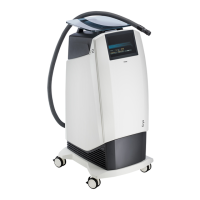

 To Next Page











