Non-Sound Decoder MX600 - MX638 and Sound Decoder MX640 - MX659 Page 25
may however be useful to use this method if used together with decoders from other manufacturers
that do not have the capability mentioned above, in order to harmonize the brake sequences.
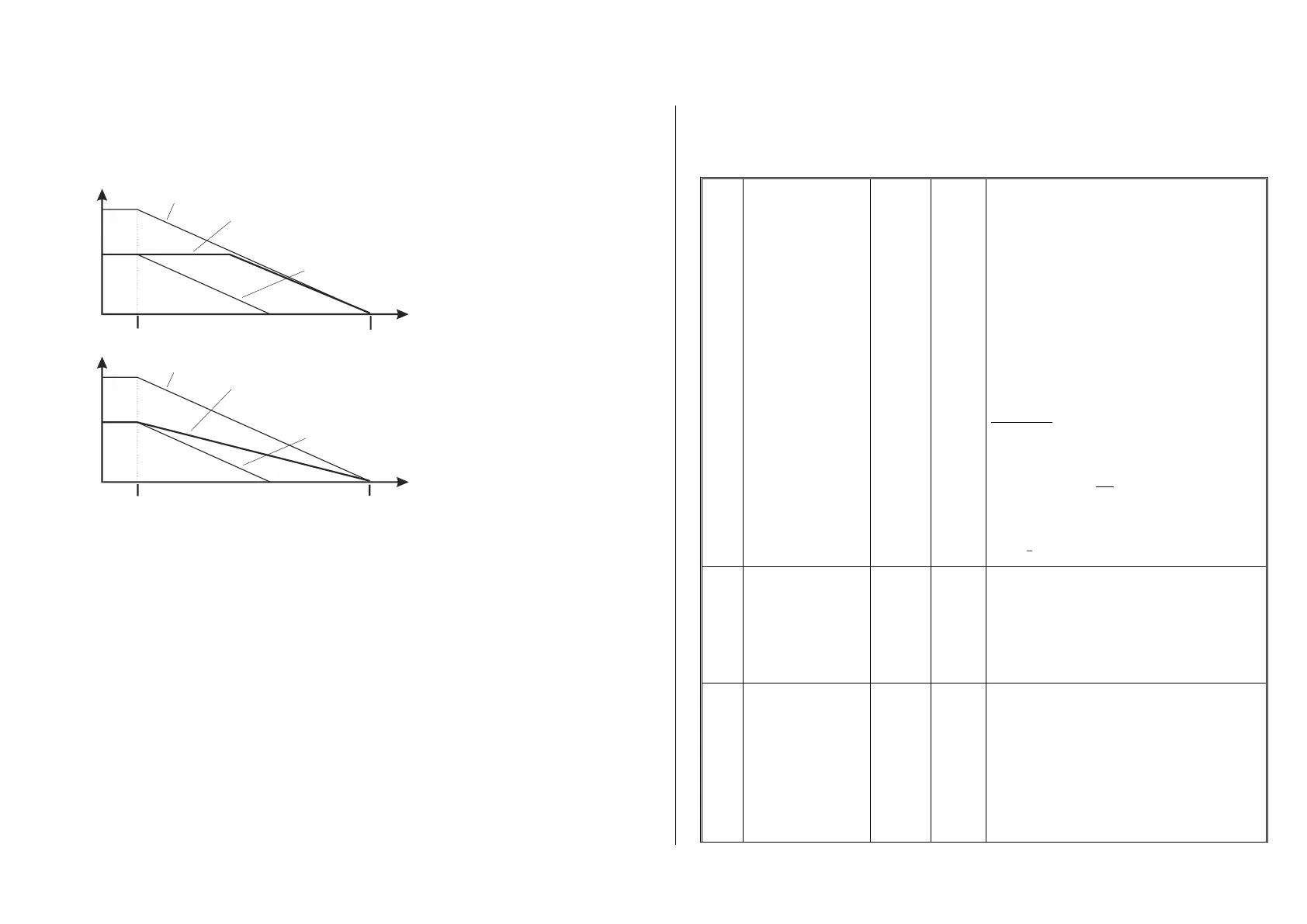
The second method may also be the preferred method if distance controlled stopping is used manual-
ly (CV #140 = 2 or 12), so that the train reacts immediately to speed changes from the throttle.
First method for con-
stant stopping dis-
tance
Second method
for constant stop-
ping distance
“Distance controlled stopping“, when activated, is exclusively applied to decelerations leading to a
full stop, but not to speed reductions without stopping (these are still handled by CV #4). Neither is
there any influence to acceleration events.
The traveled distance is constantly being recalculated in order to get as close as possible to the de-
sired stop point. The deceleration rate within distance controlled stopping is always applied exponen-
tially, that is the deceleration rate is high in the top speed range followed by gentle braking until the
train comes to a full stop; which in this case is not governed by CV #122! The application of CV #121
for exponential acceleration however remains unchanged.
3.13 Shunting, Half-Speed and MAN Functions:
On the one hand, defining the different Configuration Variables (#3, 4, 121, 122 and 123) offers proto-
typical acceleration and deceleration behavior, but is on the other hand often obstructive for quick and
easy shunting.
This is why the momentum can temporarily be reduced or eliminated altogether with a dedicated func-
tion key. Also, during shunting maneuvers it is sometimes helpful to have the speed range of the
throttle cut in half.
For historical reasons, the assignments for these "shunting-key functions" are summarized in CV
#124, which is associated with restrictions and also relatively confusing.
From today’s perspective, CV's #155, #156 and #157 are the preferred CV’s for these settings,
where function keys can be selected in a systematic and unlimited manner for each of the shunting
and MAN functions. CV #124 (Bits 0 & 1) is still relevant though for the type of momentum deactiva-
tion.
Shunting key
functions:
Low gear (half speed)
and
Momentum reduction
or deactivation
NOTE:
Extended shunting key
selection in
CV’s #155, 156
Bit 5
DC stopping
Bit 7
Changing SUSI pins to
logic level outputs
Select a function key for
LOW GEAR ACTIVATION:
Bit 4 = 1 (and Bit 3 = 0): F3 as half-speed key
Bit 3 = 1 (and Bit 4 = 0): F7 as half-speed key
Select a function key for
MOMENTUM DEACTIVATION:
Bit 2 = 0 (and Bit 6 = 0): “MN” key for deactivation,
Bit 2 = 1 (and Bit 6 = 0): F4 key for deactivation
Bit 6 = 1 (Bit 2 is irrelevant): F3 for deactivation.
Effect of above key (MN, F3 or F4) on
MOMENTUM:
Bit 1, 0 = 00: no effect on momentum
= 01: removes momentum of
CV #121 + #122
= 10: CV #3 + #4 reduced to ¼.
= 11: removes all momentum above.
EXAMPLES:
F3 for half speed-key: CV #124 = 16.
F3 for half speed-key and F4 to remove momentum
completely: Bits 0, 1, 2 & 4 = 1; that is CV #124 =23.
F3 for half-speed key and removing momentum:
Bits 0, 1, 4 &6 = 1; that is CV #124 = 83.
Bit 5 = 1: ”DC stopping“
Bit 7 = 0: SUSI-interface active
= 1: FU-outputs active instead of SUSI.
Selecting a function key
as half-speed key
Expanding on the settings of CV #124; if another key is
required than F3 or F7:
CV #155: Defines a function key for half-speed activa-
tion (= top speed cut in half).
If a key is assigned with CV #155, a possible assign-
ment through CV #124 is disabled.
CV #155 = 0 doesn’t mean that the F0 key is assigned
but rather that the setting in CV #124 is active.
Selecting a function key
for deactivating
momentum
This CV deactivates the configuration for F-keys in CV
#124 (Bits 2&6) in case they are not satisfactory. The ef-
fects (Bits 0&1) of the momentum don NOT change.
The assignment of a key for the deactivation of the mo-
mentum is deactivated, if CV 156>0 (i.e.: a key is de-
fined here). Additionally you can suppress the change of
the lights wen changing direction with Bit 7=1.
After defining a key with this CV, the momentum deacti-
vation or reduction still needs to be defined in CV #124:
CV #124, Bit 1, 0:
= 00: no effect on momentum
Speed
Distance
Entering the stop section. Desired stop point
Deceleration starts at full speed
Deceleration starts at less than full speed,
w ith “ con s tant s top ping dis tan c e
train stops at desired point by automatically reducing the deceleration
v au les ins pite of immediate ly s tar ted stopping s eq uenc e.
” programmed as CV # 140 = 11,12,13
-
The same with disabled constant stopping distance,
train s top s to ear ly.
Speed
Distance
Entering the stop section.
(Or speed regulator turned to stop)
Desired stop point
Deceleration starts at full speed
Deceleration starts at less than full speed,
w ith “ con s tant s top ping dis tan c e
- tr ain s top s at des ired point b y automatic ally delay in g s tart of br ak ing
follo wed by “nor mal” pr o g r es s io n.
” programmed as CV # 140 = 1, 2, 3
The same with disabled constant stopping distance,
train s top s to ear ly.



 To Next Page