19
COMPUTER MANUAL
Remove the safety film from the display before use.
COMPUTER (MODEL)
EBIC05PRO-GRY
TURNING ON
The computer turns on after power is connected.
It will display all elements on the screen within two seconds.
AUTO ON/OFF
The computer is switched on when the flywheel moves or any button is pressed.
The computer is switched off after four minutes of inactivity.
COMPUTER RESET
Press and hold the START/STOP button for 2 seconds to reset the computer.
Press and hold the ENTER and START/STOP buttons simultaneously for 2
seconds to completely reset the computer and stored values and programs.
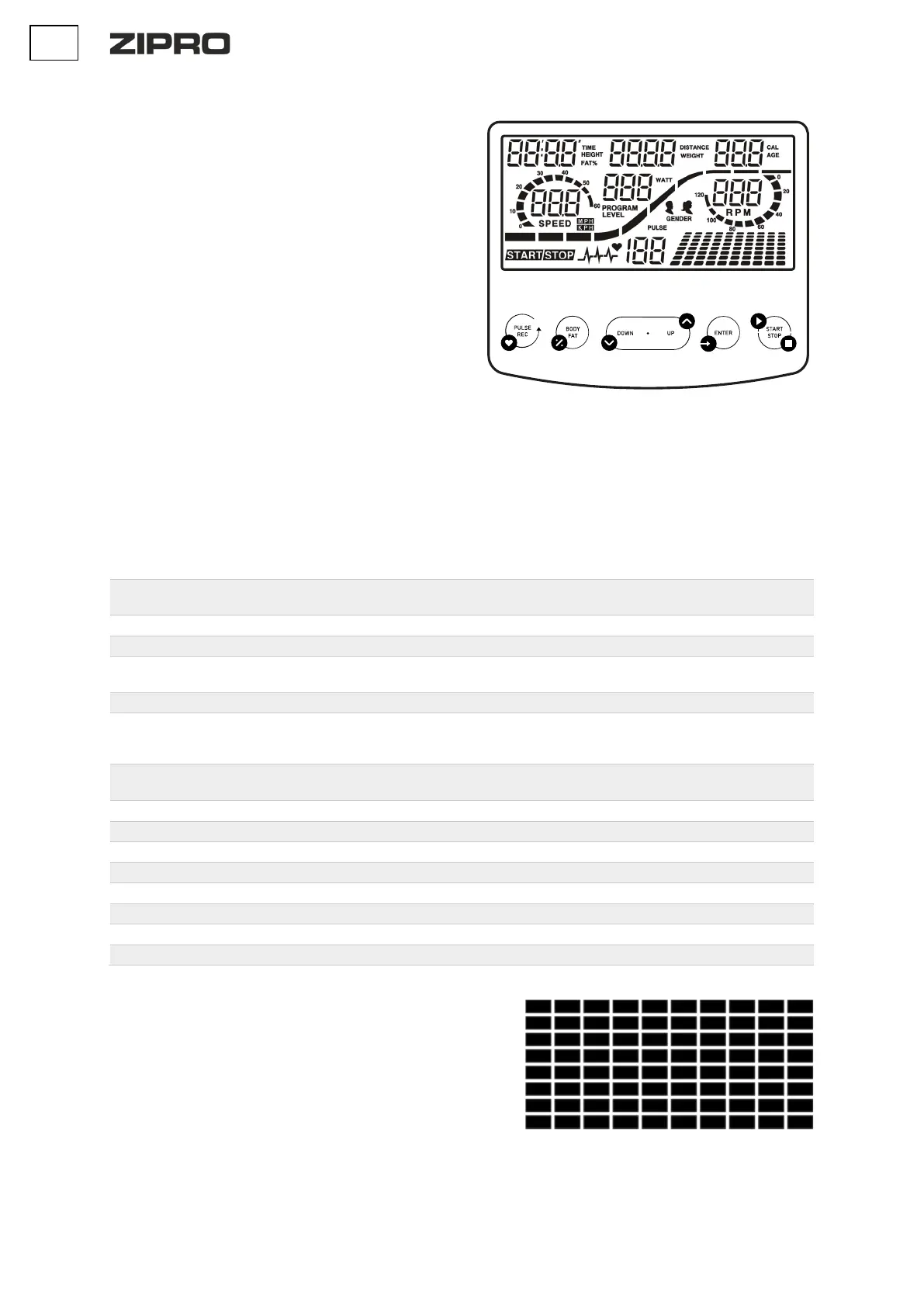
BUTTONS
• ENTER - in STOP mode is used to confirm your selection; in START mode it allows you to change the SPEED or RPM display or switch automatically.
• START/STOP - is used to start or stop a workout.
• UP - it is used to select and increase values. In START mode it allows you to increase the resistance level (LEVEL).
• DOWN - it is used to select and decrease values. In START mode, it allows you to decrease the resistance level (LEVEL).
• PULSE REC (PULSE RECOVERY) - allows you to check your fitness and training level based on the rate at which your heart rate drops after training.
In PULSE RECOVERY mode, press to exit the programme.
• BODY FAT – it measures the fat tissue content in the body.
FUNCTIONS (SPECIFICATION)
TIME Total exercise duration, from the start to the end.
00:00-99:59 min
Displays the current speed.
Displays the current resistance level.
Total distance from the start to the end of the exercise.
The travelled distance.
Visual representation of distance. Each bar indicates 100 metres.
Total calories burnt from the start to the end of the exercise.
(The measurement is an approximation for comparing training sessions. Do not use for medical
Displays cadence (revolutions per minute).
Visualisation – the column on the left-hand side of the screen.
Displays the current heart rate.
Energy used during training.
Selects one of 11 programmes.
HRC heart rate controlled programme.
WATT controlled programme.
There are 10 columns of load bars and 8 fields in each column. Each column
represents 3 minutes of training (without changing the TIME value) and each
field represents 4 load levels.


 To Next Page
 Loading...