20
MANUAL PROGRAMME
• Using the UP and DOWN buttons, select the program P1.
• Press the ENTER button to confirm your selection.
• Use the UP or DOWN buttons to set the time (TIME). distance
(DISTANCE). calories (CALORIES). pulse (PULSE).
• Press the ENTER button to confirm your selection.
• Start the workout by pressing the START/STOP button.
• Stop the workout by pressing the START/STOP button.
During the workout, you can change the intensity level (LEVEL) by pressing the
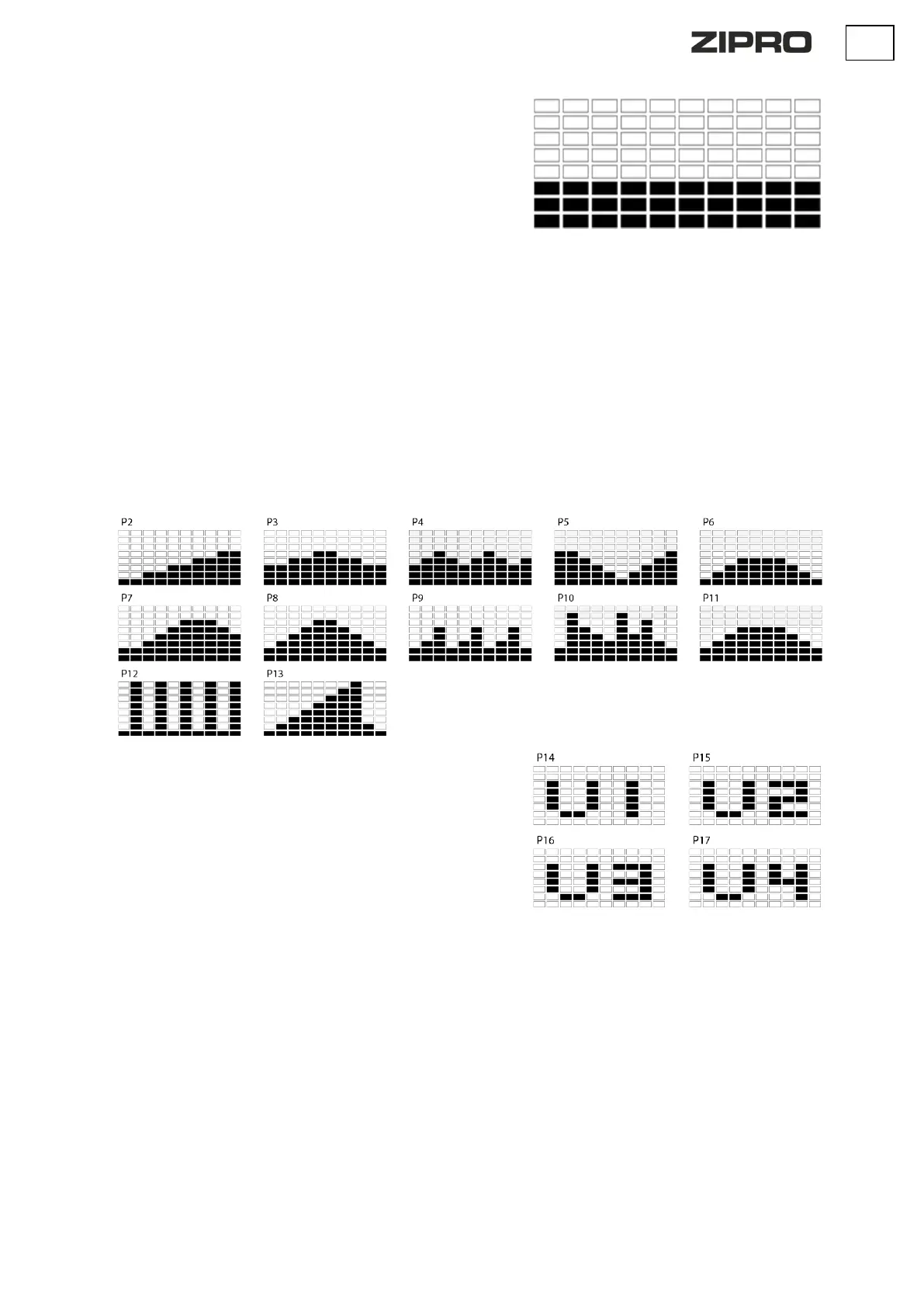
P2: STEPS P3: HILL P4:ROLLING P5: VALLEY P6: FAT BURN
P7: RAMP P8: MOUNTAIN P9: INTERVALS P10: RANDOM
P11: PLATEAU P12: FARTLEK P13: PRECIPICE
• Using the UP and DOWN buttons, select the program P2-P13.
• Press the ENTER button to confirm your selection.
• Use the UP or DOWN buttons to set the time (TIME). distance
(DISTANCE). calories (CALORIES). pulse (PULSE).
• Press the ENTER button to confirm your selection.
• Start the workout by pressing the START/STOP button.
• Stop the workout by pressing the START/STOP button.
During the workout, you can change the intensity level (LEVEL) by pressing the
UP or DOWN button.
The workout is divided into 10 stages, each symbolised by a separate column.
For each stage, the user can set LEVEL, TIME, DISTANCE, CALORIES. according
to personal preference. The programme will be saved in the computer's
memory.
• Using the UP and DOWN buttons, select the program U1-U4.
• Press the ENTER button to confirm your selection.
• Use the UP or DOWN buttons to set the intensity level (LEVEL). The
default setting is 1.
• Press the ENTER button to confirm your selection.
• Repeat the operation for each column to create a complete programme
profile.
• Use the UP or DOWN buttons to set the time (TIME). distance
(DISTANCE). calories (CALORIES). pulse (PULSE).
• Press the ENTER button to confirm your selection.
• Start the workout by pressing the START/STOP button.
• Stop the workout by pressing the START/STOP button.
During the workout, you can change the intensity level (LEVEL) by pressing the
UP or DOWN button. The change does not affect the saved programme.


 To Next Page
 Loading...