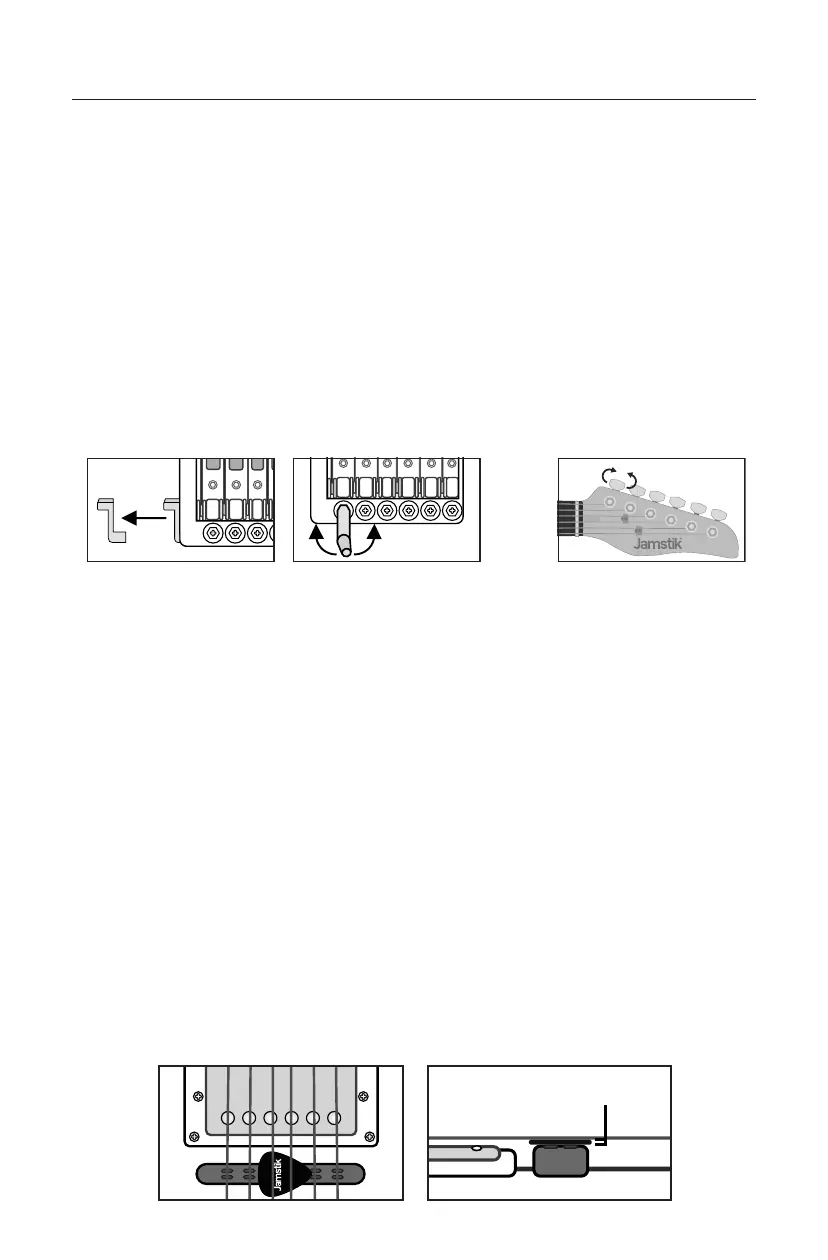
• Your guitar may need to be tuned upon shipment, and subsequently over time.
• Tuning is critical for optimal MIDI performance. We recommend checking your
guitar’s tuning before each use for best results.
• For the headless Jamstik Studio, your guitar is tuned at the bridge rather than the
headstock. Use the built-in tuning handle at the bridge to rotate the tuners up to
correct tension.
• The headstock Jamstik Classic is tuned like a standard electric guitar by turning the
tuning pegs on the headstock by hand.
• The Jamstik may require correct tuning before successful MIDI connection and
tuning can be done with a traditional guitar tuner method or the software tuner over
MIDI in Jamstik Software once properly connected
Guitar Setup Instructions
Keeping Your Guitar Tuned
Optional Step - Adjusting the MIDI Pickup
• The MIDI Pickup was calibrated at the factory, but you may find that you want to make
fine adjustments to accommodate your personal playing style/preferences.
Maintaining the proper spacing between the MIDI pickup and string is crucial for
optimal performance.
▪ To test and adjust the pickup height, press your finger down on the 3rd or 4th
string and fret the highest note. Then measure the distance between the
pickup and the string. The distance should be around 1mm—which is the
width of the included guitar pick. The distance should be slightly greater than
1mm on strings 1, 2, 5, and 6.
▪ If the pickup and strings are not at this spacing, use the included hex key to
either raise or lower the midi pickup.
▪ You may also want to adjust individual string heights or fine-tune your pickup.
You can use the velocity readouts in any DAW’s MIDI roll or the calibration
section of the Jamstik Creator as a guide and watch our video tutorials on
jamstik.com/start or jamstik.com/support for extra assistance.
3
Jamstik Studio Jamstik Classic
1mm



 To Next Page