- 2 -
Upon connection of cables, correct polarity is crucial. Incorrect polarity may lead to
damage of the sound system or other equipment!
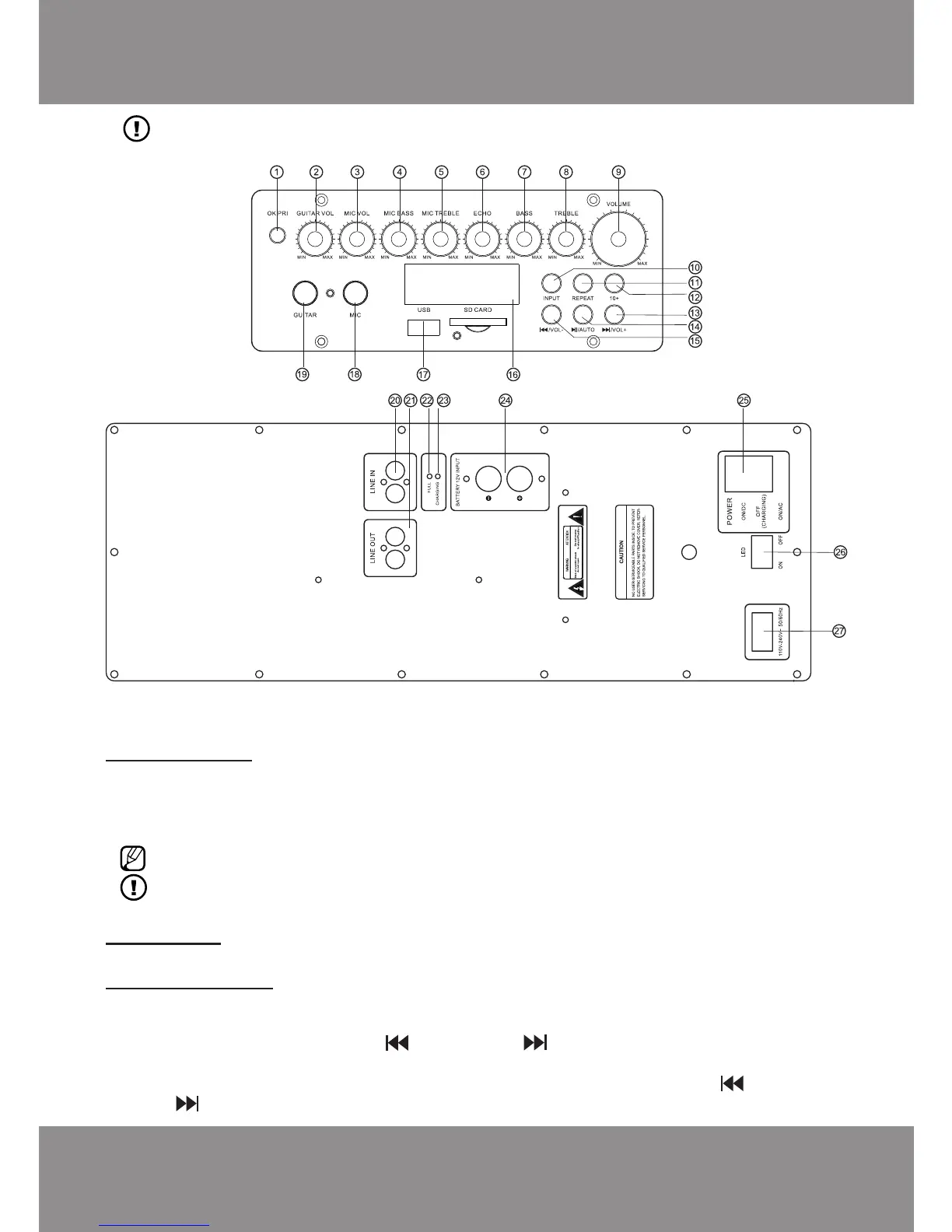
Control panels
PREPARATION
Battery charging:
Connect the included power cable to the port of the sound system ~220-240V 50/60Hz (27), blue
charging mode indicator CHARGING (23) will light up.
Battery should be charged for approximately 8 to 12 hours. When battery has fully charged, red
indicator FULL will light up.
If the sound system is on during the charging, the battery charging duration takes longer.
If you will not use the sound system for a long time, charge the battery every 3 months.
USE
Switching on:
Switch POWER (25) to ON/DC (battery) or ON/AC (electric power).
Volume adjustment:
The sound system has two volume controllers:
a) VOLUME (9), adjusts (limits) the maximum volume.
b) digital controller with buttons [ / VOL-] (15), [ / VOL+] (13) and remote control buttons
[VOL-], [VOL+].
You can turn the volume down or up by pressing and holding the button [ / VOL-] (15)
or [ / VOL+] (13).



 To Next Page