Operating 21
3.10 CALIBRATION MENU
Calibration menu allows to calibrate laser sensor of pushing wall. Calibration should be
performed by authorized service.
3.11 WEIGHING SYSTEM MENU
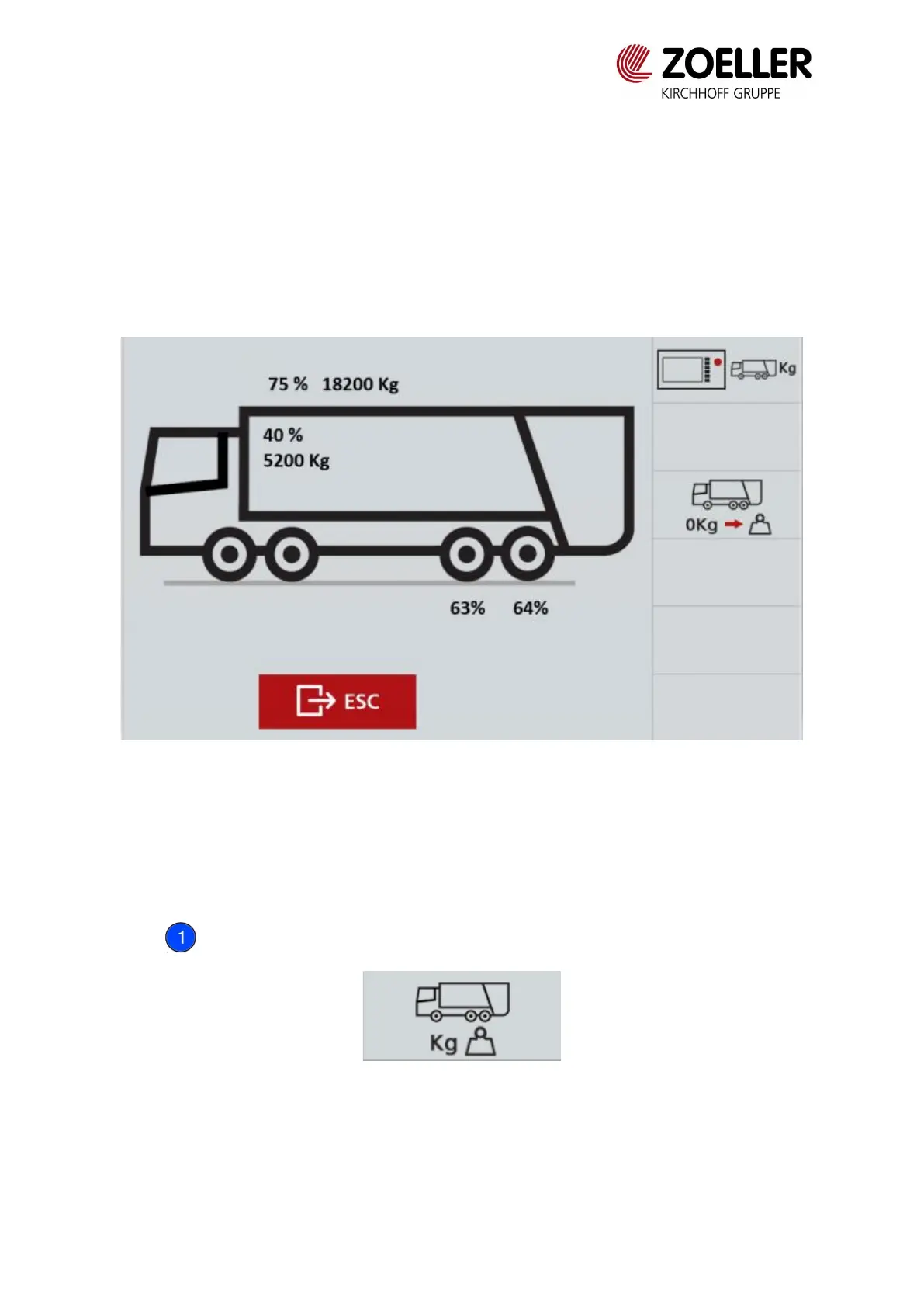
When the vehicle is equipped with weighing system, information on the total weight of the
vehicle, the weight of the waste in the body and the axles loads can be found in the menu.
The figure below shows example values.
Fig. 3.15 Weighing system
From the sample screen above, you can find out that the total weight of the vehicle with waste
is 18,200 kg (75% of the total permissible weight of the vehicle), the weight of waste is 5,200
kg (40% of the permissible weight of waste), which means that the weight of the vehicle is
13,000 kg (18,200 kg). -5200kg = 13000kg). The loads on the two rear axles are respectively
63% and 64% of the permissible load.
Button allows to change unit of parameters (% or kg) displayed on main screen.
Fig. 3.16 Weighing system icon on main screen


 To Next Page