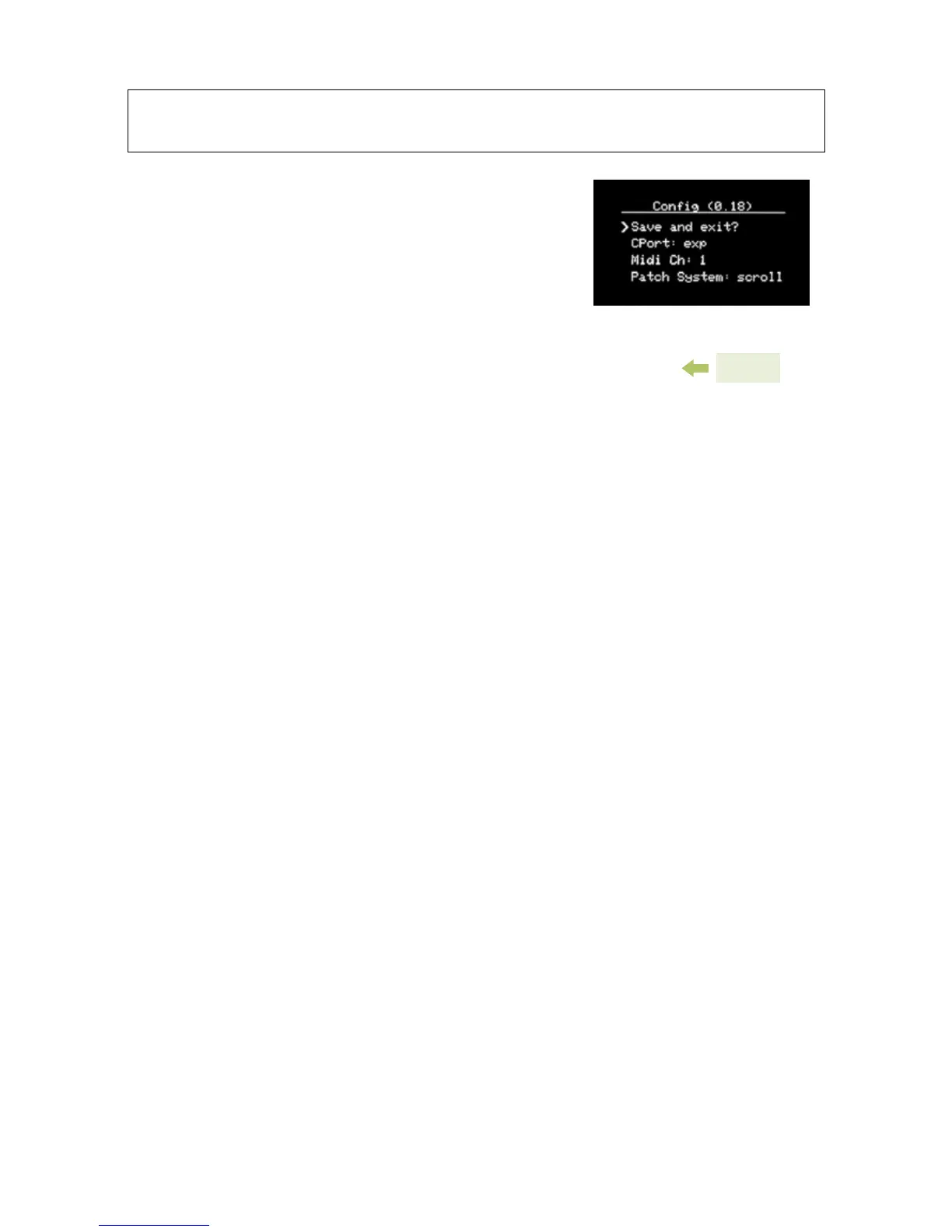
CONFIG MENU
The Cong Menu is the global options
menu for the ZOIA. Here, you have
access to options that are not specic
to modules, pages, or patches.
Save and exit?: Press this to save
any changes you have made and return. If you press back
instead, your changes will not be saved.
CPort: Use this to select how you’d like to use the control port.
You can connect an expression pedal, a control voltage from 0
to 5 volts, MIDI in and out, or an external switch. See MIDI,
page 27 and Control Port, page 29 for more info.
Midi Ch: Select which MIDI channel ZOIA will respond to
when sending Program Changes, from 1-16. See MIDI,
page 27 and Control Port, page 29 for more info.
Patch System: Select whether you’d like to use Scroll mode
or Bank mode for recalling patches with the stompswitches.
See Stompswitches, page 11.
Num Patches: This sets the number of patches you can scroll
through using the stompswitches (in Scroll mode). The ZOIA can
save up to 64 patches (numbered 0-63), though if you don’t wish
to scroll through a bunch of empty patches, you can bring the
Num Patches value down. Remember, you can still select these
patches using the Patch List.
Num Banks: Select how many banks to cycle through when
using bank mode. Use up to 21 banks, from which you can
select 3 patches per bank.
25


 To Next Page