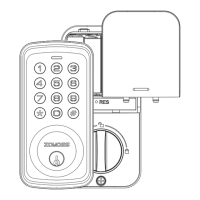
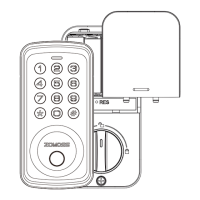
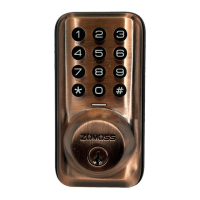
The Zomoss ZS01 is a smart deadbolt lock designed for residential use, offering multiple methods for securing and accessing your door. It combines traditional mechanical locking with modern electronic features, providing enhanced convenience and security.
Function Description
The primary function of the Zomoss ZS01 is to secure a door, preventing unauthorized entry, and to allow authorized users to unlock it. It operates as a deadbolt, providing a robust locking mechanism. The lock supports both electronic and mechanical operation.
Electronically, the ZS01 can be unlocked from the outside using a Master Code or User Codes entered on a keypad. The Master Code is a crucial element, serving for both programming the lock and unlocking it. User Codes are for daily access by authorized individuals. The lock also features an "Auto Re-lock Mode," which automatically extends the bolt 30 seconds after unlocking, enhancing security by ensuring the door is always locked. This auto-lock function is off by default but can be enabled and its delay time adjusted. For quick and temporary access, a "One-Time Code" can be generated, which is automatically deleted after a single use.
Mechanically, the ZS01 can be unlocked from the outside using a physical backup key. This is particularly useful in situations where batteries are completely dead or if no valid User Code is known. From the inside, the lock is operated by a thumbturn, which can be rotated to either the "Unlock" or "Lock" position.
The ZS01 also incorporates several security and convenience features:
- Wrong Entry Limit: After 10 unsuccessful attempts to enter a valid PIN code, the unit will shut down for 3 minutes, deterring brute-force attempts.
- Unlock with Fake Code: This feature allows users to enter random digits before or after their actual PIN code, preventing code exposure to onlookers.
- Silent Mode: The lock can be set to silent mode, muting the beep sounds when pressing the keypad. However, low battery and system alerts will still be audible.
- Vacation Mode: This security feature restricts all user codes until the master code is entered on the keypad. If the lock is unlocked by the thumbturn while in vacation mode, an alarm will sound, alerting the homeowner to potential unauthorized internal access.
Usage Features
Installation of the Zomoss ZS01 involves preparing the door by checking dimensions for the hole in the door face (2-1/8" or 54 mm), backset (2-3/8" or 2-3/4" or 60 or 70 mm), and door edge hole (1" or 25 mm), as well as door thickness (1-3/8" to 2" or 35 to 50 mm). The latch is then installed, ensuring it is flush with the door edge and properly centered. The strike plate is installed on the door frame, with a minimum 1" (25 mm) deep hole. A powered screwdriver is not recommended for installation to avoid overtightening.
The exterior assembly is installed with the latch fully retracted (unlocked position), routing the cable below the latch and inserting the cylinder tailpiece through the horizontal slot. The cable is then sent through the mounting plate, which is secured with screws, ensuring it remains parallel to the door edge.
For the interior assembly, the battery cover is removed, the cable connector is firmly inserted into its socket, and the thumbturn is rotated to a vertical position, ensuring the latch remains fully retracted. The interior assembly is then secured with screws.
After physical installation, a critical "Reset" step is required to teach the lock the orientation of the door. This involves loading three AA batteries (new, non-rechargeable Alkaline batteries are recommended) while the door is open and unlocked, then pressing and holding the Reset button while inserting the fourth battery. The button should be held until the latch bolt automatically extends. This process also serves as a factory reset, deleting all user codes and restoring default settings.
Programming the lock involves using the Master Code. The default Master Code (12345678) must be changed before any other programming. User Codes (4-10 digits) can be added, with up to 20 user codes stored. User Codes can also be deleted. The lock's settings, such as Silent Mode, Auto Lock, and Auto Lock Time Delay, can be enabled or disabled and adjusted through specific keypad sequences using the Master Code.
Maintenance Features
The Zomoss ZS01 includes a "Battery Indicator" feature. If the lock emits 10 beeps and 10 red flashes after any key press or lock/unlock operation, it indicates that the batteries need replacement. It is recommended to replace all four AA alkaline batteries simultaneously with new ones, avoiding mixing old and new batteries. All settings are retained in memory even when batteries are removed.
For mechanical override, a backup key is provided. To unlock, the key is inserted into the cylinder, rotated 90° counterclockwise, and then rotated 90° back to remove. To lock, the key is inserted, rotated 180° clockwise, and then 180° back to remove. It is important to keep a copy of the backup key in a secure location outside the home.
Regular maintenance includes protecting user codes and the Master Code, restricting access to the lock's interior assembly, and routinely checking settings to ensure they haven't been altered. Proper cleaning and maintenance are essential for continued functionality. Users should avoid applying cleaner or detergent directly to any part of the lock.
The Zomoss ZS01 has an IP54 water-resistance rating, meaning it can withstand water splashes but is not waterproof. It should not be exposed to direct sunlight for extended periods, as this may damage the lock. The operating temperature range for the Zomoss is between -4°F to 131°F.
Troubleshooting guidance is provided for common issues such as the latch not extending during reset, the motor not turning, electronic lock/unlock failures, thumbturn rotation problems, keypad unresponsiveness, rapid battery drain, and issues with the latch cycling multiple times. Solutions often involve re-installing components, checking cable connections, replacing batteries, adjusting alignment, or performing a factory reset.


 To Next Page
 General