8
SYSTEM OPERATIONS
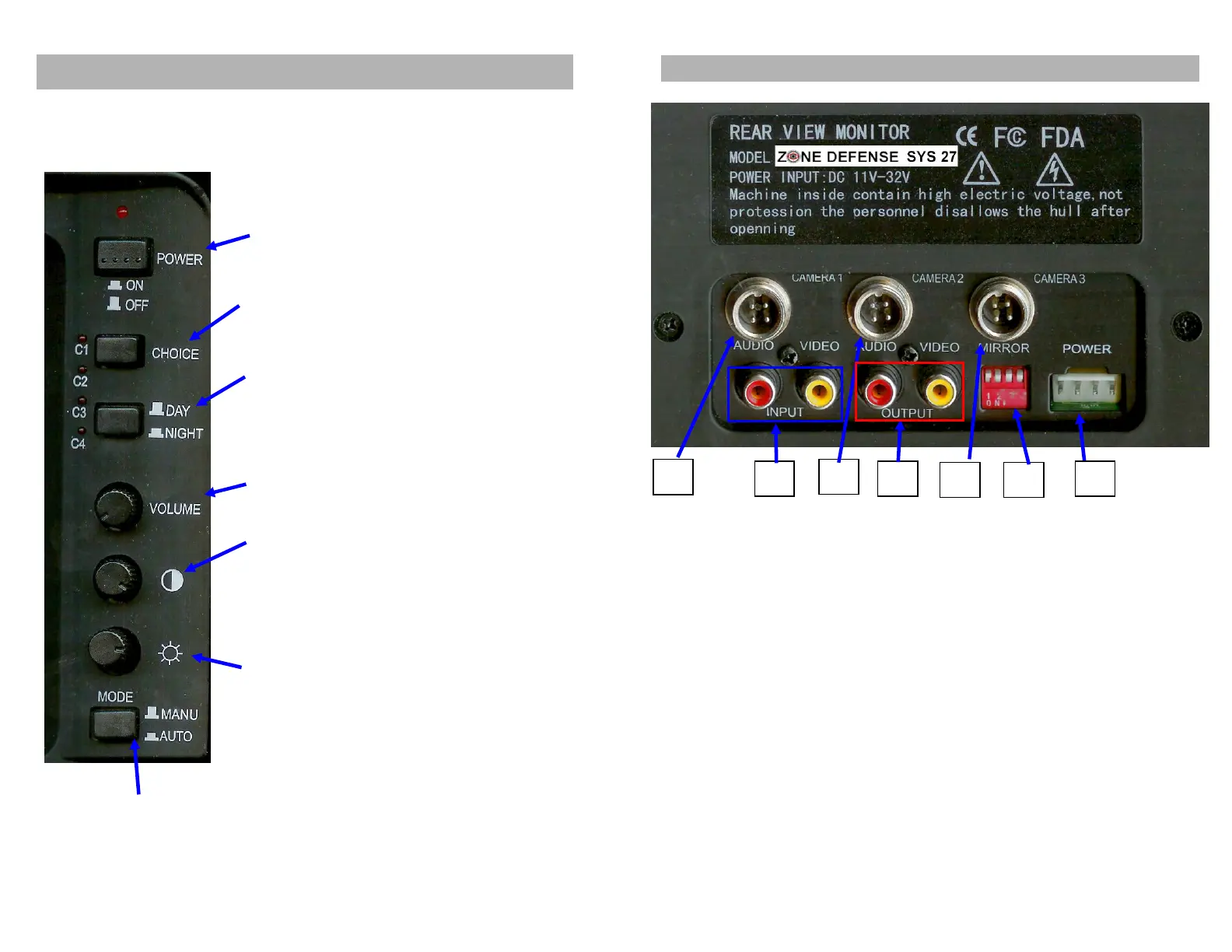
Control Panel Display
1. ON/Off Power button
2. Camera 1 - 4 selection switch
3. Day/Night button: adjust
brightness level with push of
button.
4. Volume
5. CONT. (Contrast) button:
enhance contrast with
clockwise rotation, to reduce
use counterclockwise
rotation.
6. BRIT. (Brightness) button:
Enhance brightness with
clockwise rotation, to reduce
use counterclockwise
rotation.
7. Mode: auto position turns system on when power
is activated. Manual mode requires the On/Off
switch to activate.
9
CONNECTION OPERATIONS
1. Camera 1 input
2. Audio / Video Input
3. Camera 2 input
4. Audio / Video Output
External Speaker Jack
5. Camera 3 input
6. C1-C4 Normal / Mirror image switch
(Up is mirrored / down is normal)
7. Power Plug
Power cable connections:
1. Red to 12V DC power input
2. Orange to reversing, automatically powers camera 1
(to backup light wire, turns on camera one when energized)
3. White to headlight switch, for auto dimming
4. Black to ground (GND)
System 27 can be linked to 4 channels of cameras as well as 1 channel of
video/audio output, which can be connected to a video recorder device for
recording images.



 To Next Page