ZOOM A2.1u
12
NOTE
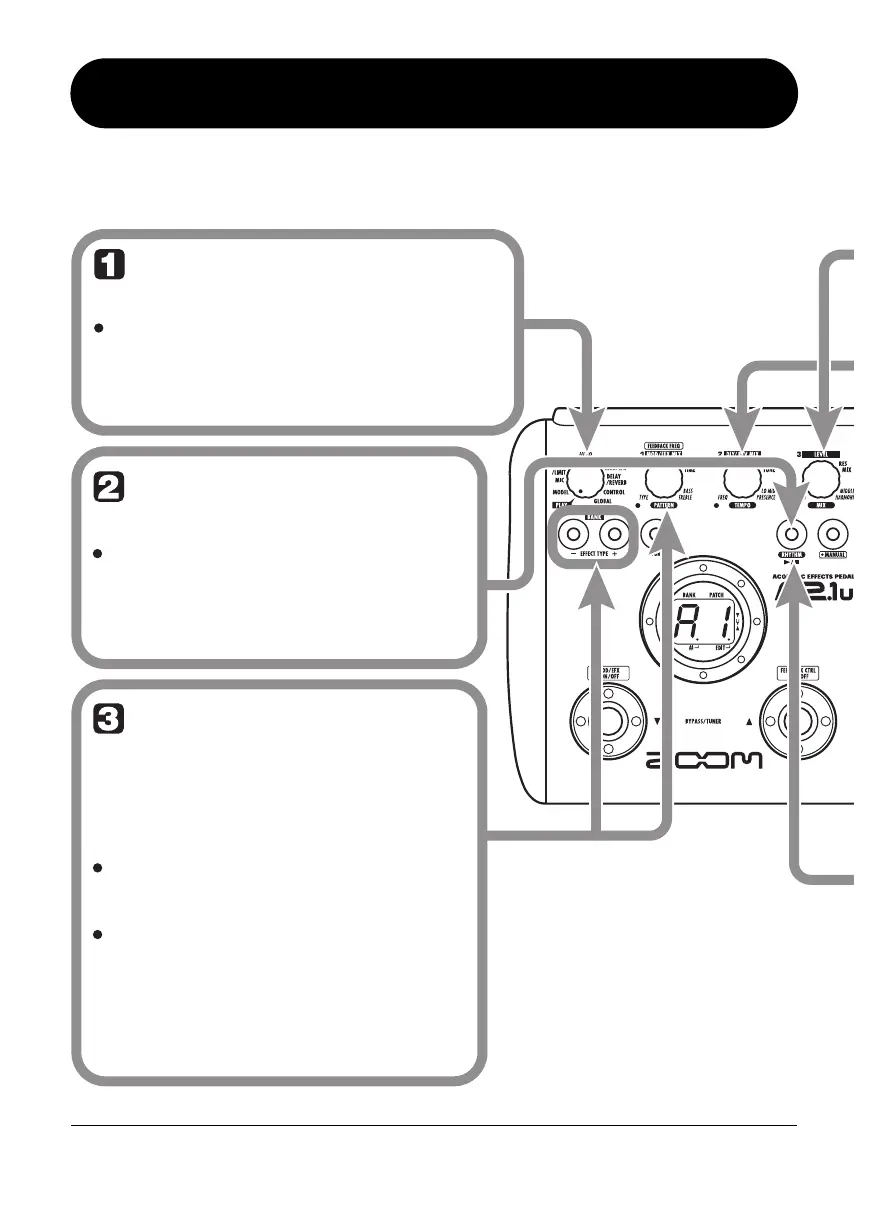
Set the A2.1u to play
mode (or manual mode)
If the Module selector is set to a position
other than "PLAY", set it to "PLAY".
Start the rhythm
function
Select a rhythm
pattern
To start the rhythm function, press
the RHYTHM [R/P] key.
To continuously switch rhythm
patterns, turn parameter knob 1.
To select the next higher or next
lower rhythm pattern, press one of
the BANK [-]/[+] keys.
While the rhythm is playing, the
DELAY/REVERB module is set to off.
The A2.1u has 40 built-in rhythm patterns.
For more information on the pattern contents,
see the back cover of this manual.
When the above steps are carried out, the
current rhythm pattern number (01 – 40) is
briefly shown on the display.
HINT
The rhythm function can be used both in
play mode and manual mode.
Using the Rhythm Function
The A2.1u has a built-in rhythm function that plays realistic drum sounds in various patterns. The rhythm
function is available in play mode or in the bypass/mute condition.
eA21u.fm 12 ページ 2005年11月4日 金曜日 午後5時23分


 To Next Page