24
Changing Various Settings
Changing Various Settings
3
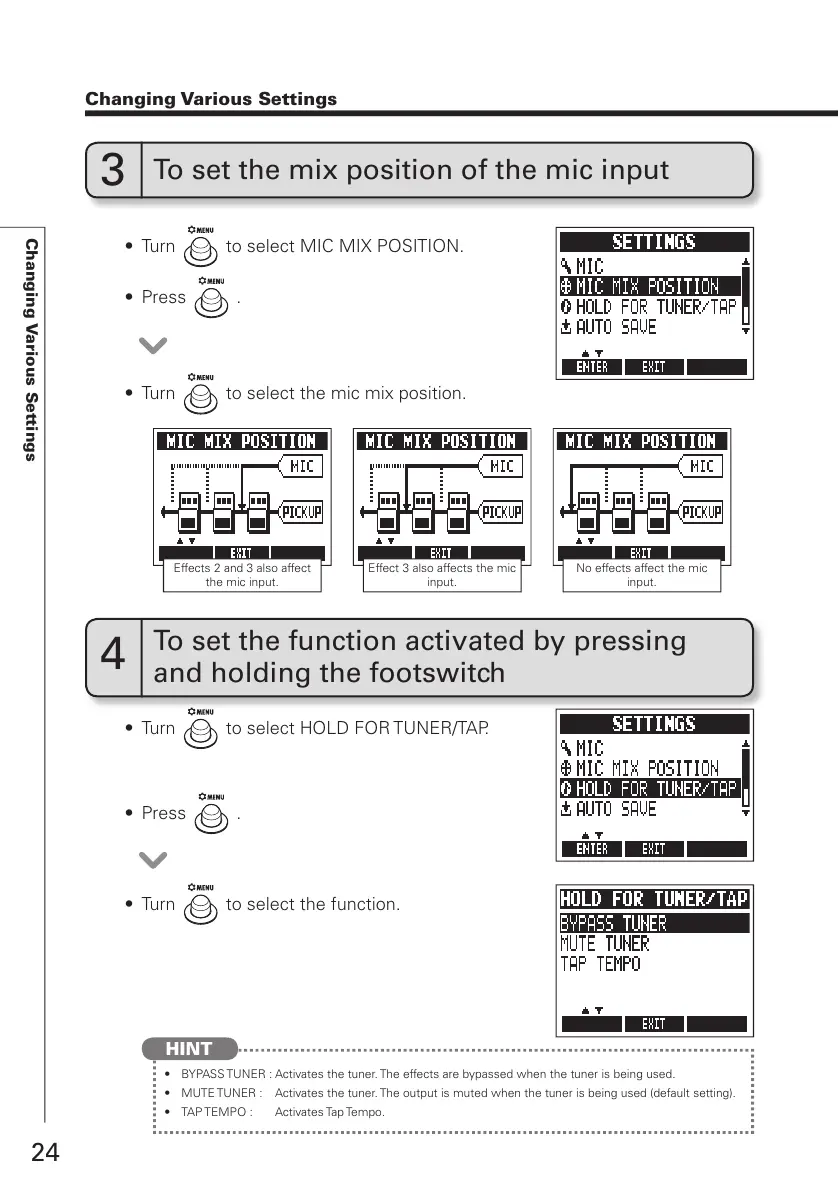
To set the mix position of the mic input
4
To set the function activated by pressing
and holding the footswitch
t 5VSO to select MIC MIX POSITION.
t 5VSO
to select HOLD FOR TUNER/TAP.
t 5VSO
to select the mic mix position.
t 5VSO
to select the function.
t 1SFTT
.
t 1SFTT
.
t #:1"4456/&3"DUJWBUFTUIFUVOFS5IFFGGFDUTBSFCZQBTTFEXIFOUIFUVOFSJTCFJOHVTFE
t .65&56/&3 "DUJWBUFTUIFUVOFS5IFPVUQVUJTNVUFEXIFOUIFUVOFSJTCFJOHVTFEEFGBVMUTFUUJOH
t 5"15&.10 "DUJWBUFT5BQ5FNQP
HINT
Effects 2 and 3 also affect
the mic input.
Effect 3 also affects the mic
input.
No effects affect the mic
input.



 To Next Page