32
About the Firmware
About the Firmware
Restoring the to its Factory Default Settings
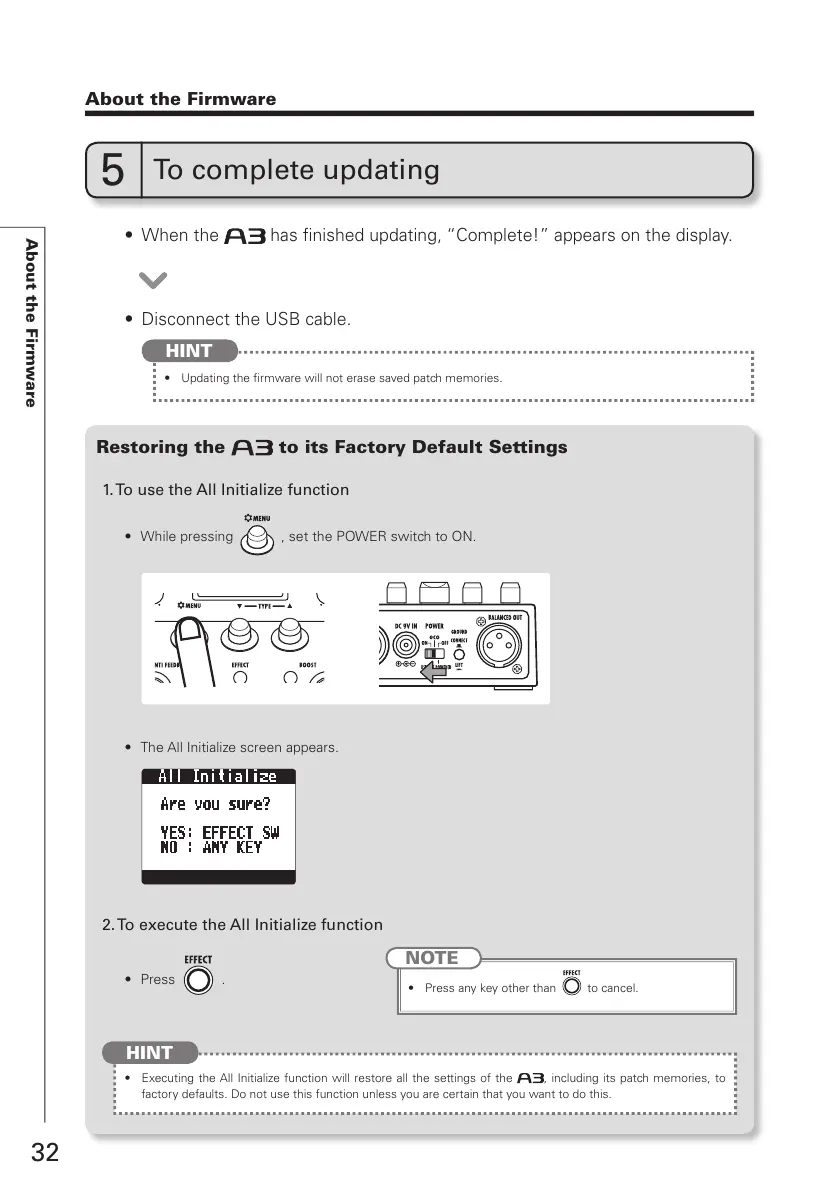
1. To use the All Initialize function
2. To execute the All Initialize function
t 8IJMFQSFTTJOH , set the POWER switch to ON.
t 5IF"MM*OJUJBMJ[FTDSFFOBQQFBST
t &YFDVUJOHUIF"MM*OJUJBMJ[FGVODUJPOXJMMSFTUPSFBMMUIFTFUUJOHTPG UIF , including its patch memories, to
factory defaults. Do not use this function unless you are certain that you want to do this.
HINT
t 1SFTT .
t 8IFOUIF has finished updating, “Complete!” appears on the display.
t %JTDPOOFDUUIF64#DBCMF
5
To complete updating
t 6QEBUJOHUIFmSNXBSFXJMMOPUFSBTFTBWFEQBUDINFNPSJFT
HINT
NOTE
t 1SFTTBOZLFZPUIFSUIBO to cancel.



 To Next Page