28
Using the Tuner
Using the Tuner
1
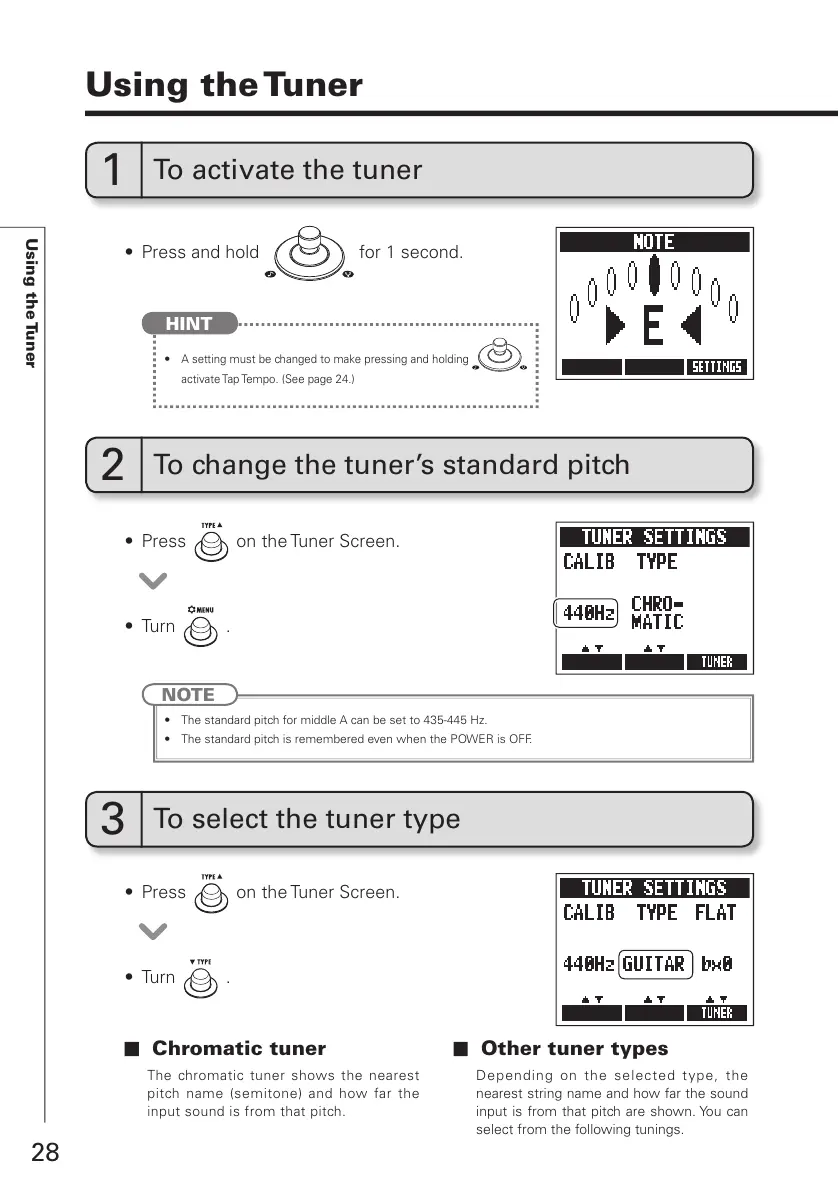
To activate the tuner
t 1SFTTBOEIPME for 1 second.
t
A setting must be changed to make pressing and holding
activate Tap Tempo. (See page 24.)
HINT
t 1SFTT
on the Tuner Screen.
t 1SFTT
on the Tuner Screen.
t 5VSO
.
t 5VSO
.
2
To change the tuner’s standard pitch
3
To select the tuner type
NOTE
t 5IFTUBOEBSEQJUDIGPSNJEEMF"DBOCFTFUUP)[
t 5IFTUBOEBSEQJUDIJTSFNFNCFSFEFWFOXIFOUIF108&3JT0''
Chromatic tuner
The chromatic tuner shows the nearest
pitch name (semitone) and how far the
input sound is from that pitch.
Other tuner types
Depending on the selected t ype, the
nearest string name and how far the sound
input is from that pitch are shown. You can
select from the following tunings.



 To Next Page