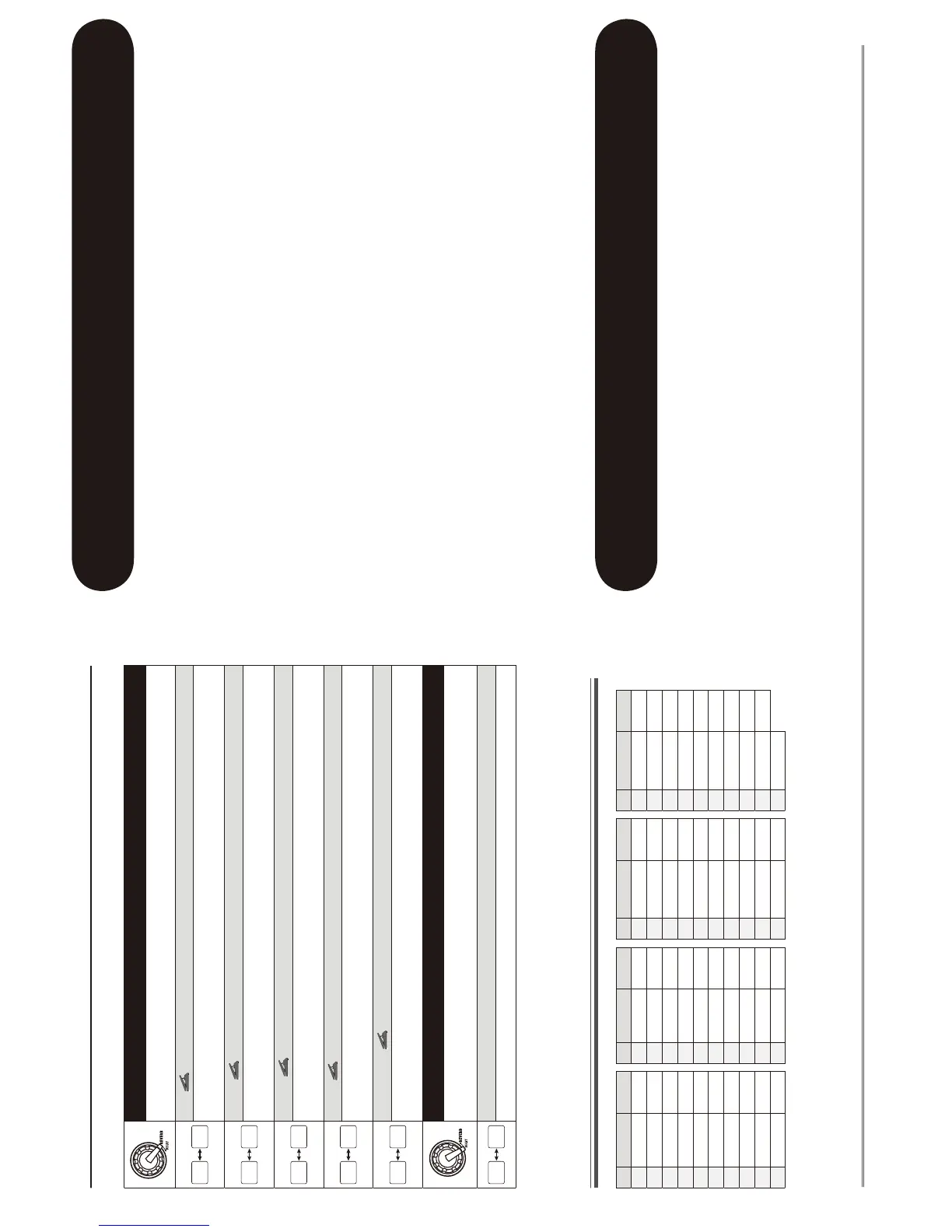
■ REVERB module
REVERB (Type&Prm1)
Selects the REVERB module effect type and controls parameter 1 at the same time.
Hall
This reverb effect simulates the acoustics of a concert hall. Higher right-digit settings increase the mixing
ratio of the effect sound.
**
Room
This reverb effect simulates the acoustics of a room. Higher right-digit settings increase the mixing ratio of
the effect sound.
++
Spring
This effect simulates a spring-type reverb. Higher right-digit settings increase the mixing ratio of the effect
sound.
Arena
This reverb effect simulates the acoustics of a large venue such as a sports arena. Higher right-digit settings
increase the mixing ratio of the effect sound.
,,
Tiled Room
This reverb effect simulates the acoustics of a tiled room. Higher right-digit settings increase the mixing ratio
of the effect sound.
DECAY (Prm2)
Controls parameter 2 of the REVERB module. This parameter is common to all effect
types.
Decay
Adjusts the decay duration.
Rhythm Function Preset Patterns
# Name TimSig # Name TimSig # Name TimSig # Name TimSig
1 8beat 1 4/4 11 METAL 2 4/4 21 POP 3 4/4 31 BALLAD 1 4/4
2 8beat 2 4/4 12 THRASH 4/4 22 DANCE 1 4/4 32 BALLAD 2 3/4
3 8beat 3 4/4 13 PUNK 4/4 23 DANCE 2 4/4 33 BLUES 1 4/4
4 8shuffle 4/4 14 DnB 4/4 24 DANCE 3 4/4 34 BLUES 2 3/4
5 16beat 1 4/4 15 FUNK 1 4/4 25 DANCE 4 4/4 35 JAZZ 1 4/4
6 16beat 2 4/4 16 FUNK 2 4/4 26 3per4 3/4 36 JAZZ 2 3/4
7 16shuffle 4/4 17 HIPHOP 4/4 27 6per8 3/4 37 METRO 3 3/4
8 ROCK 4/4 18 R'nR 4/4 28 5per4 1 5/4 38 METRO 4 4/4
9 HARD 4/4 19 POP 1 4/4 29 5per4 2 5/4 39 METRO 5 5/4
10 METAL 1 4/4 20 POP 2 4/4 30 LATIN 4/4 40 METRO
Troubleshooting
Specifications
• No power
Refer to "Turn power on" on page 8.
• Reverb effect does not operate
While a rhythm pattern is playing, the reverb
effect is not available. Stop the rhythm pattern
first (
g
p. 12).
• Patch switching does not change the
sound
Is the patch selection method of the G1N/G1XN
set to "pre-select" (
g
p. 18)? Turn power off and
then on again to return to normal operation.
• High level of noise
Is ZOOM AC adapter being used? Be sure to use
only an adapter for 9 V DC, 300 mA with center
minus plug (ZOOM AD-0006).
• Battery life is short
Are manganese batteries being used? Continuous
operation time is about 12 hours with alkaline
batteries.
Effect types 54
Effect modules max. 8 simultaneous modules
Patch memory User area: 10 patches x 4 banks = 40
Preset area: 10 patches x 4 banks = 40
Total 80 patches
Sampling frequency 96 kHz
A/D converter 24 bit, 128 times oversampling
D/A converter 24 bit, 128 times oversampling
Signal processing 32 bit
Frequency response 20 Hz - 40 kHz +1.0 dB -4.0 dB (10-kilohm load)
Display 2-digit 7-segment LED
Input Standard mono phone jack
Rated input level -20 dBm
Input impedance 470 kilohms
Output Standard stereo phone jack (doubles as line/headphone jack)
Maximum output level Line +3 dBm
(output load impedance of 10 kilohms or more)
Phones 20 mW + 20 mW (into 32-ohm load)
Control input For FP02/FP01 or FS01 (G1 only)
Power requirements
AC adapter 9 V DC, 300 mA (center minus plug) (ZOOM AD-0006)
Batteries G1N/G1XN Four IEC R6 (size AA) batteries, approx.
12 hours continuous operation (alkaline batteries)
Dimensions G1N 155 mm (D) x 136 mm (W) x 52 mm (H)
G1XN 155 mm (D) x 234 mm (W) x 52 mm (H)
Weight G1N 350 g (without batteries)
G1XN 600 g (without batteries)
Options Expression pedal FP01/FP02 or Foot switch FS01 (G1N only)


 To Next Page
 Loading...