37
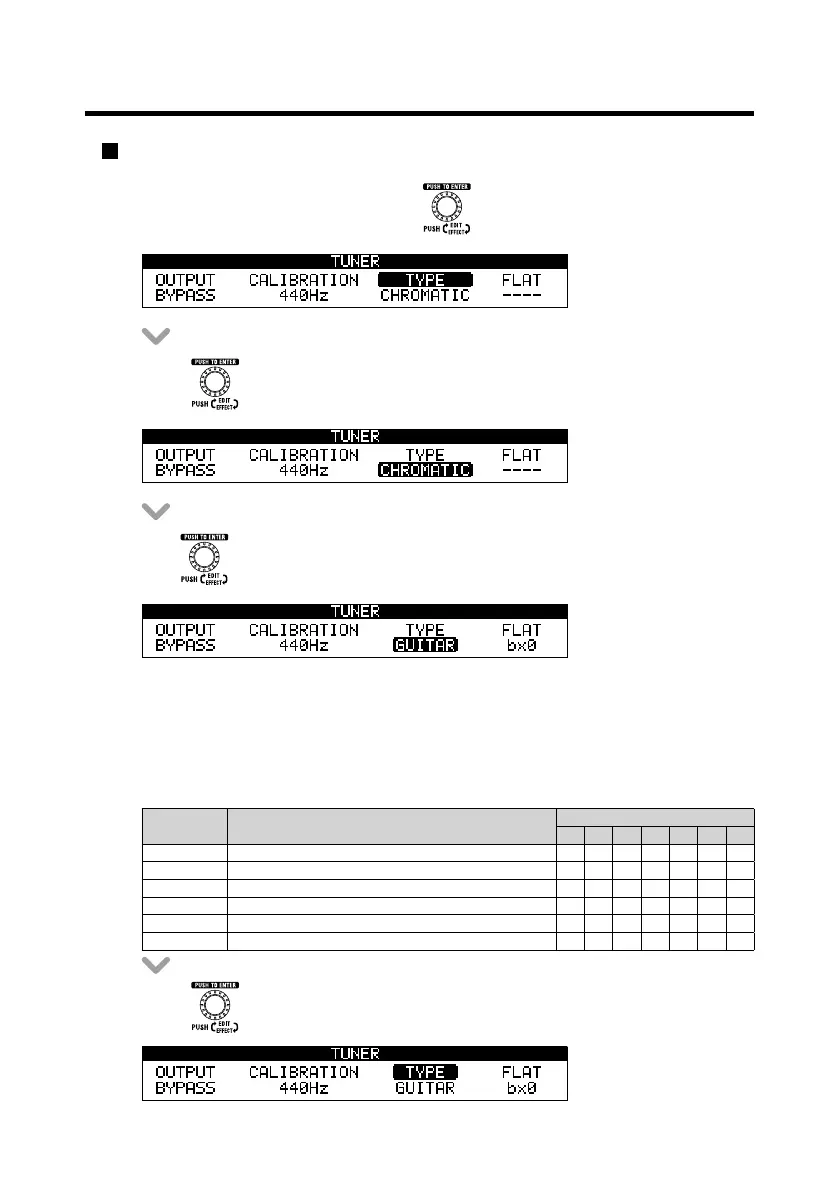
Changing the tuner type
t 0OUIF56/&3.&/6TDSFFOUVSO UPTFMFDU5:1&
t 1SFTT .
t 5VSO to select the tuner type.
CHROMATIC
The chromatic tuner shows the nearest pitch name (semitone) and how far the input sound
is from that pitch.
Other tuner types
Depending on the selected type, the nearest string name and how far the sound input is
from that pitch are shown. The following tuner types can be selected.
Display Meaning
String number/Note name
7 6 5 4 3 2 1
(6*5"3 Standard tuning for guitars, including 7-string guitars B & A D ( B &
01&/" In open A tuning, the open strings make an A chord - & A & A C# &
01&/% In open D tuning, the open strings make a D chord - D A D F# A D
01&/& *OPQFO&UVOJOHUIFPQFOTUSJOHTNBLFBO&DIPSE - & B & ( B &
01&/( *OPQFO(UVOJOHUIFPQFOTUSJOHTNBLFB(DIPSE - D ( D ( B D
%"%("% This alternate tuning is often used for tapping, etc. - D A D ( A D
t 1SFTT UPDPOmSNUIFUVOFSUZQF
Using the tuner



 To Next Page