Need help?
Do you have a question about the Zoom H2N and is the answer not in the manual?
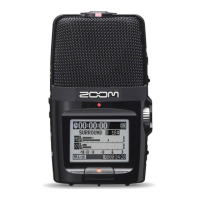
Identifies key external parts, ports, and controls of the H2N recorder.
Describes the procedure for turning the H2N device on and off using the power switch.
Explains how to access the menu, select the SD card option, and initiate formatting for optimal use.
Guides users on choosing a folder to organize and save recordings on the H2N.
Details how to select the desired audio file format (e.g., WAV48kHz/24bit) for recordings.
Explains the simple method of using the REC button to begin and end audio capture.
Describes MS stereo mode for capturing sound from left and right.
Details XY stereo mode for natural, accurate sound capture.
Covers 2ch and 4ch surround recording options and adjustments.
Guides users on navigating through and playing back recorded audio files.
Identifies level information on the display and optimal recording ranges (-18 to -6 dB).
Explains how to use volume buttons for playback audio control.
Details using the mic gain wheel to set recording sensitivity and prevent distortion.
Describes how to eject the SD card and transfer audio files to a computer.
 General
| MP3 bit rates | 48 - 320 Kbit/s |
|---|---|
| Recording modes | Pulse-code modulation (PCM) |
| Built-in microphone | Yes |
| Maximum recording time | - h |
| Audio formats supported | MP3, PCM, WAV |
| Display type | LCD |
| Display resolution | 128 x 64 pixels |
| Output power | 400 mW |
| Number of built-in speakers | 1 |
| Interface | USB |
| USB connector type | Mini-USB B |
| FM radio | - |
| Media types supported | Flash card |
| Battery life (max) | 20 h |
| Compatible battery sizes | AA |
| Number of batteries supported | 2 |
| Product color | Black |
| Microphone input impedance | 2000 Ω |
 Weight and Dimensions
| Depth | 113.8 mm |
|---|---|
| Width | 67.6 mm |
| Height | 42.7 mm |
| Weight | 130 g |

 To Next Page