Need help?
Do you have a question about the Zoom iQ6 and is the answer not in the manual?
Highlights warnings and cautions to prevent injury or equipment damage. Essential safety information.
Guidelines for handling the device to prevent damage or malfunction. Includes dropping and foreign objects.
Conditions to avoid for optimal performance and safety, such as temperature, humidity, and vibrations.
Information on electromagnetic interference and how to mitigate it for reliable operation.
Instructions on how to clean the device safely and effectively, specifying suitable materials.
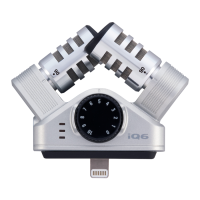
Instructions on how to adjust the recording angle of the X/Y stereo microphone to 90° or 120°.
Guidance on using the MIC GAIN knob to manually set the recording level for optimal input.
 General
| Type | Mobile phone/smartphone microphone |
|---|---|
| Bit rate | 16 bit |
| Sample rate | 48 kHz |
| Microphone sensitivity | 130 dB |
| Device interface | - |
| Connectivity technology | Wired |
| Product color | Silver |
| Compatible products | iPhone (5, 5s, 5c, 6, 6 Plus), iPod touch, iPad Air, iPad mini |
 Weight and Dimensions
| Depth | 30.6 mm |
|---|---|
| Width | 61.1 mm |
| Height | 53.1 mm |
| Microphone weight | 30.5 g |

 To Next Page