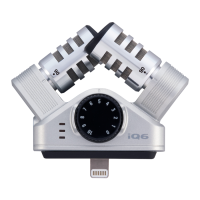
Check the level indicator, and adjust the recording level so that the middle LED lights
HINT
If the input level is too high and causes distortion (−0.25 dB or higher), the red LED will light. If
this occurs, use the MIC GAIN knob to reduce the recording level.
For recording and playback procedures, see the instructions for the app that you are using.
NOTE
No sound is output from the connected device speakers when the is connected. If you
want to listen to audio using the speakers, disconnect the from the device when you are
done recording.
Connect the and the iOS device completely. Incomplete connection could cause
malfunction or damage.
When you are not using the , disconnect it from the iOS device and put it away. If you use
the iOS device while the is still connected, damage could occur if excessive force is
applied to the connector.
If the connected device sends or receives data wirelessly while recording with the , noise could
occur in the recording. Using the phone function of the iPhone will also cause recording to stop. When
using the , put the connected device into Airplane Mode.
ZOOM iQ6 Operation Manual – Download
Related Manuals:
1. zoom H6 Handy Recorder Operation Manual zoom H6 Handy Recorder Operation Manual – Download...
2. zoom H6 Handy Recorder Operation Manual zoom H6 Handy Recorder Operation Manual – Download...
3. zoom F6 MultiTrack Field Recorder Operation Manual zoom F6 MultiTrack Field Recorder Operation
Manual – Download [optimized]zoom...
4. Zoom H8 Handy Recorder User Manual Zoom H8 Handy Recorder User Manual – Download...
5. Zoom Cable Modem/Router 5363 User Manual MODEL 5363 QUICK START This Quick Start describes
how to...
6. Zoom-5370 DOCSIS 3.0 16×4 Cable Modem User Manual Zoom-5370 DOCSIS 3.0 16×4 Cable
Modem User Manual – Optimized...


 To Previous Page