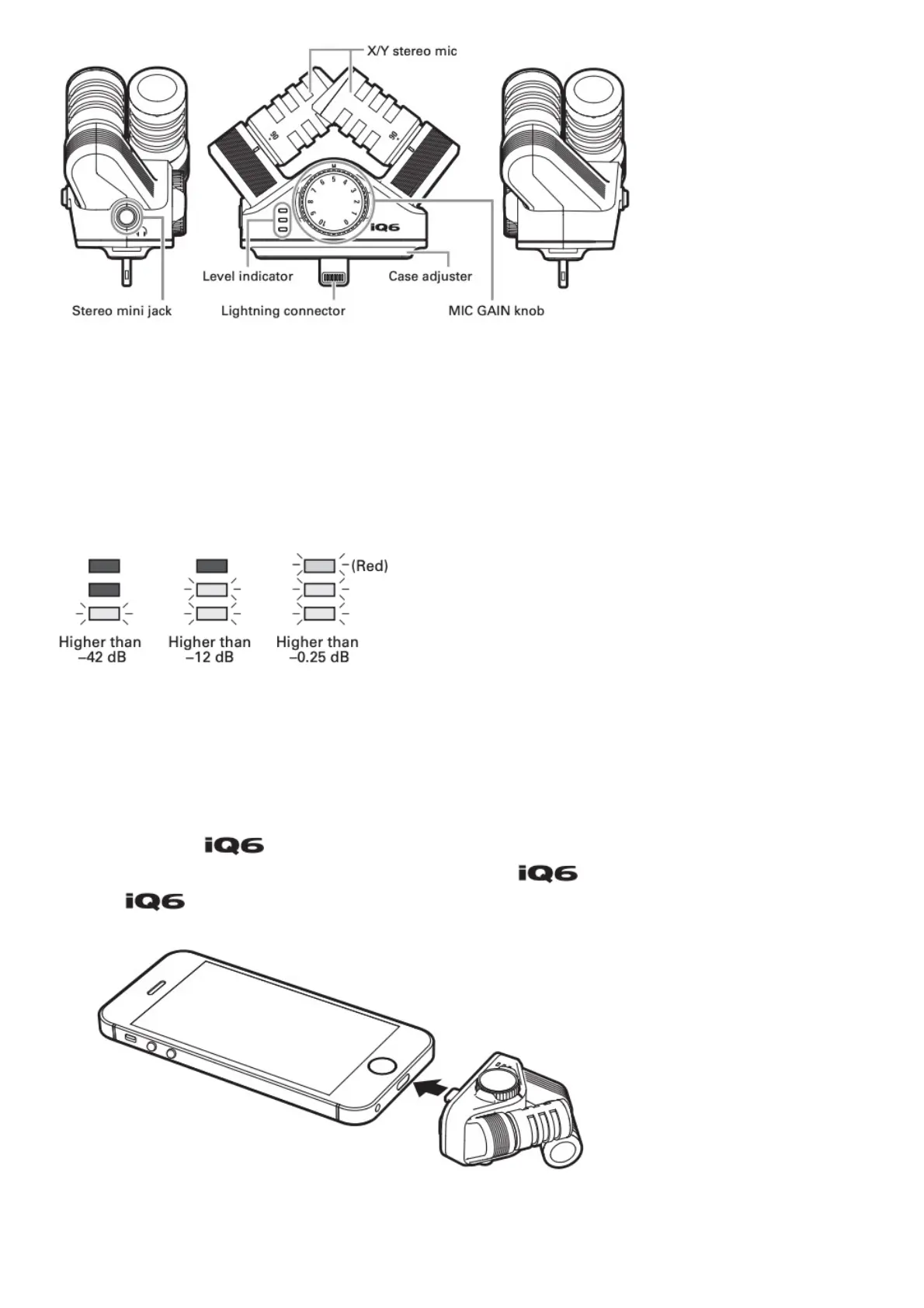
X/Y stereo mic: This is an X/Y format stereo mic. You can set the recording angle to 90° or 120° by
turning the individual mics. (See “Adjusting the stereo width.”)
Stereo mini jack: Connect headphones to monitor recording and playback. This can also be used as
a line output jack.
MIC GAIN knob: Use to adjust the recording level manually. (See “Adjusting the recording level.”)
Level indicator: The red LED lights dimly when connection with the device is normal. The LEDs also
light according to the level of the input signal.
Lightning connector: Connect to the Lightning connector of the iOS device.
Case adjuster: Remove this if the case of the device prevents the Lightning connector from
connecting completely.
Connecting with the Device
1. Connect the to the device with the lighting connector.
When the connected device is providing power to the , the red LED lights dimly.
The becomes ready for use when Handy Recorder or another app that can use it is
started.


 To Next Page