2
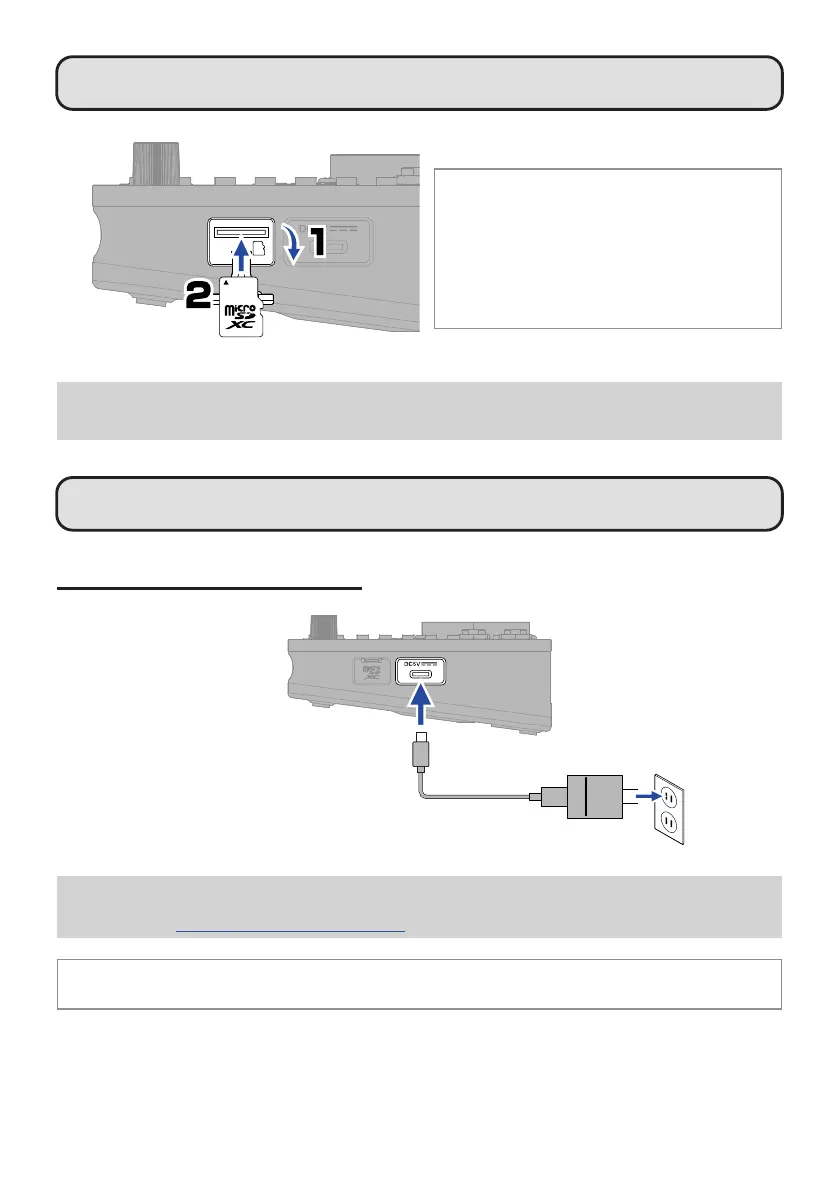
Inserting microSD cards
Supported recording media:
microSDHC memory cards
microSDXC memory cards
We recommend using microSD cards that have been
conrmed to operate with this recorder.
See the ZOOM website (zoomcorp.com/help/l6) for
information about microSD cards that have been
conrmed to work with this unit.
• Always turn the power off before inserting or removing a microSD card.
• To remove a microSD card, push it further into the slot and then pull it out.
Be careful not to let the microSD card y out.
Turning the power on
Connecting an AC adapter
AC adapter
(ZOOM AD-17)
The power will automatically turn off if the L6 is unused for 10 hours.
If you want to keep the power on always, use the L6 Editor app to turn off the automatic power saving (Auto Power
Off) function. (
→
“L6 Editor application for computers”)
A portable battery or 4 AA batteries (alkaline, lithium or rechargeable NiMH) can also be used.


 To Next Page