11
ZOOM UIB-01
Preparations
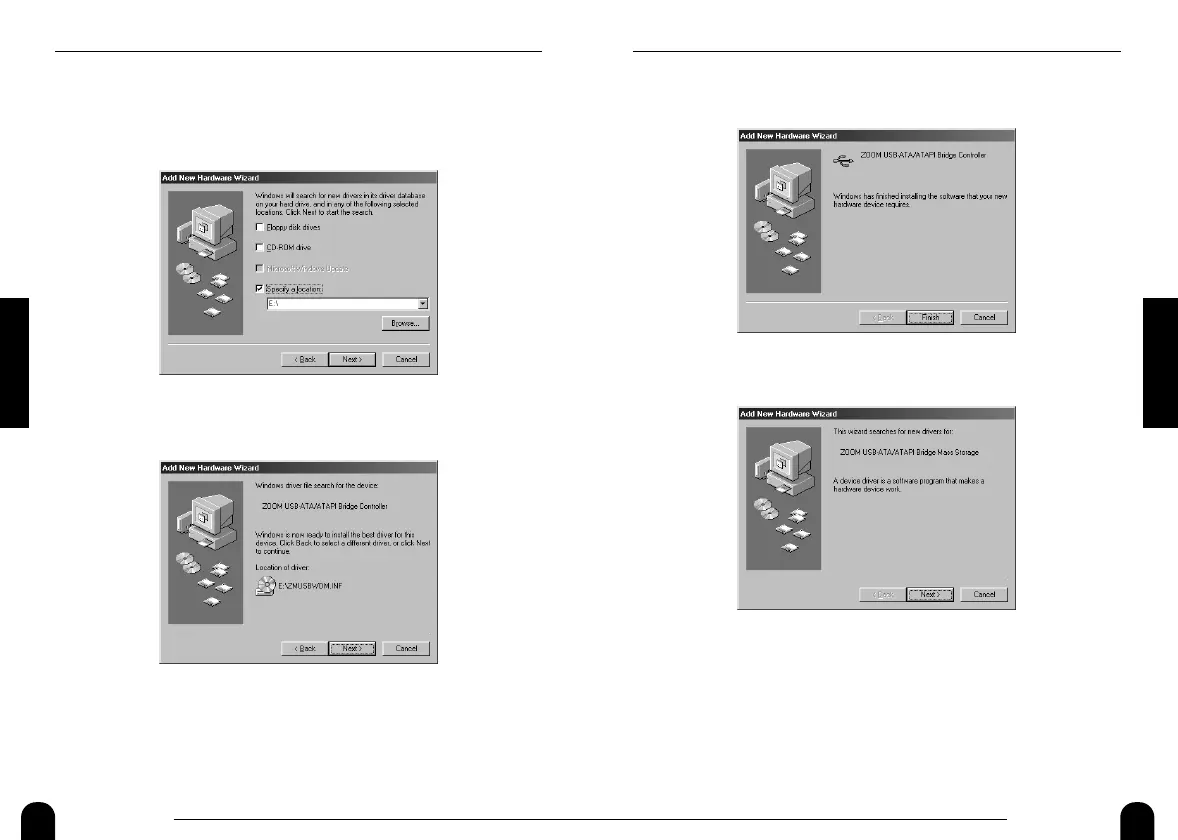
5.
After a while, the following screen will be shown. Click on
the [Finish] button.
6.
After a while, the following screen will be shown. Click on
the [Next] button.
7.
Place a check mark in "Search for the best driver..." on the
next screen, and click on the [Next] button (same as step 2).
8.
Place a check mark in "Specify a location " on the next
screen, enter "[CD-ROM drive letter]:\", and click on the
[Next] button (same as step 3).
10
ZOOM UIB-01
Preparations
3.
Place a check mark in "Specify a location " on the next
screen, enter "[CD-ROM drive letter]:\", and click on the
[Next] button.
The following example uses the drive letter "E".
4.
Verify that the following indication is shown, and click on
the [Next] button.


 To Next Page