6
corrections to be made in each axis. However this is not the recommend procedure to track an
object. The mount should be placed in station i.e. aligned in such a way that only the R.A. is required
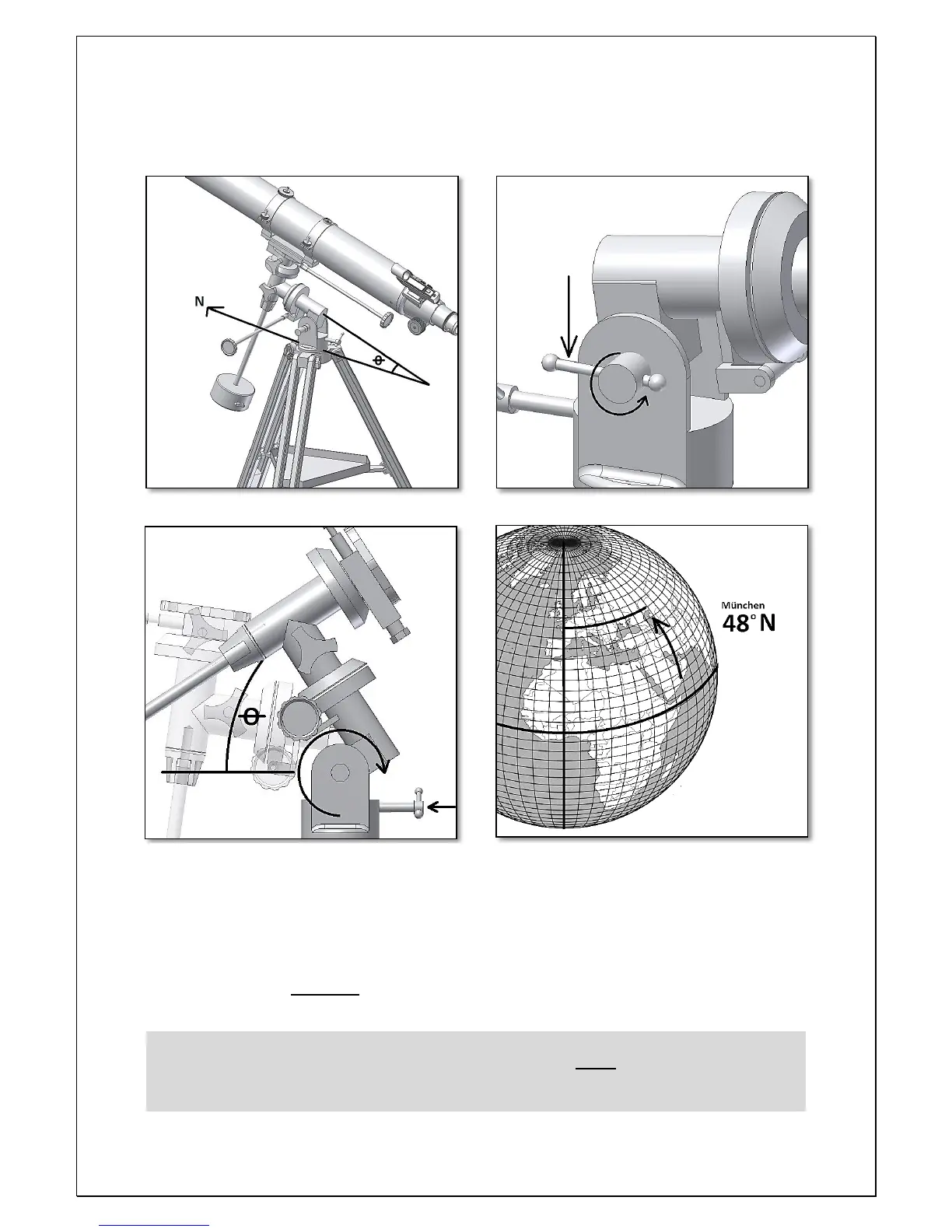
to turn to track a Star. 4.2. How to set the mount in station. Point the telescope’s R.A. axis to
north – fig. 18. Release the altitude break - fig. 19- so that the R.A. inclination can be adjusted.
Rotate the latitude adjustment so that the inclination of the mount is the same as the latitude of
observers. For an observer in Munich the latitude is 48 degrees. The inclination angle (Ɵ) should be
approximately 48 degrees. Make sure to re-tighten the altitude break. Now that the mount is
pointing north and has the observer’s location latitude your mount is set on station. This mean that
the mount and tripod should not be moved during observation. The two R.A. and Dec. axis can be
used to position and point the telescope to any part of the sky. Use the handles and clutches for this.
The altitude/latitude adjustment should NOT be used when
observing. Continuous use can cause wear or even break the knob.



 To Next Page