3
Hardware Overview
Front View
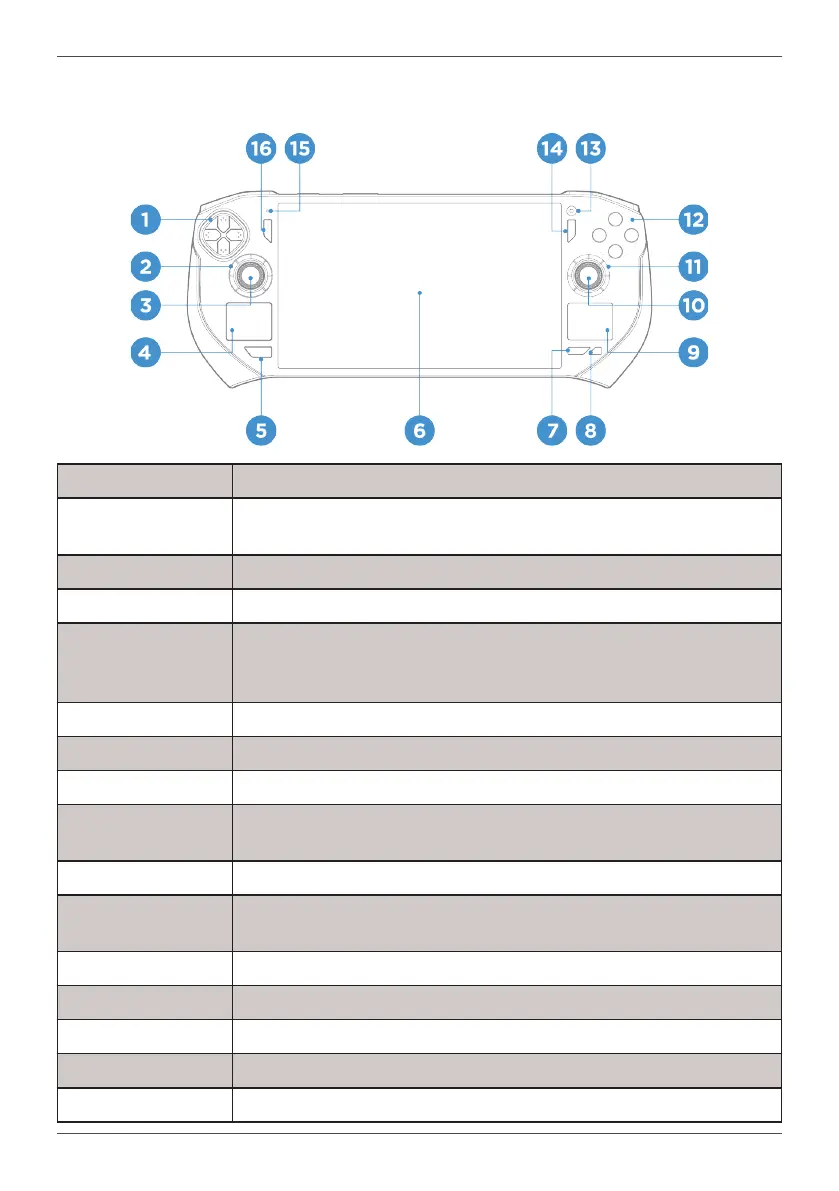
1. Direction Pad Up, down, left, right buttons primarily used to interact with games
2. Left Radial Dial
Twist left or right to quickly adjust system settings. Congurable in ONE
Launcher App
3. Left Thumbstick Joystick primarily used to interact with games
4. Left Trackpad Scroll
5. ZONE Button
Summon ONE Launcher. Hold down for 1 second or more and release
to use this button as a standard guide button (sometimes called the XBOX
button) on most controllers
6. Multi-Touch Display A 7 inch Full HD AMOLED Display with up to 10-point touch capability
7. MORE Button This button summons the Quick Menu of the ONE Launcher.
8. HOME Button Pressing it quickly toggles the desktop.
9. Right Trackpad
Mouse Cursor; Left and right mouse click for respective halves of the touch
pad
10. Right Thumbstick Joystick primarily used to interact with games
11. Right Radial Dial
Twist left or right to quickly adjust system settings. Congurable in One
Launcher App
12. A/B/X/Y Buttons Face buttons primarily used to interact with games
13. Camera 1 MP webcam
14. Option Button Corresponds to “Menu” Button on most controllers
15. Microphone For Voice Input
16. View Button Corresponds to “View” Button on most controllers



 To Next Page