5
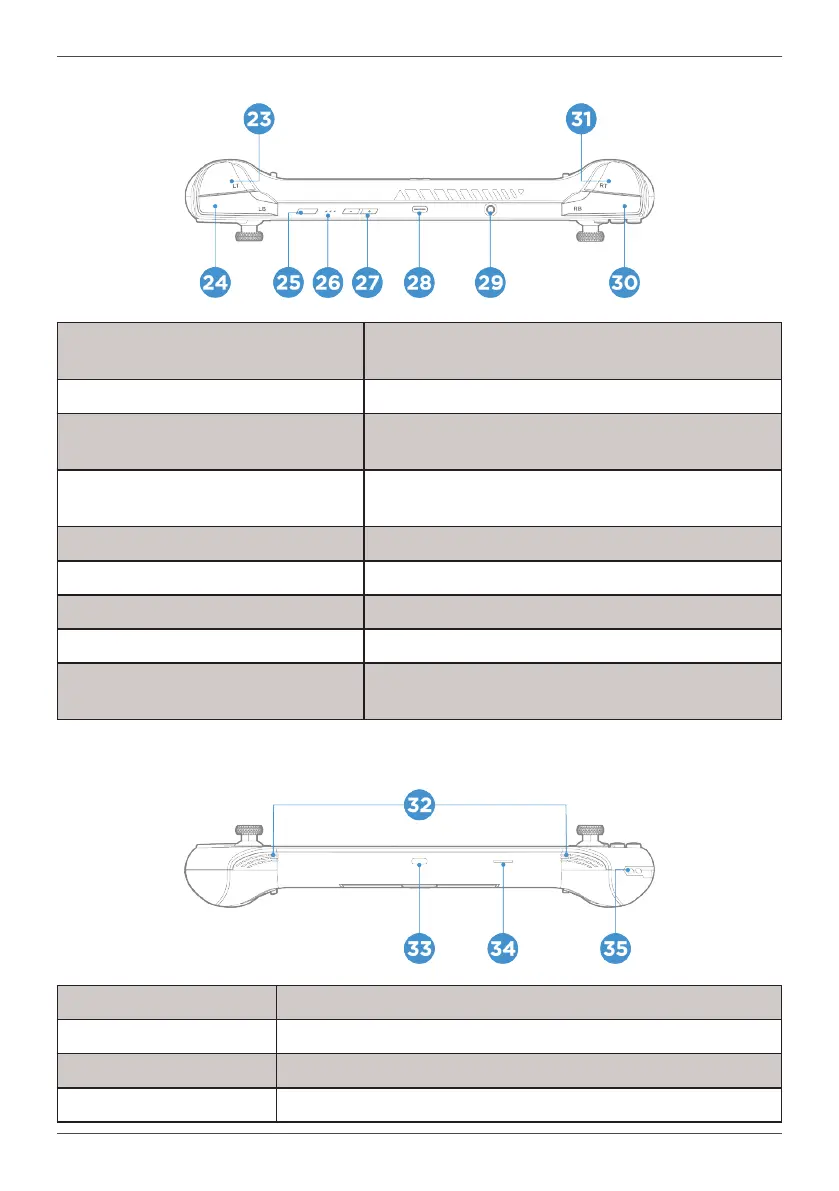
Top View
23. Left Trigger
Analog input primarily used to interact with games. Travel
Distance can be toggled.
24. Left Bumper Button primarily used to interact with games.
25. Power Button and Fingerprint Reader
Turns on or o the device. Supports Windows Hello
ngerprint login feature
26. Battery Level& Charging Indicator
Shows battery and charge status. Please refer to “Getting
Started” for Legend.
27. Volume Buttons Increase or decrease device volume
28. USB4 Connector For charging and data transfer
29. 3.5 Audio Jack Audio connection for headsets and speakers
30. Right Bumper Button primarily used to interact with games.
31. Right Trigger
Analog input primarily used to interact with games. Travel
Distance can be toggled.
Bottom View
32. Stereo Speakers
33. USB4 Connector For charging and data transfer
34. Micro SD Card Slot
35. Lanyard Mounting Point



 To Next Page