If you have any questions, please contact Affinity Cellular at 833-679-
1090 or by dialing 611 from your Affinity Cellular phone.
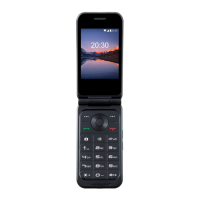
ZTE 233 VWS
Quick Guide Manual
Press and hold to turn Airplane mode on or off, restart, or to
power off. Press to end or cancel a call. Press to return to the
home screen
Left Soft Key/ Right
Soft Key
Press to select the options at the left/right corner of the bottom
of the display. The options change depending on the
application/function in use.
Press to see recently used applications
Press or hold to turn the volume up or down
Press to launch the camera from the home or apps screen, or
take a picture when the Camera app is already launched.
Press to place or answer a call. Press to launch the Recent
Calls app from the home screen to view recent calls.
Press to delete text or numbers before the cursor
Press up/down/left/right to access designated functions from
the home screen, navigate options on the display, or move the
cursor
Press to select a highlighted item on the screen or perform the
function at the bottom center of the display
From the home screen, press and hold to activate/deactivate
vibration mode. In a text-editing screen, press and hold to
change input mode.
Charging the Battery
1. Connect the adapter to the charging port. Ensure that the
adapter is inserted with the correct orientation.
NOTE: Do not force the connector into the charging
port.
2. Connect the charger to a standard AC wall outlet. If the
phone is on, you’ll see a charging icon, such as or ,
appear in the Status Bar.
3. Disconnect the charger when the battery is fully
charged.
Turning The Phone On / Off
Turn Phone On
♦ Press and hold the Power/End Key to turn
on your phone.
Turn Phone Off
♦ Press and hold the Power/End Key to open
the options menu.
♦ Select Power off> OK.
Making & Answering Calls
Placing a Call by Dialing
1. Press the Power/End Key, then enter the
phone number with the keypad. Press the Clear
Key to delete incorrect digits.
2. Press the Send Key to dial the number entered.
Ending a Call
During a call, press the Power/End Key.
Answering Calls
When you receive a phone call, press the Send
key to answer the call.
You can also press the Power/End key to reject
the call.
Ending Calls
During a call, press the Power/End key.

 Need help?
 General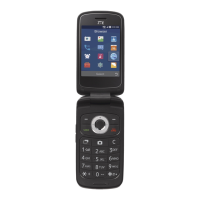

 To Next Page