
EasyManua.ls Logo

Zte WF720 - User Manual

Zte WF720
17 pages
Print Icon
To Next Page IconTo Next Page
Loading...
1
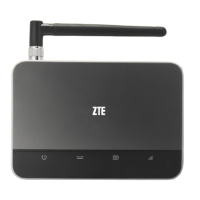
WF720
WCDMA/GSM Fixed Wireless Terminal
User Manual

Other manuals for Zte WF720

Questions and Answers

  • K
    keith68Aug 13, 2025
    What to do if Zte Touch terminals phone alerts after off-hook?
    • A
      amychavezAug 13, 2025
      If your Zte Touch terminal's phone alerts or makes prompt sounds after you pick it up, ensure that the SIM card is correctly inserted and valid. If problems persist, contact your network carrier to verify the SIM card status.
  • A
    Abigail OliverAug 16, 2025
    Why do I hear noise after off-hook on Zte Touch terminals?
    • R
      ronald59Aug 16, 2025
      If you're hearing noise after picking up the phone on your Zte Touch terminal, first ensure the device is at least 2.5 meters away from other electronic devices. If you are using the device without an antenna and the signal strength indicator is Yellow or Red, install the antenna.
  • V
    Victoria CollierAug 20, 2025
    How to fix no dialing tone on Zte Touch terminals after off-hook?
    • R
      racheljimenezAug 20, 2025
      If you don't hear a dialing tone after picking up the phone on your Zte Touch terminal, check the antenna connection and the connection between the device and the telephone.
  • V
    vthompsonAug 25, 2025
    What to do if Zte Touch terminals has no response when power on?
    • H
      Heather BoothAug 25, 2025
      If your Zte Touch terminal doesn't respond when you power it on, power off the device, wait a few seconds, and then power it back on.
  • T
    toddcookAug 28, 2025
    Why is my Zte Touch terminals phone buzzing after off-hook?
    • J
      Justin MillerAug 28, 2025
      If your phone is buzzing after you pick it up when connected to the Zte Touch terminal, the telephone may not be compatible with the device. Try using a different telephone.
  • A
    Aaron RoseAug 31, 2025
    Why is the incoming call display abnormal on Zte Touch terminals?
    • J
      Jennifer CurrySep 1, 2025
      If the incoming call display is abnormal on your Zte Touch terminal, ensure that the phone you are using supports the CLIP function (Calling Line Identification Presentation).
  • A
    Adam BeasleySep 4, 2025
    What to do if Zte Touch terminals stops dialing tone after 30 seconds?
    • D
      David AndersonSep 4, 2025
      If the system stops sending a dialing tone 30 seconds after you pick up the phone on your Zte Touch terminal, hang up and then pick up the phone again to make a call.
  • N
    Nancy GreeneSep 8, 2025
    What to do for other abnormal phenomenon with Zte Touch terminals?
    • G
      Guy RobertsonSep 8, 2025
      Refer to the User Manual firstly, and then check whether the parts, such as power supply adapter and antenna, etc. are connected properly or not. If there is no problem, restart the device.

Summary

Getting to Know Your Device

Appearance

Describes the physical layout and components of the WF720 device.

LED Indicator

Explains the meaning of different LED light states for signal, battery, and power.

Device Installation

Before You Begin

Provides initial guidance on device placement and network compatibility.

Installing the SIM Card and the Battery

Step-by-step instructions for installing the SIM card and battery.

Installing the Power Adapter

Instructions for connecting the power adapter to the device and wall outlet.

Connecting the Device to a Phone

Steps to connect a telephone to the WF720 device using phone ports.

Turning on Your Device

Procedure for powering on the device, indicated by signal strength light.

Checking the Wireless Signal

How to verify and ensure optimal wireless signal strength for the device.

Using Your Device

Making Calls

Instructions for initiating phone calls using the connected telephone.

Receiving Calls

How to answer incoming calls on the WF720 device.

Voice Mail

Steps to access and manage voicemail messages.

Call Waiting

Explanation of how to use the call waiting feature and manage multiple calls.

Call Forwarding

Instructions for activating and deactivating call forwarding to another number.

Deactivating Call Forwarding

Procedure to disable the call forwarding feature.

Calling Line Identification Restriction

How to restrict the display of your phone number when making calls.

3 - Way Calling

Steps to use the 3-Way Calling feature for conference calls.

Adjusting Volume

Method to adjust the call volume levels on the device.

PIN Lock

Troubleshooting

Specification

Safety Notes

IC Notice

Zte WF720 Specifications

General IconGeneral
BrandZTE
ModelWF720
CategoryTelephone Accessories
Wi-FiNo
SIM Card SlotYes
Power SupplyAC Adapter
Number of Handsets Supported1
Voice CodecFR, HR, EFR, AMR
PortsRJ11
DisplayLCD
BatteryLi-ion

Related product manuals
