EasyManua.ls Logo

Zte WF723CC - User Manual

Zte WF723CC
17 pages
Print Icon
To Next Page IconTo Next Page
Loading...
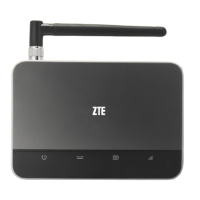
ZTE WIRELESS HOME PHONE BASE
USER GUIDE

Questions and Answers

  • R
    Richard WebbAug 5, 2025
    What to do if there is no dial tone on Zte WF723CC?
    • C
      Charles McintyreAug 5, 2025
      If you don't hear a dial tone on your Zte Telephone Accessories device, please wait for 1 to 2 minutes after turning it on. If the signal reception is poor, try moving to a location with better signal reception.
  • K
    Kelly MurphyAug 12, 2025
    What to do if there is a rapid engaged tone on Zte WF723CC Telephone Accessories?
    • T
      Tiffany HillAug 12, 2025
      If you experience a rapid engaged tone when picking up the phone on your Zte Telephone Accessories, place the phone back on the receiver and try again.
  • M
    Michael KruegerAug 19, 2025
    Why does my Zte WF723CC Telephone Accessories connection sound distorted?
    • B
      boyermichelleSep 12, 2025
      If the connection sounds distorted or noisy on your Zte Telephone Accessories, it could be due to a damaged cable or phone set, or interference from nearby electrical appliances. Try the following: * Remove any electrical appliances that are too close to the phone or device. * Try using a different cable or phone. If the problem persists, contact the dealer.
  • B
    burnslaurenAug 27, 2025
    What to do if there is no tone after dialing on Zte Telephone Accessories?
    • D
      dklineAug 27, 2025
      If there is no tone after dialing on your Zte Telephone Accessories, wait 4 to 8 seconds for the call to connect.

Summary

Getting Started

Getting To Know Your Device

Overview of the ZTE Wireless Home Phone Base, including front, top, and bottom views.

Device Back and Bottom Views

Illustrates and labels the ports and features on the back and bottom of the device.

Installing the Battery

Battery Installation Steps

Step-by-step instructions for safely inserting and securing the device's battery.

Installing the nano-SIM Card

nano-SIM Card Insertion

Procedure for inserting the nano-SIM card, including important warnings.

Charging the Battery

Battery Charging Procedure

Instructions on connecting the charger and when to disconnect it.

Status Indicators

Indicator Lights and Meanings

Explains the meaning of different indicator lights on the device.

Device Installation

Optimal Placement for Signal

Guidance on placing the device for strong signal reception.

Using Your Device

Powering Your Device On and Off

Instructions on how to use the power switch to turn the device on and off.

Connecting to a Phone

Details on connecting a phone to the device's phone ports.

Making and Receiving Phone Calls

Steps for dialing, answering, and ending phone calls.

Adjusting Call Volume

How to adjust call volume using the device or connected phone.

Managing Your Voicemail

Instructions for checking and configuring voicemail messages and options.

Setting Up Conference Calls

Steps to conduct a conference call with multiple parties.

Using Call Waiting

How to handle incoming calls while already on a call.

Forwarding Incoming Calls

Instructions for forwarding calls to another number based on different conditions.

TTY Mode

Details on using the device with TTY devices for hearing or speech impaired users.

PIN Lock and PUK Lock

Information on managing SIM card lock status and recovery.

Specifications

Device Specifications

Technical details including model name, dimensions, weight, frequency, and supported bands.

Battery Specifications

Details on battery type, capacity, and talk/standby times.

Troubleshooting

Common Symptoms and Solutions

Addresses common issues like no dial tone, distorted audio, or connection problems.

Regulatory and Safety Information

Safety Precautions

Important safety guidelines for using the device and avoiding hazards.

FCC Compliance

Information regarding compliance with FCC rules for radio frequency emissions.

RF Exposure

Guidelines on maintaining safe distance from antennas to comply with exposure limits.

CTIA Requirements

Requirements and safety information related to battery usage and charging.

Warranty

Product Warranty Details

Information on the product's warranty period and conditions.

Contact Us

Customer Support Information

Provides website and telephone number for customer assistance.

Zte WF723CC Specifications

General IconGeneral
BrandZte
ModelWF723CC
CategoryTelephone Accessories
LanguageEnglish

Related product manuals