EasyManua.ls Logo

Zte Z233VL - User Manual

Zte Z233VL
112 pages
Print Icon
To Next Page IconTo Next Page
Loading...
1
Z233VL
User Manual

Table of Contents

Questions and Answers

  • D
    David Dickson VAug 18, 2025
    What to do if my Zte Z233VL Cell Phone is unable to connect to the network?
    • S
      Sydney BeckAug 18, 2025
      If your Zte Cell Phone is unable to connect to the network, the micro-UIM card may be invalid, so contact your service provider. You might also be outside the network’s service area; check the service area with your provider. A poor signal could also be the cause; move to an open space, or if inside, get closer to a window.
  • C
    Christopher GoodwinAug 21, 2025
    What to do if my Zte Z233VL Cell Phone PIN Code is blocked?
    • J
      Jacqueline BakerAug 21, 2025
      If your Zte Cell Phone PIN code is blocked, it is because you have entered an incorrect PIN code three consecutive times. Contact your service provider. If they provide the micro-UIM card’s PUK code, use it to unlock the micro-UIM card.
  • R
    Rebecca MartinAug 23, 2025
    Why does my Zte Z233VL Cell Phone have echo or noise during calls?
    • E
      englishshawnAug 23, 2025
      Echo or noise during calls on your Zte Cell Phone can be due to poor network link quality from your service provider or poor quality of the phone line you are calling. End the call and dial again; you may be switched to a better-quality network link or phone line.
  • O
    owenjustinAug 26, 2025
    What to do if my Zte Z233VL micro-UIM card shows an error?
    • A
      Angela RandolphAug 26, 2025
      If your Zte Cell Phone displays a micro-UIM card error, the card may be malfunctioning or damaged. Take the micro-UIM card to your service provider for testing. Alternatively, the card might be inserted improperly; ensure it is correctly inserted. Also, debris on the micro-UIM card contacts can cause this issue; use a soft, dry cloth to clean the contacts.
  • L
    Lauren FrankAug 27, 2025
    How to fix Zte Z233VL that cannot be turned on?
    • J
      Jermaine Braun Jr.Aug 27, 2025
      If your Zte Cell Phone cannot be turned on, the battery power has likely been depleted. Recharge the phone’s battery.
  • M
    Michael Berger MDAug 30, 2025
    What to do if the battery of Zte Cell Phone is not charging?
    • J
      jadamsAug 30, 2025
      If the battery of your Zte Cell Phone is not charging, there might be several reasons. The battery or battery charger could be damaged, in which case you should contact the dealer. The phone’s temperature may also be a factor; avoid charging in temperatures below 32°F (0°C) or above 113°F (45°C). Also, check all connectors to ensure they are properly connected, as poor contact between the battery and charger may be the problem.
  • C
    Christopher PenaSep 1, 2025
    How to unblock PIN code on Zte Cell Phone?
    • J
      Joseph EspinozaSep 1, 2025
      If the PIN code on your Zte Cell Phone is blocked, it is because you have entered an incorrect PIN code three consecutive times. Contact your service provider. If they provide the micro-SIM card’s PUK code, use that to unlock the micro-SIM card.
  • K
    Katie GarzaSep 3, 2025
    Why is my Zte Z233VL reception so poor?
    • M
      Mary GordonSep 3, 2025
      Poor reception on your Zte Cell Phone can occur because the network signal is weak at your location, such as in a basement or near a tall building. Wireless transmissions may not effectively reach these areas. Try moving to a location where the network signal can be properly received. Alternatively, the network may be busy, especially during peak times. Avoid using the phone at such times, or try again after a short wait. Finally, you might be too far from a base station. In this case, you can request a service area map from your service provider.
  • S
    Susan BrownSep 6, 2025
    What to do if my Zte Z233VL standby time is shortened?
    • S
      Steven FernandezSep 6, 2025
      A shortened standby time on your Zte Cell Phone can be due to several factors. The standby time is related to your service provider system configuration, and the same phone used with different service providers’ systems will not provide the same standby time. If you are in an area with a weak signal, temporarily power off the phone. Also, a depleted battery, especially in high-temperature environments, will shorten battery life. Contact the dealer to change a new battery. Finally, if your phone cannot connect to the network, it will continue sending signals to locate a base station, consuming battery power. Change your location to one where the network is accessible, or temporarily turn off your phone.
  • M
    Mr. Raymond MannSep 8, 2025
    Why am I unable to select certain features on my Zte Z233VL?
    • S
      Stacey RussellSep 8, 2025
      You may be unable to select certain features on your Zte Cell Phone because your service provider does not support these features, or you have not applied for services that provide these features. Contact your service provider. It can also be caused by a damaged battery or battery charger, in which case you should contact the dealer. Also, if the phone’s temperature is below 0 °C or higher than 45 °C, adjust the battery charging environment to avoid extremes of temperature.

Summary

Getting Started

Getting to Know Your Phone

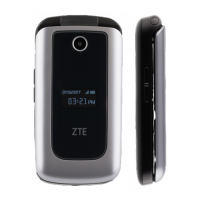
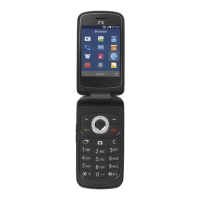
Introduces the physical layout and key components of the ZTE Z233VL mobile device.

Knowing the Keys

Explains the function of each key on the ZTE Z233VL mobile device.

Installing the micro-UIM Card and microSDHC Card (Not Included)

Step-by-step guide for installing the micro-UIM and microSDHC cards into the phone.

Removing the micro-UIM Card and microSDHC Card

Instructions on how to safely remove the micro-UIM and microSDHC cards.

Charging the Battery

Guide on how to charge the phone's battery using the provided charger.

Powering On;Off

Instructions on how to turn the phone on and off using the Power/end key.

Setting Up for the First Time

Initial setup procedures required after purchasing or resetting the phone.

Connecting to Networks and Devices

Connecting to Mobile Networks

Instructions on enabling/disabling data access and setting up Access Point Names (APN).

Connecting to Bluetooth Devices

Steps to turn Bluetooth on/off, change device name, and pair with other Bluetooth devices.

Connecting to Your Computer via USB

Guides on connecting the phone to a computer using a USB cable for data transfer and charging.

Phone Calls

Placing and Ending Calls

Details on how to dial, place, and end phone calls on the ZTE Z233VL.

Answering or Rejecting Calls

Procedures for answering or rejecting incoming phone calls, with options for text messages.

Contacts

Messages

Camera

Settings

General Settings

Configuring basic phone functions like Airplane Mode, Bluetooth, Location, and Display.

Device

Managing device-specific settings like Data Usage, Storage, PC connection, and Accessibility.

Personal

Setting up security features, SIM card locks, and phone reset options.

Troubleshooting

For Your Safety

General Safety

Important safety guidelines for using the phone, including driving and handling.

Radio Frequency (RF) Energy

Information on RF exposure, SAR limits, and compliance with FCC regulations.

FCC Regulations

Device compliance with Part 15 of FCC Rules and cautions regarding modifications.

Hearing Aid Compatibility (HAC) Regulations for Mobile Phones

Information on phone compatibility with hearing aids and rating systems.

CTIA Requirements

Guidelines related to battery handling, usage, and charging system compliance.

Distraction

Warnings about phone use while driving or operating machinery.

Product Handling

Recommendations for safe handling, cleaning, and environmental considerations for the phone.

Specifications

Zte Z233VL Specifications

General IconGeneral
BrandZTE
ModelZ233VL
Display2.8 inches
Resolution240 x 320 pixels
Camera2 MP
Expandable MemorymicroSD up to 32 GB
Bluetooth4.1
USBMicro USB
ColorsBlack
NetworkCDMA
Standby TimeUp to 300 hours

Related product manuals