Need help?
Do you have a question about the Zte Z839 and is the answer not in the manual?
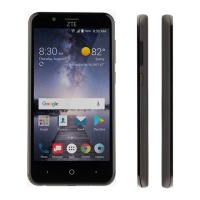
Press and hold to turn on/off airplane mode, power off or restart the phone.
Touch to return to the home screen or use Google Search.
Touch to go to the previous screen.
Touch to see recently used applications.
Press or hold to turn the volume up or down.
Instructions for installing SIM, battery, and microSD card into the phone.
Guidance on fully charging the phone's battery as soon as possible.
Emphasizes giving full attention to driving and complying with laws.
Stresses the need for full attention when operating machinery.
User is responsible for phone use and consequences; follow safety measures.
Use only approved accessories; avoid metal contact with battery terminals.
Seek professional advice when connecting phone to vehicle electrical system.
Do not disassemble; only qualified personnel can service or repair.
Be careful near medical devices; consult doctor for interference issues.
Maintain 15 cm separation from pacemakers; use opposite ear.
Interference possible; consult hearing aid manufacturer for alternatives.
Consult doctor and manufacturer regarding phone interference with medical devices.
Turn off device in hospitals and healthcare facilities as requested.
Turn off device when instructed by airport or airline staff.
Some car makers forbid phones unless hands-free with external antenna.
Obey signs; turn off wireless devices in potentially explosive locations.
Power off devices in blasting areas to avoid interfering with operations.
This document is a user guide for the ZTE Z839 mobile phone, providing essential information on its operation, safety, and maintenance.
The phone's primary function is communication, enabling users to make and receive calls, send messages, and access various applications. It features a power key for turning the device on/off, restarting, and controlling the screen display. A home key allows users to return to the main screen and access Google Search or Now on Tap. The back key navigates to the previous screen, while the recent apps key displays recently used applications. Volume up/down keys control the audio output.
For initial setup, users need to install a nano-SIM card, battery, and microSD card. The guide provides step-by-step instructions for opening the back cover, inserting the nano-SIM card into its slot, aligning and pushing down the battery, and slipping the microSD card into its holder. It emphasizes the importance of using a standard nano-SIM card from a service provider to avoid damage. The battery needs to be charged before first use, and the guide details connecting the adapter to the charging/micro-USB jack, plugging the charger into an AC power outlet, and disconnecting it once fully charged. A warning is included against using unapproved accessories, as they could damage the phone or cause the battery to explode. If the battery is extremely low, the phone might not power on immediately, requiring at least 20 minutes of charging before attempting to power on again.
General safety guidelines are extensively covered to ensure safe usage. Users are advised not to make or receive handheld calls or text while driving to minimize distraction. The phone should be kept at least 10 mm away from the ear or body during calls. Warnings are given regarding small parts that may cause choking, the phone's ability to produce loud sounds, and the need to avoid contact with magnetic objects. Users should keep the phone away from pacemakers and other electronic medical devices. It is crucial to turn off the phone in hospitals, medical facilities, aircraft, and gas stations. The phone may produce bright or flashing lights, and users are warned not to dispose of it in fire. To prevent hearing damage, listening at high volume levels for prolonged periods is discouraged. The guide also advises against exposing the phone to extreme temperatures or liquids and explicitly states not to disassemble the phone, as only approved personnel should service it. Only approved accessories should be used, and the phone should be turned off near explosive materials or liquids. Users should not rely solely on the phone for emergency communications.
The document includes information on FCC RF Exposure (SAR) and FCC Regulations. The phone is designed to meet emission limits for RF energy, with SAR values provided for head and body usage. It complies with SAR for general population/uncontrolled exposure limits and has been tested according to measurement methods and procedures. The FCC has granted equipment authorization, and SAR information is available online. For body-worn operation, a separation distance of 10 mm between the unit and the human body is recommended, and belt clips or holsters without metallic components should be used.
Hearing Aid Compatibility (HAC) Regulations for Mobile Phones are also detailed. The phone is compliant with FCC HAC regulations (ANSI C63.19-2011). It explains that digital wireless phones can sometimes cause interference with hearing aids or cochlear implants due to electromagnetic energy. The guide describes M-Ratings (M3 or M4) and T-Ratings (T3 or T4) which indicate the phone's compatibility with hearing devices, with M4 and T4 being the better ratings. Users are encouraged to try the phone with their hearing device in different locations to determine if interference occurs.
CTIA Requirements for battery handling are provided, emphasizing that users should not disassemble, crush, bend, deform, puncture, or shred the battery. It also prohibits modifying, remanufacturing, inserting foreign objects, immersing in liquids, or exposing the battery to fire or explosion. Only the specified battery and a CTIA-certified charging system (per IEEE 1725) should be used. Short-circuiting the battery or allowing metallic objects to contact terminals is forbidden. Battery replacement should only be done with another battery qualified per IEEE-Std-1725. Prompt disposal of used batteries according to local regulations is advised, and children's battery usage should be supervised. Dropping the phone or battery, especially on hard surfaces, should be avoided, and suspected damage requires inspection by a service center. Improper battery use can lead to fire or explosion. The phone must only be connected to CTIA-certified adapters bearing the USB-IF logo or products that have completed the USB-IF compliance program.
Distraction while driving is addressed, urging full attention to reduce accident risk. Using a phone, even with a hands-free kit, can cause distraction, and users must comply with local laws restricting wireless device use while driving. Similar caution is advised when operating machinery.
Product handling and maintenance features are also outlined. Users are responsible for their phone's use and its consequences. The phone should be turned off where its use is prohibited. It should be treated with care, kept clean and dust-free. The screen and camera lens should be kept clean to maintain reaction speed and image quality, using a soft material like an eyeglass cleaning cloth. Alcohol or corrosive substances should not be used for cleaning. The phone and its accessories should not be exposed to open flames, lit tobacco products, liquid, moisture, or high humidity. Dropping, throwing, or bending the phone is discouraged. Painting the phone or its accessories is not recommended. Disassembly should only be performed by authorized personnel. The phone should not be exposed to extreme temperatures (minimum -5 and maximum +50 degrees Celsius) or placed near heating equipment or high-pressure containers. Local regulations for electronic product disposal should be checked. Carrying the phone in a back pocket is advised against to prevent breakage.
For small children, the guide warns against leaving the phone and its accessories within their reach, as they could cause injury or damage the phone. The phone contains small parts with sharp edges that could cause injury or choking.
Demagnetization is mentioned, advising against allowing electronic devices or magnetic media near the phone for extended periods. Electrostatic Discharge (ESD) is addressed by warning against touching metal connectors on the nano-SIM and microSDHC cards. Users should not touch the antenna unnecessarily. For normal use, when making or receiving calls, the phone should be held to the ear with the bottom towards the mouth. Airbag safety is highlighted, stating that the phone should not be placed over an airbag or in its deployment area, and should be stored safely while driving.
Seizures/Blackouts are discussed, noting that the phone can produce bright or flashing lights. A small percentage of people may be susceptible to blackouts or seizures when exposed to flashing lights or patterns. Users with a history of such occurrences should consult a physician. To reduce risk, the phone should be used in a well-lit room with frequent breaks.
Repetitive Stress Injuries (RSI) are addressed for texting or gaming. Users are advised not to grip the phone too tightly, press buttons lightly, use special features like message templates and predictive text, and take frequent breaks to stretch and relax.
Emergency Calls are mentioned, clarifying that the phone, like any wireless phone, relies on radio signals and cannot guarantee connection in all conditions, thus should not be solely relied upon for emergencies.
Loud Noise is discussed, warning that the phone can produce loud noises that may damage hearing. Users should turn down the volume before using headphones, Bluetooth stereo headsets, or other audio devices.
Phone Heating is noted as a normal occurrence during charging and use.
Electrical Safety covers accessories, advising the use of only approved ones and against connecting incompatible products. Care should be taken to prevent metal objects from contacting or short-circuiting battery terminals, and the battery surface should not be punctured.
Connection to a Car advises seeking professional advice when connecting a phone interface to the vehicle's electrical system.
Faulty and Damaged Products section reiterates that only qualified personnel should service or repair the phone. If the phone has been submerged, punctured, or subjected to a severe fall, it should not be used until checked by an authorized service center.
Radio Frequency Interference is addressed, particularly concerning personal medical devices. Users should consult their doctor and device manufacturers to determine if the phone's operation may interfere with medical devices. For pacemakers, a minimum separation of 15 cm is recommended, and the phone should be used on the opposite ear and not carried in a breast pocket. Hearing Aids users may experience interfering noises, and increasing separation or consulting the hearing aid manufacturer is suggested. In Hospitals, clinics, and health care facilities, wireless devices should be turned off when requested. On Aircraft, wireless devices must be turned off when instructed, and airline staff should be consulted about wireless device use. If the device has a 'flight mode,' it must be enabled before boarding.
Interference in Cars notes that some vehicle manufacturers forbid mobile phone use unless a hands-free kit with an external antenna is installed.
Explosive Environments section warns users to obey posted signs to turn off wireless devices in gas stations and other potentially explosive atmospheres, including fueling areas, below decks on boats, fuel/chemical transfer/storage facilities, and areas with chemicals or particles like grain, dust, or metal powders. In Blasting Caps and Areas, the mobile phone or wireless device must be powered off to avoid interfering with blasting operations.
 General
| Display Size | 5.0 inches |
|---|---|
| Resolution | 720 x 1280 pixels |
| Processor | Qualcomm Snapdragon 210 |
| RAM | 1 GB |
| Storage | 8 GB |
| Rear Camera | 8 MP |
| Front Camera | 2 MP |
| Operating System | Android 6.0 (Marshmallow) |
| Expandable Storage | Yes, up to 32 GB |
| SIM | Micro SIM |


 To Next Page