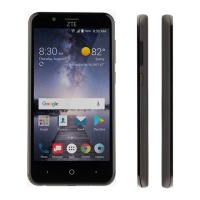
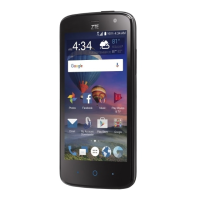
How to fix a Zte Z855 Cell Phone that cannot turn on?
- Ppamela28Aug 16, 2025
If your Zte Cell Phone cannot be turned on, it is likely that the battery power has been depleted. Recharge the phone’s battery to resolve this issue.
How to fix a Zte Z855 Cell Phone that cannot turn on?
If your Zte Cell Phone cannot be turned on, it is likely that the battery power has been depleted. Recharge the phone’s battery to resolve this issue.
How to fix nano-SIM card error on Zte Z855 Cell Phone?
If you are experiencing a nano-SIM card error on your Zte Cell Phone, it could be due to several reasons. The nano-SIM card might be malfunctioning or damaged; take the nano-SIM card to your service provider for testing. The nano-SIM card might be inserted improperly; insert the nano-SIM card properly. There might be debris on the nano-SIM card contacts; use a soft, dry cloth to clean the nano-SIM card contacts.
How to improve poor reception on Zte Z855?
If you are experiencing poor reception on your Zte Cell Phone, it could be due to several reasons. The network signal might be weak because of your location, such as being in a basement or near a tall building. In this case, move to a location where the network signal can be properly received. Alternatively, the network might be busy, especially during peak hours. Try to avoid using the phone at such times, or wait a short time before trying again. Finally, you might be too far away from a base station. You can request a service area map from your service provider to check coverage.
What to do if my Zte Z855 is unable to connect to the network?
If your Zte Cell Phone is unable to connect to the network, the nano-SIM card may be invalid, so you should contact your service provider. Another reason might be that you are not within the network’s service area; check the service area with your service provider. Also, a poor signal can prevent connection, so move to an open space, or if you are inside a building, move closer to a window.
Why my Zte Z855 Cell Phone cannot charge the battery?
If your Zte Cell Phone battery is not charging, the battery or battery charger could be damaged; in this case, contact the dealer. Extreme temperatures can also prevent charging; if the phone’s temperature is below 0 °C or higher than 45 °C, adjust the battery charging environment to avoid extremes of temperature. A poor connection between the battery and charger can also be the problem; check all connectors to ensure that all connections have been properly made.
Why Zte Z855 standby time is shortened?
Several factors can cause a shortened standby time on your Zte Cell Phone. The standby time depends on your service provider system configuration. If you are located in an area where signaling is weak, temporarily power off the phone. The battery may be depleted, and high temperatures will shorten battery life, so contact the dealer to change a new battery. Also, if you are unable to connect to the network, the phone will continue to send out signals as it attempts to locate a base station, which consumes battery power. Change your location to one where the network is accessible, or temporarily turn off your phone.
What to do if Zte Cell Phone crashes, reboots, freezes, or cannot be powered on?
If your Zte Cell Phone crashes, reboots, freezes, or cannot be powered on, it may be due to incompatibility with some third-party software. Uninstall the software that may be causing the problem. You can also try to upgrade the phone software or reset the phone to factory status.
Why is there echo or noise on my Zte Z855 calls?
Echo or noise during calls on your Zte Cell Phone may be due to poor network link quality from your service provider or poor local telephone line quality. End the call and dial again; you may be switched to a better-quality network link or phone line.
What to do if PIN code is blocked on Zte Cell Phone?
If the PIN code on your Zte Cell Phone is blocked, it is because you have entered an incorrect PIN code three consecutive times. Contact your service provider. If the service provider provides the nano-SIM card’s PUK code, use the PUK code to unlock the nano-SIM card.
Why am I unable to select certain features on my Zte Z855?
If you are unable to select certain features on your Zte Cell Phone, it is because your service provider does not support these features, or you have not applied for services that provide these features. Contact your service provider.
Identifies external features and components of the phone.
Details on using the Gboard, including special keys and suggestions.
Controls mobile data, roaming, and network type.
Shares internet via USB tethering.
Configures the initial email account on the phone.
Composing and sending SMS and MMS messages.
Instructions for taking pictures with the camera.
Operations for playback, volume, and navigation.
Acquires and installs applications from the Play Store.
Manages Wi-Fi, Bluetooth, and Mobile network connections.
Protects phone with screen locks and encryption.
Basic safety guidelines for phone use.
Identifies external features and components of the phone.
Details on using the Gboard, including special keys and suggestions.
Controls mobile data, roaming, and network type.
Shares internet via USB tethering.
Configures the initial email account on the phone.
Composing and sending SMS and MMS messages.
Instructions for taking pictures with the camera.
Operations for playback, volume, and navigation.
Acquires and installs applications from the Play Store.
Manages Wi-Fi, Bluetooth, and Mobile network connections.
Protects phone with screen locks and encryption.
Basic safety guidelines for phone use.
| SIM | Micro-SIM |
|---|---|
| Type | IPS LCD |
| Operating System | Android 5.1 (Lollipop) |
| Internal Storage | 8 GB |
| RAM | 1 GB |
| Features | LED flash |
| Video | 1080p@30fps |
| Loudspeaker | Yes |
| 3.5mm jack | Yes |
| WLAN | Wi-Fi 802.11 b/g/n, hotspot |
| Bluetooth | 4.0, A2DP |
| GPS | Yes, with A-GPS |
| Radio | FM radio |
| USB | microUSB 2.0 |
| Sensors | Accelerometer |
| Resolution | 720 x 1280 pixels |
| Card slot | microSDXC (dedicated slot) |
| Selfie camera | 5 MP |
| Size | 5.0 inches |