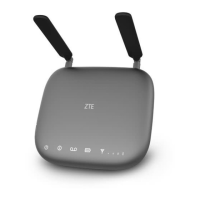
The Z723EL is a wireless device designed to enable users to make calls using their wireless service provider's cellular network, effectively replacing traditional home phone jacks. It functions as a cellular home phone base, allowing standard telephones to connect to a cellular network for voice communication.
Technical Specifications
Device Specifications:
- Model Name: Z723EL
- Dimensions: 1.11 x 6.30 x 5.51 inches
- Weight: Approximately 383.5 grams
- Interface: N/A (refers to a specific type of external interface, not general connectivity)
- Frequency: 1.1G
- Technology Bands Supported: LTE
Battery Specifications:
- Limited Charge Voltage: 4.35 V
- Type: Lithium-ion
- Capacity: 2300mAh
- Battery Talk Time: Approximately 3 hours
- Continuous Standby Time: Approximately 13 hours
Usage Features
The Z723EL is designed for straightforward operation. It comes with a nano-SIM card pre-inserted.
Interface Description:
The device features two RJ11 telephone ports for connecting standard telephones, a power socket for the external power supply, and a power switch to turn the device on or off. It also includes a micro-USB jack, primarily for manufacturer use.
Installation:
To install, the Z723EL should be placed in an area with strong cellular signal reception, ideally near a window or outside wall.
Power On/Off:
The device is powered on or off using a dedicated On/Off switch.
Connecting to a Phone:
Users unplug their home phone from the wall jack and plug it into the 'PHONE 1' port on the Z723EL using a phone cable. A second 'Phone 2' port is available for an additional phone or cordless base station, with all connected telephones sharing the same number.
Placing and Ending Calls:
To place a call, users pick up the handset of the connected phone, dial the number, and either press '#' or wait 4-8 seconds for the call to connect. Ten-digit dialing is required even for local numbers. Calls are ended by hanging up the home phone or returning the receiver to its base.
Answering Calls:
Incoming calls are answered by picking up the handset. If the phone has a hands-free function, the call can be answered and ended using the Hands-free button.
Adjusting Volume:
Call volume can be adjusted using the connected phone's controls or by entering the Z723EL Volume Setting Mode during a call (press ** or ## within 1 second). In this mode, * or # adjusts the volume down or up, respectively. There are five volume levels, with level 4 as the default.
Checking Voicemail:
The Z723EL supports voicemail. A flashing voicemail indicator and an intermittent dial tone on connected phones signal new messages. Users can check voicemail by dialing 1 or *86 from a connected phone, waiting 4-8 seconds, and following voice prompts. Voicemail setup details are available in the "Set Voicemail" section.
Setting Up a Conference Call:
With call waiting and three-way call features enabled by the network, users can set up conference calls. This involves placing the first call, pressing the Flash (or Talk) key, dialing the second number, and then pressing 3 and Flash to connect all parties. If the phone lacks a Flash or Talk key, an off-hook mechanism can be used.
Adjusting Call Settings:
- Set Voicemail: Dial
*86 from a connected phone and follow prompts to set voicemail options like password and name announcement.
- Use Call Waiting: When on a call, pressing the
Flash (or Talk) key allows users to hold the current call and accept a waiting call, and to switch between calls.
- Forward Incoming Calls: The device supports call forwarding to another phone number (mobile or office). This feature can be configured for "Always forward," "When busy," "When unanswered," or "When unreachable." Airtime charges apply to forwarded calls.
- TTY Mode: The Z723EL is TTY compatible. Users can set TTY mode by dialing
*983*889*n# on a connected phone, where n corresponds to:
n=0: TTY Off mode (for users who can hear and talk).n=1: TTY Full mode (for users who cannot talk or hear, for text messages).n=2: VCO mode (for users who can talk but cannot hear, for voice and text responses).n=3: HCO mode (for users who can hear but cannot talk, for listening and text responses).
Common Settings (Keyboard Commands):
*983*3284#: Reset device to factory mode.*983*238*xx#: Set auto-dialing time (4-12 seconds, default 4s).*983*338*xx#: Set flash diagnosing time (200-1200ms, default 700ms).*983*866*xx#: Set voicemail number.*983*808*n#: Set caller ID display method (n=0 for FSK, n=1 for DTMF, default FSK).
Status Indicators:
The device has status indicators for Power, Voicemail, and Network Signal Strength.
- Power: Green (On), Green blinking (Shutting down), Off (Power off).
- Voicemail: Green blinking (New voicemail waiting), Off (No message).
- Information: Blinking (10S) (Success), Red blinking (10S) (Update end fail), Green blinking (During activation), Red blinking (Activation fail), Green (FOTA update in process), Green (Update end or activation).
- Battery Charge: Green (More than 50% discharging), Green blinking (More than 50% charging), Yellow (20%-49% discharging), Yellow blinking (20%-49% charging), Red (Less than 20% discharging), Red blinking (Less than 20% charging), Off (No battery installed).
- Network Signal Strength: Green (1-4 bars, Low to High), Network red and no bar lit (Limited, no service, searching, or LTE register failed), Network red blinking and no bar lit (Device not able to use as normal).
Maintenance Features
Safety Precautions:
- Avoid electromagnetic interference by placing the Z723EL away from TVs, radios, and other electronic equipment.
- Consult a physician or medical device manufacturer if using medical devices like hearing aids or pacemakers, as the Z723EL may interfere.
- Maintain a distance of at least 20 centimeters from the Z723EL.
- Do not use in dangerous environments with explosive gases or products.
- Use only original or ZTE-authorized accessories.
- Do not attempt to dismantle the device; it has no user-serviceable parts.
- Keep the device and accessories away from liquids and moisture.
- Avoid placing objects on top of the Z723EL to prevent overheating.
- Ensure the device is placed in a ventilated environment.
- Do not expose to direct sunlight or hot areas.
- Keep children from playing with the device or charger.
- Maintain a phone cable length of less than 10 meters between the Z723EL and the phone.
- The Z723EL is for indoor use only; do not use it outside or connect to external telephone extensions to prevent lightning damage.
Cleaning and Maintaining:
- Clean the Z723EL with an antistatic cloth; avoid chemical or abrasive cleansers. Turn off the device before cleaning.
- Operate the Z723EL within a temperature range of -10°C to +55°C and store it between -40°C and +70°C. The humidity range is 5% to 95%.
- Do not use during a thunderstorm; remove the mains power pack from the wall socket.
- Avoid unnecessary removal of the nano-SIM card to prevent loss or damage from static electricity.
Battery Safety (CTIA Requirements):
- Do not disassemble, crush, bend, deform, puncture, or shred the battery.
- Do not modify, remanufacture, insert foreign objects, immerse in liquids, or expose to fire, explosion, or other hazards.
- Use the battery only for the specified system.
- Use only charging systems qualified with the system per CTIA Certification Requirements for Battery System Compliance to IEEE 1725.
- Do not short-circuit the battery or allow metallic conductive objects to contact battery terminals.
- Replace the battery only with another battery qualified per IEEE-Std-1725.
- Dispose of used batteries promptly according to local regulations.
- Supervise children's battery usage.
- If the phone or battery is dropped, especially on a hard surface, and damage is suspected, take it to a service center for inspection.
- Improper battery use can result in fire, explosion, or other hazards.
- The phone should only be connected to CTIA certified adapters, USB-IF logo products, or products that have completed the USB-IF compliance program.
Regulatory Information:
- RF Exposure Information (SAR): The device complies with FCC radiation exposure limits for an uncontrolled environment. Human proximity to the antenna should be at least 20cm (8 inches) during normal operation.
- FCC Compliance: The device complies with part 15 of the FCC Rules, meaning it may not cause harmful interference and must accept any interference received. Changes or modifications not expressly approved by the manufacturer could void the user's authority to operate the equipment. The transmitter must not be co-located or operating in conjunction with any other antenna or transmitter. If interference occurs, users are advised to reorient/relocate the receiving antenna, increase separation between equipment and receiver, or connect the equipment to a different circuit.



 To Next Page

 General