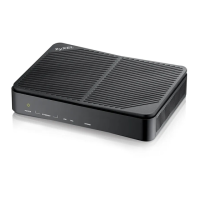
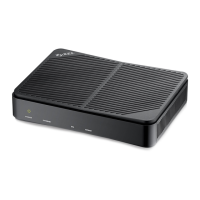
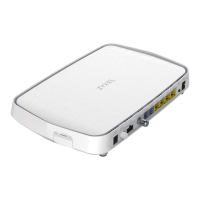
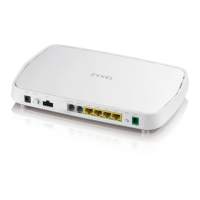
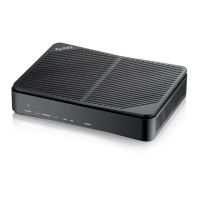
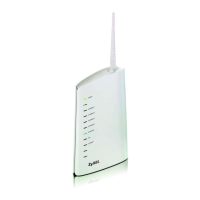
The PK5001Z is an 802.11n Wireless ADSL2+ 4-port Gateway, designed to provide Internet connectivity and wireless networking capabilities. It functions as a wireless ADSL router with a built-in four-port Ethernet switch, enabling both wired and wireless connections for multiple devices.
Function Description:
The primary function of the PK5001Z is to connect to the Internet via an ADSL line and distribute that connection to connected devices, either wirelessly or through its Ethernet ports. It supports the 802.11n wireless standard, offering enhanced speed and range for wireless clients. The integrated 4-port switch allows for direct wired connections to computers, gaming consoles, or other network-enabled devices. The device is designed for both vertical and wall-mounted usage, offering flexibility in placement.
Important Technical Specifications:
- Wireless Standard: 802.11n
- ADSL Standard: ADSL2+
- Ethernet Ports: 4-port built-in switch
- LAN IP Address: http://192.168.0.1 (default)
- Default Administrator Password: Located on the back label of the device.
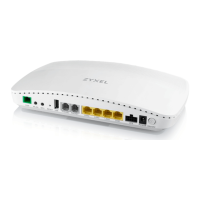
- DSL Port: For connecting to a telephone jack or modem port on a splitter.
- Ethernet Ports: For connecting computers for configuration or Internet access.
- Power: Requires an appropriate power adaptor connected to the POWER socket.
- Front Panel Lights:
- POWER light: Blinks during startup, solid when ready.
- ETHERNET lights: Solid when connected, blinks with traffic.
- DSL light: Solid when a DSL connection is established.
- INTERNET light: Solid when Internet access is available, blinks during data transmission.
- FCC Compliance: Part 68 of FCC rules and ACTA requirements.
- Ringer Equivalence Number (REN): 02
- USOC Jack Required: RJ14
- FCC Registration Number: US: 1RODL02BPK5001Z
- Wireless Operation (U.S.A.):
- IEEE 802.11b/g/n (20MHz): Firmware-limited to channels 1 through 11.
- IEEE 802.11n (40MHz): Firmware-limited to channels 3 through 9.
- FCC RF Exposure Compliance: Requires a separation distance of at least 20 cm between the antenna and all persons.
- Telecommunication Line Cord: Use only No. 26 AWG (American Wire Gauge) or larger.
- Antenna: Meets ETSI and FCC certification requirements with included antenna(s). Only use the included antenna(s).
Usage Features:
- Quick Start Guide: Provides instructions for initial setup and configuration.
- Automatic Internet Connection Setup: The device attempts to automatically detect and set up the DSL connection to the ISP. The DSL light turns green upon detection, and the Internet light comes on when ready. For PPPoE connections, users will need to enter their username and password.
- Wireless Configuration: Users can configure wireless settings, including SSID (network name), channel, and security.
- Wireless Security Options: Supports WPA-PSK (recommended for stronger security) and WEP. It is strongly recommended to enable wireless security to prevent unauthorized access.
- Advanced Internet Connection Setup: Allows for manual configuration of Internet connection settings if automatic setup fails or specific ISP parameters are required. This involves logging into the web configurator, navigating to Network > WAN, and entering ISP-provided information.
- Web-based Configuration: The device is configured through a web browser using its LAN IP address (http://192.168.0.1).
- Troubleshooting Steps: The manual provides detailed steps for troubleshooting common issues such as inability to access the web configurator, no Internet access via Ethernet, or no Internet access via wireless. These steps include checking front panel lights, verifying ISP information, restarting the device, and ensuring correct wireless security settings.
- Device Placement: Can be used vertically or wall-mounted. If wall-mounting, ensure no electrical lines, gas, or water pipes will be damaged.
Maintenance Features:
- Connection Checks: Users are advised to check physical connections and inspect cables for damage if lights are not on or if there are connection issues.
- Power Cycling: A common troubleshooting step involves turning the device off, waiting a few seconds, and then turning it back on.
- Firmware Limitations (U.S.A.): Wireless channels are firmware-limited for specific 802.11 standards to comply with U.S. regulations.
- Safety Warnings:
- Do NOT use near water (wet basement, swimming pool).
- Do NOT expose to dampness, dust, or corrosive liquids.
- Do NOT store things on the device.
- Do NOT install, use, or service during a thunderstorm due to risk of electric shock.
- Connect ONLY suitable accessories.
- Do NOT open the device; only qualified service personnel should service or disassemble it.
- Ensure cables are connected to correct ports and placed carefully to avoid tripping hazards.
- Always disconnect all cables before servicing or disassembling.
- Use ONLY an appropriate power adaptor or cord.
- Connect power adaptor/cord to the correct supply voltage (e.g., 110V AC in North America, 230V AC in Europe).
- Do NOT allow anything to rest on the power adaptor/cord.
- Do NOT use if power adaptor/cord is damaged.
- Do NOT attempt to repair the power adaptor/cord; order a new one from the vendor.
- Do NOT use the device outside; ensure all connections are indoors.
- Do NOT obstruct ventilation slots to prevent harm to the device.
- WEEE Mark: The product is marked with the WEEE symbol, indicating that used electrical and electronic products should not be mixed with general waste and should be treated separately.
- Service Requirements: In case of equipment malfunction, all repairs should be performed by the Company or an authorized agent. Users are responsible for reporting service needs. Contact information for ZyXEL Communications Corporation is provided for service inquiries.
- User Manual Information: The user's manual or instruction manual for intentional or unintentional radiators cautions the user that changes or modifications not expressly approved by the party responsible for compliance could void the user's authority to operate the equipment. If the manual is provided in an alternative form (e.g., computer disk, Internet), the user should be able to access the information.

 Need help?
 General


 To Next Page