247securityinc.com
1.866.693.7492
247securityinc.com | 1.866.693.7492 | 1455 Alderman Drive, Alpharetta GA 30005, USA
Pg.28 of 47
CONFIGURATION MENUS
NETWORK MENU
It is important that only qualied technicians make changes to the installed settings.
Incorrect settings may cause TITAN to be inaccessible and require servicing. Should
you have any questions regarding this, please contact Tech Support.
Do not make changes unless you have specic knowledge of each setting.
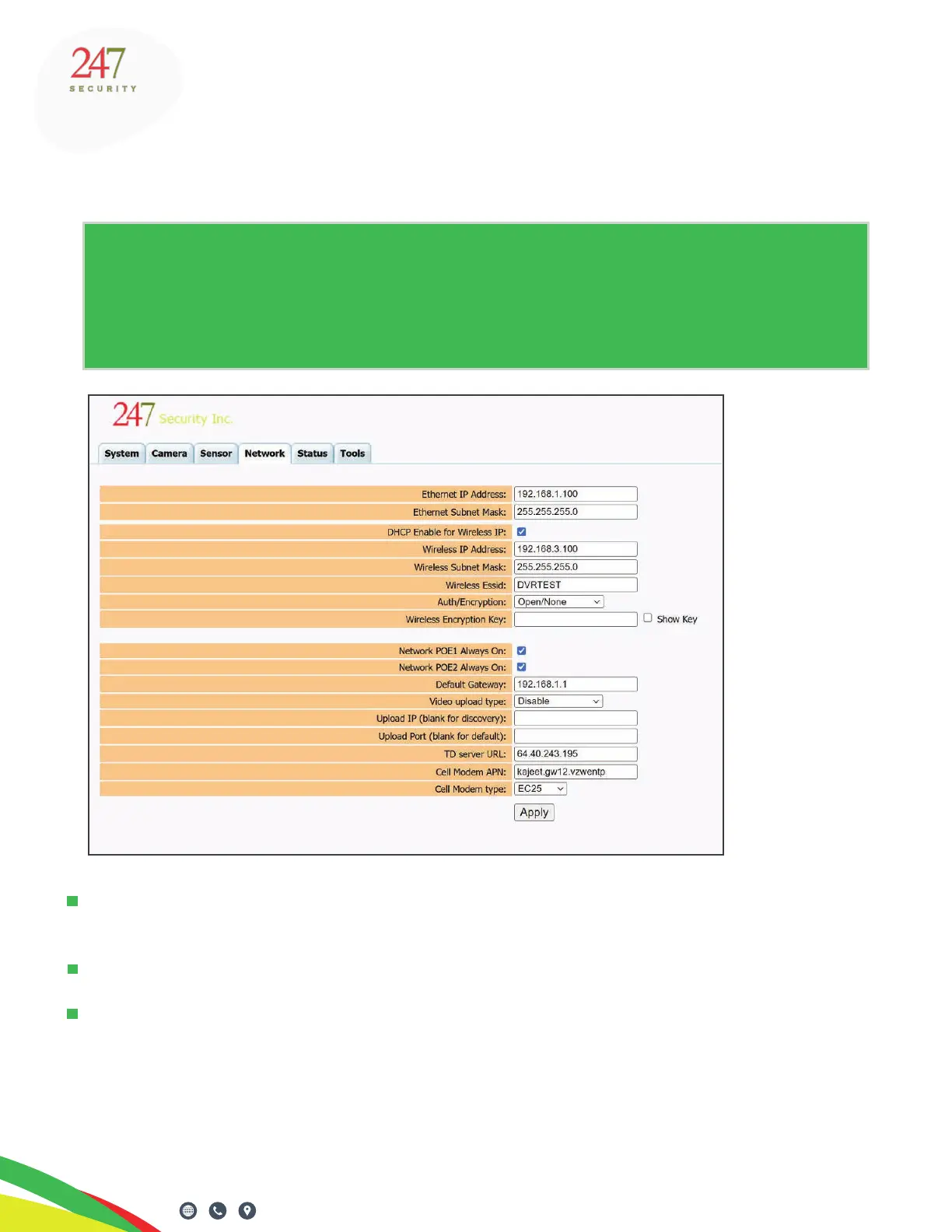
The default Ethernet IP address of ZEUS TITAN is “192.168.1.100”. It must be modied if there are
more than two vehicles with DVRs, or if there is an external WiFi bridge.
If this IP address is modied the user will NOT be able to access the DVR if the IP address is lost.
The “Network POE1/2 Always On” option is used to send constant power to TITAN over the POE
(“Power Over Ethernet”) interface. If the box is left unchecked, power will only be provided when
the ignition signal is switched o.
If the box is checked, power will always be provided to the POE interface and the AP/Client will be
functioning during recording and running time.



 To Next Page