10
4. CONTROL
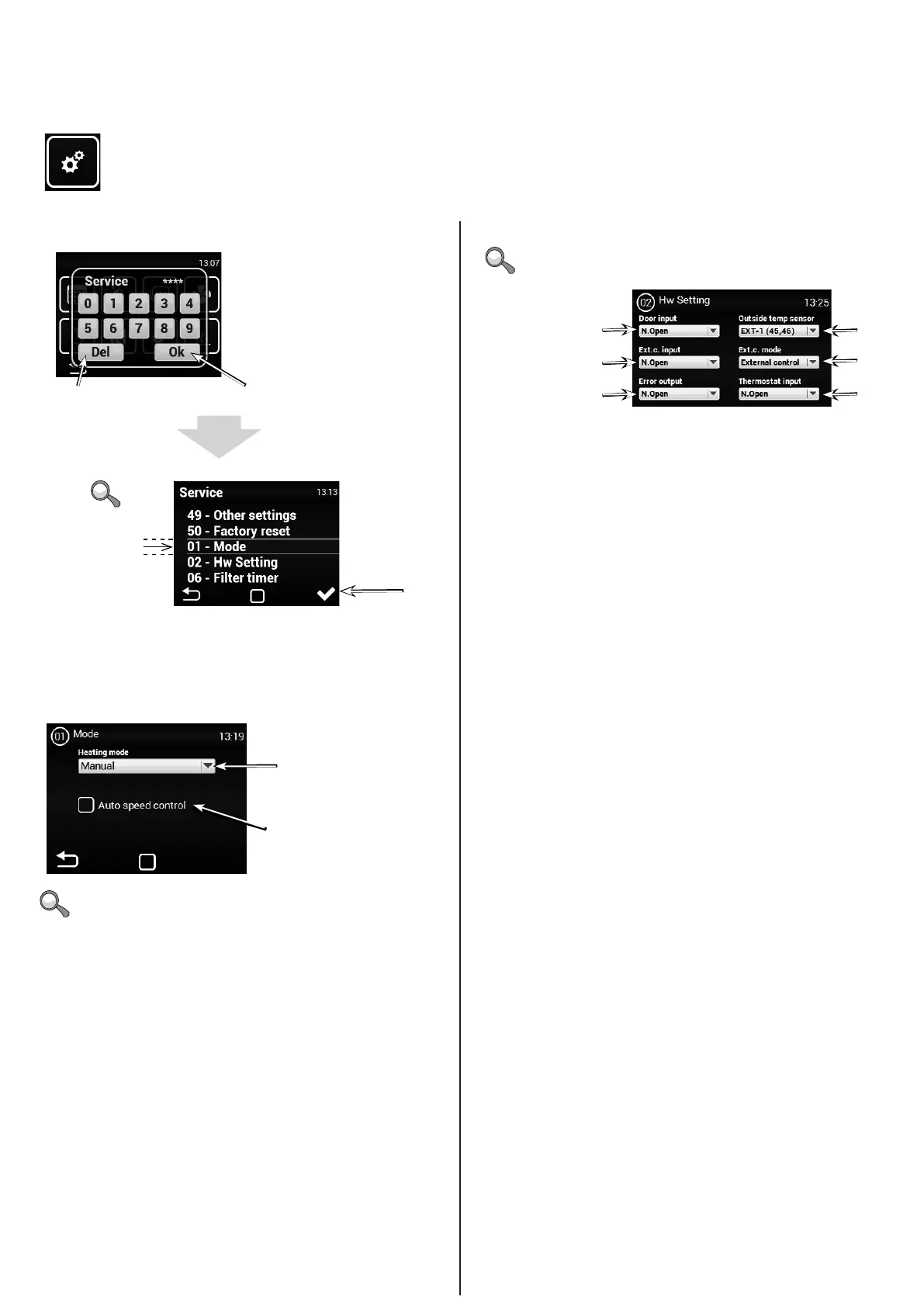
Service menu
MENU - MODE
MENU - HW SETTING
Enter code 1616 to access the service menu
1616
Choose this
menu after
centring the
screen and
tapping on enter
Setting AUTO or MANUAL may block/unblock certain items in
the service menu.
Access menu
Access selected
menu
Delete/return
MANUAL control
Activate/deactivate automatic
control of motor speed according to
temperature
Ad 1)
Ad 2)
Ad 3)
Door contact (NO/NC)
External control contact
(NO/NC)
Error contact (NO/NC)
Ad 1) – External temperature sensor activation/settings Options:
None – no sensor connected – inactive
EXT-1 (45,46) – sensor connected (must be on terminals 45 y 46)
BMS – sensor active and used from the master system
Ad 2) - Sets the external contact input behaviour. Options:
None – inactive
External control – External switching of device
Night reduction – Night reduction on/o
(settings described below)
Ad 3) - Thermostat (NO/NC)
Use this menu to set the detailed behaviour of the inputs and
outputs of the regulators


 To Next Page