11
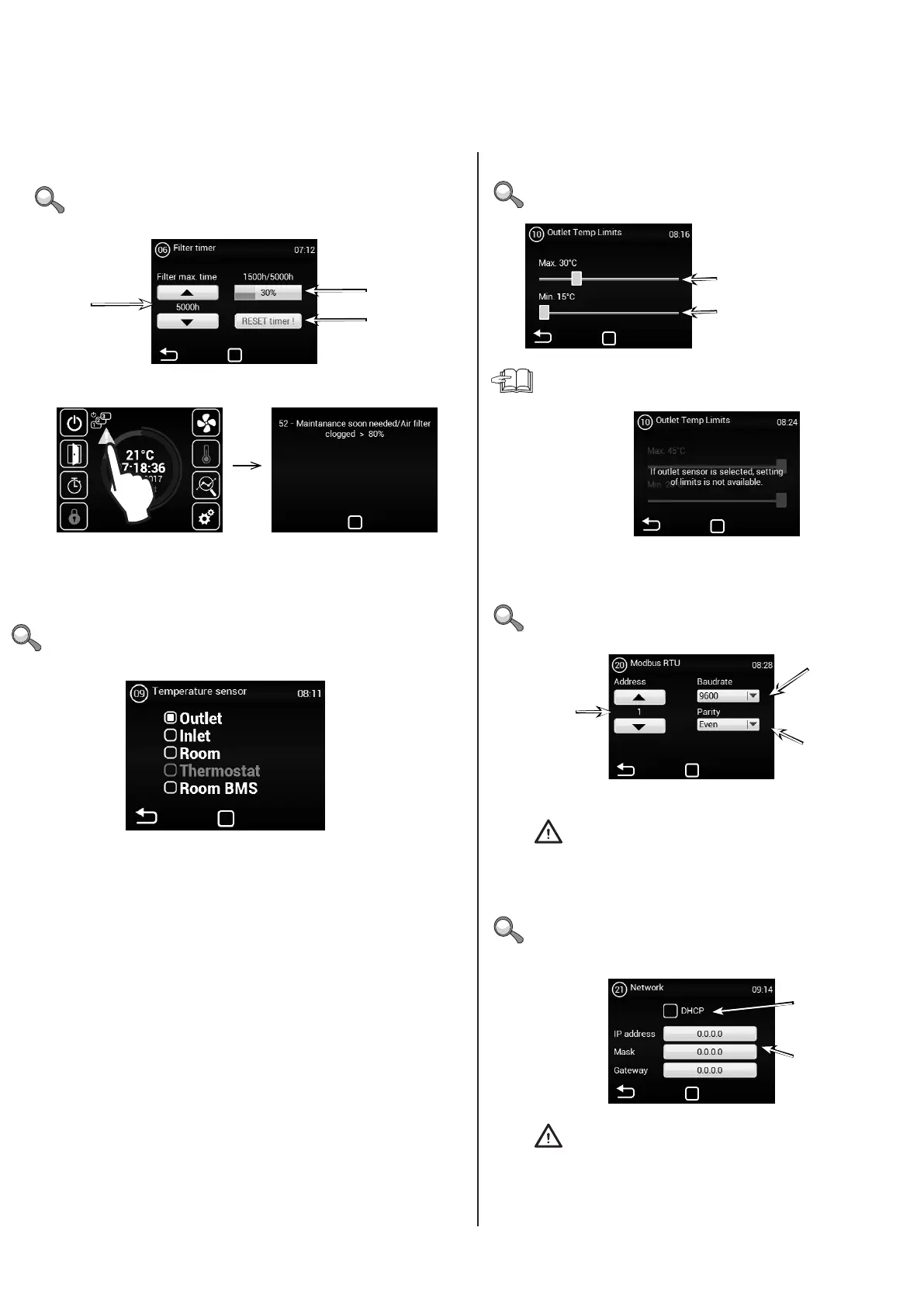
MENU - OUTLET TEMP LIMITS
MENU - MODBUS RTU
MENU - NETWORK
Maximum temperature limit: 25°C
- 45°C
Address
1~247
Parity
None
Odd
Even
DHCP blocked/enabled
Regulator network settings
to be entered manually:
IP address
Mask
Gate
Communication speed:
4800 Bd
9600 Bd
14400 Bd
19200 Bd
38400 Bd
Minimum temperature limit: 15°C
- 20°C
Use this menu to set the limits of the exhaust
Use this menu to set the Modbus RTU communication
parameters
Use this menu to set the communication parameters of the
network interface
An incorrect setting may prevent communication with the
regulator
An incorrect setting may prevent communication with the
regulator
If “OUTLET” is selected in the TEMPERATURE SENSOR MENU,
it will not be possible to set values as they are already dened by
the sensor. You will see this screen:
MENU - FILTER TIMER
MENU - TEMPERATURE SENSOR
Current timer
status
Set the time after which
a notice will appear in
the main screen.
1000h ~ 5000h
Shows the status of the
clogged lter in the main screen
RESET button
(use after replacing
lters)
Use this menu to set the period (in motor hours) after which
you will be reminded to replace the lters or reset to timer.
Available only in automatic mode
Use this menu to select the sensor to be used for primary
temperature control
Options:
Outlet – Temperature sensor at the outlet (behind the exchanger)
Inlet – Temperature sensor at the inlet (before the exchanger)
Room – Room temperature sensor
Thermostat – Room thermostat (ON/OFF)
Room BMS – Room temperature sensor from master system
4. CONTROL


 To Next Page