9
4. CONTROL
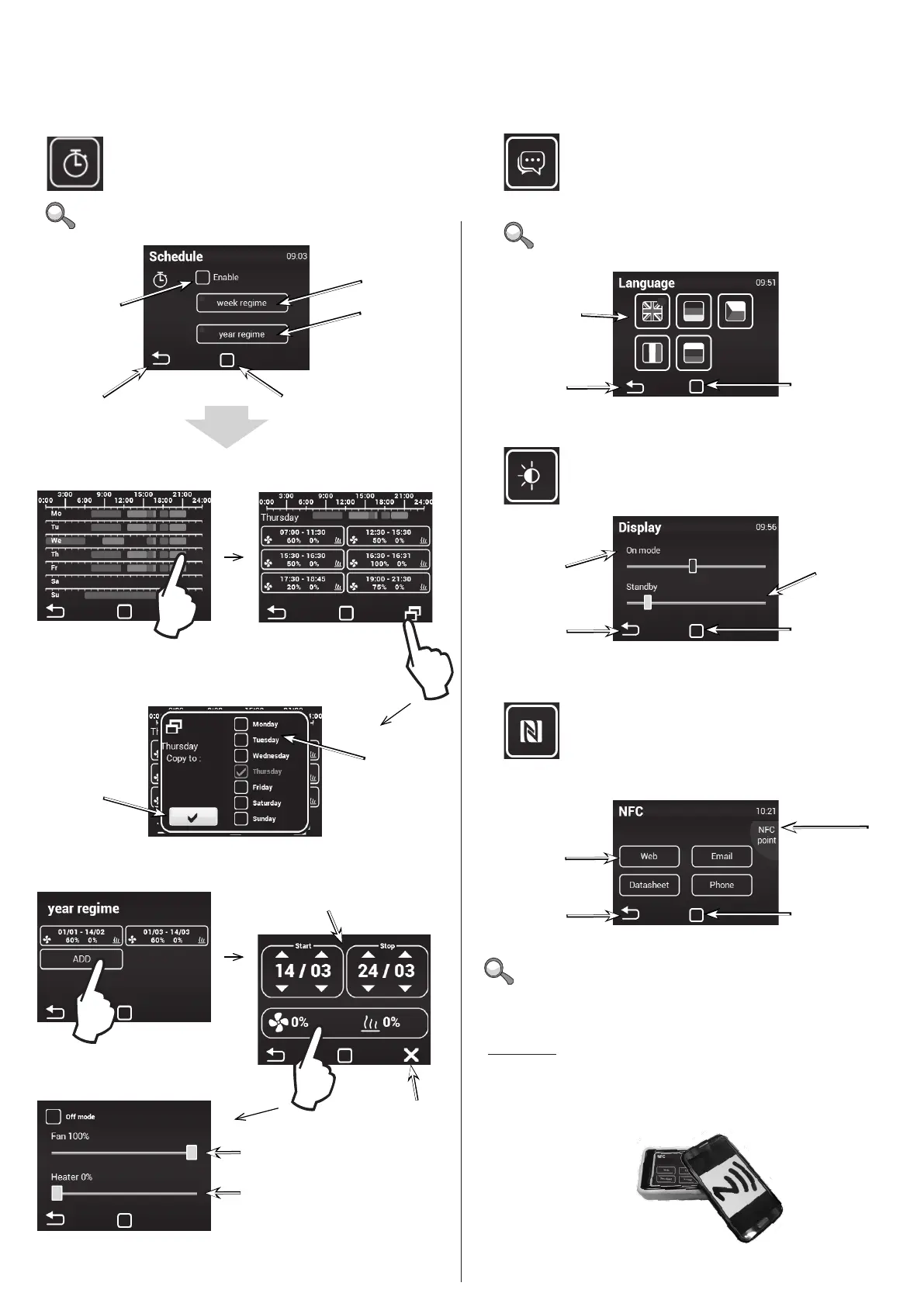
Timer Language
Lightning settings
Near Field Communication (NFC)
Weekly mode
Annual mode
Activate/deactivate timer
Weekly mode
Select lan-
guage
Annual mode
Copy to
START / STOP interval
Required ventilation rate in manual mode
Only MANUAL
Required heating rate in manual mode
CANCEL
Conrm
+ return
Conrm
+ return
Back to main screen
Back to main
screen
Tap on a day to set dierent time
modes
Tap to add a new time
mode
Button to copy the day
plan to another day
Copy + return
Unless otherwise set, the unit goes on stand-by mode
after the timer expires.
There are 5 languages available
Conrm
+ return
Display backlight
when on
Lightning level on
stand-by
Back to main
screen
The NFC menu allows devices compatible with Near Field
Communication (NFC) to transmit relevant information.
Mobile telephones and tables are usually tted with this chip.
Check whether your device has this feature before use.
How to use:
1) In the NFC menu, select the information you want to see
in your device
2) Enable NFC in your device and place it in the upper-right corner
of the control, see image below
Conrm
+ return
Choice of
information type
Back to main
screen
The active area
where the NFC
transmitter is
located


 To Next Page