13
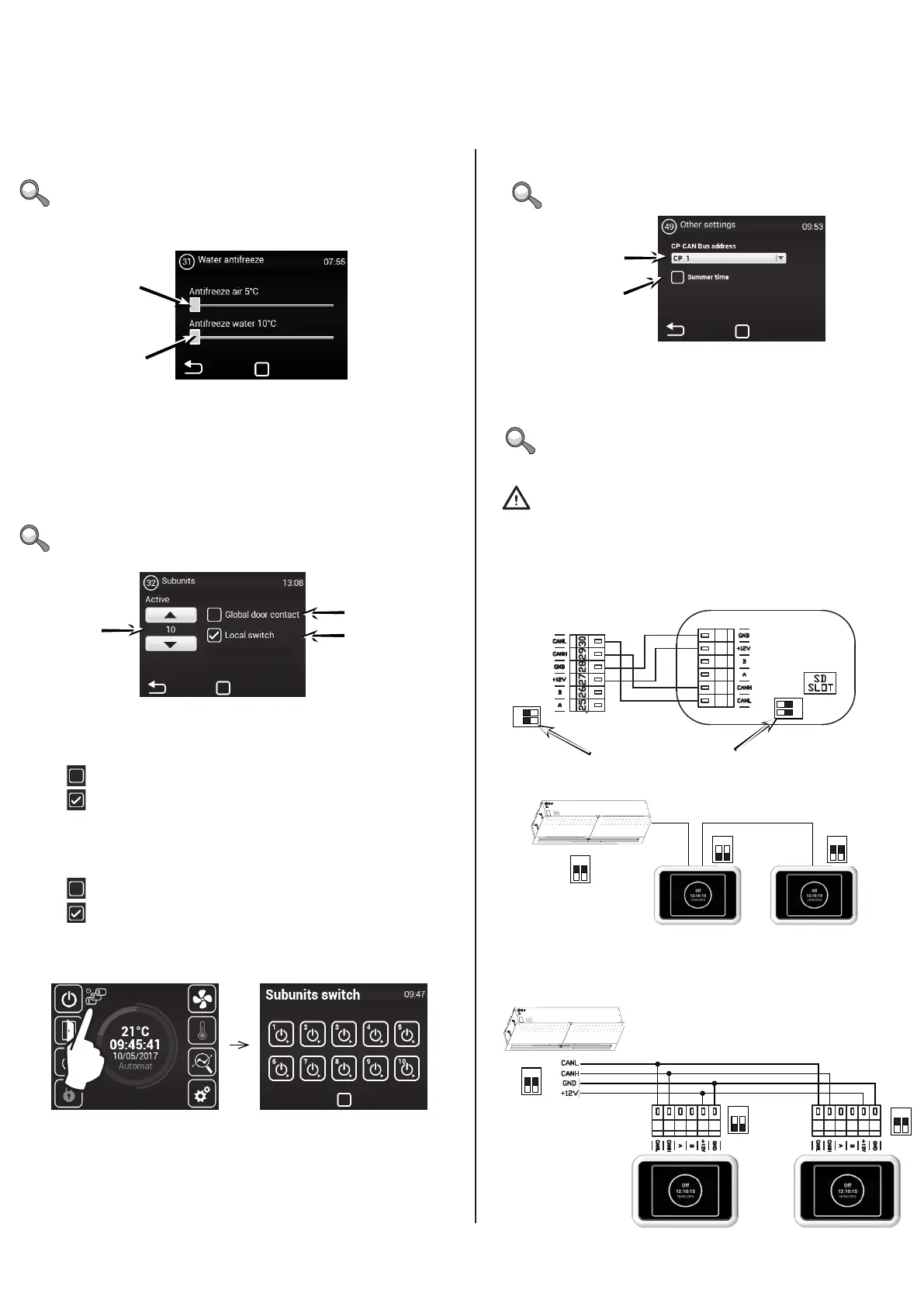
MENU - OTHER SETTINGS
Use this menu to set the remaining parameters
The address is set for each control, which then addressed
according to it.
Ad 1)
Ad 1) – Sets the CAN address of the control panel so up to 2 control panels
may be connected to the MASTER regulator
Options: CP 1 = control panel’s address is 1
CP 2 = control panel’s address is 2
Enable/disable automatic
switch of
summer/winter time
MENU - SUBUNITS
Use this menu to set the behaviour of the IC-S regulators
connected as SLAVE
The menu is enabled only in units with water exchanger
Number of SLAVE regulators:
0 ~ 10
Ad 1)
Ad 2)
Ad 1) – Use one door contact as main. Its status will be sent to the
SLAVE regulators and it will no longer be necessary to connect it to each
regulator, if required.
Not allowed = the door contact will not transmit to the SLAVE regulator from the MASTER
Allowed = the door contact will transmit to the SLAVE regulator from the MASTER
Ad 2) – Activates in the main screen the icon to turn
each SLAVE regulator ON/OFF If inactive, all the SLAVE
regulators will be turned on or o simultaneously
Not allowed = The SLAVE regulators are turned on/o simultaneously
Allowed = The SLAVE regulators can be turned on/o individually
form the main screen
MENU - WATER ANTIFREEZE
Settings
(20%-100%)
Ventilation rate with
open doors
(20%-100%)
Electric connection – Option 1:
CP 1
CP 2
CAUTION!
Each panel must have its own address,
otherwise it may result in the malfunction of the regulator.
Terminals must be set if multiple panels are to be connected. They are found in the main electronics and
the controller:
Terminal settings
Example of controller connection – Option 1:
ON
ON
CP 1
CP 2
ON
ON
ON
ONOFF
OFF
4. CONTROL


 To Next Page