80 CHAPTER 5: CONFIGURING THE ROUTER
PPPoA
PPP over ATM, this is a popular choice among European DSL providers. To
configure this function correctly, you should obtain the information from
your ISP.
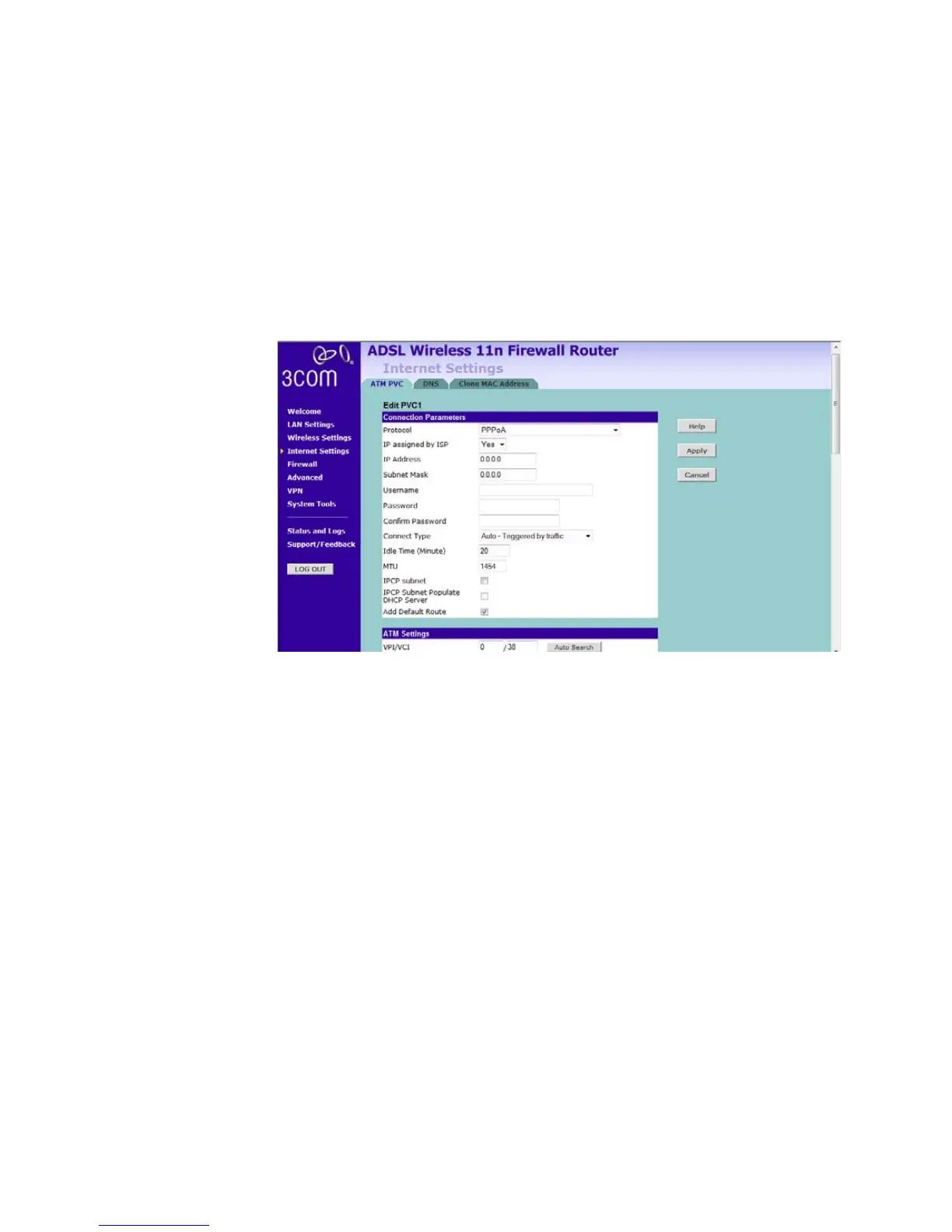
Figure 62 PPPoA Settings Screen
1 Select PPPoA from the protocol drop-down menu.
2 IP assigned by ISP, if select Yes, then no need to enter the IP address and
Subnet mask information. If select No, then enter the IP address and
Subnet mask information.
3 Enter the user name assigned to you by your ISP in the Username field.
And enter the password assigned to you by your ISP in the Password field.
Re-enter your password in the Confirm Password field.
4 Select always connected, auto, or manual from the Connect type
drop-down menu. If you have a flat rate service charge for Internet
connection, select always connected. If your ISP charges you by the
minute, do not select this mode.
5 If you want your Router to automatically disconnect from the Internet
after a period of inactivity, specify a time in the Idle Time field. (Enter a
value of 0 to disable this timeout).
6 Enter the MTU value in the MTU field. Do not make changes to this
setting, unless your ISP specifically requires a different setting other than
1454.






 To Next Page